

插件:模板与仪表盘
Melis 有两类插件,它们是完全不同的东西:
- 模板插件(Templating plugins) —— 可复用的内容块,放置到前台页面的
MelisDragDropZone中(例如滑块、产品列表、联系表单)。 - 仪表盘插件(Dashboard plugins) —— 显示在后台仪表盘上的小部件(widget)。
两者都有图形化的脚手架工具(melis-templating-plugin-creator、melis-dashboard-plugin-creator)——先用它生成样板代码,再继续阅读以理解并定制它。在 Melis v6 中,这些脚手架是位于 /melis-react 后台的原生 React 向导(每个都仍带有一个 New / Old 切换开关,可切换到 iframe 中的经典工具)。框架、模块集合以及生成的 PHP 都没有改变——改变的只是你用来操作它们的 UI,现在是 React。
模板插件(前台)
模板插件继承 MelisEngine\Controller\Plugin\MelisTemplatingPlugin 并实现:
| 方法 | 作用 |
|---|---|
front() (必需) | 返回传递给插件前台 .phtml 的变量数组。 |
back() | 渲染后台预览 + 编辑器(已提供合理的默认实现)。 |
createOptionsForms() | 根据插件配置构建后台表单的选项卡(tabs)。 |
loadDbXmlToPluginConfig() / savePluginConfigToXml($params) | 解码/编码插件已保存的参数(以 XML 形式存储在页面内容中)。 |
构造函数将插件与其配置关联起来:
use MelisEngine\Controller\Plugin\MelisTemplatingPlugin;

class MyBlockPlugin extends MelisTemplatingPlugin
{
    public function __construct($updatesPluginConfig = [])
    {
        $this->configPluginKey = 'mymodule';      // key in the plugin config file
        $this->pluginXmlDbKey  = 'myBlock';       // XML element name saved in the page
        parent::__construct($updatesPluginConfig);
    }

    public function front()
    {
        $id = $this->pluginFrontConfig['someParam'] ?? null;
        // … fetch data via a service …
        return ['pluginId' => $this->pluginFrontConfig['id'], 'items' => $items];
    }
}
插件配置文件
每个插件都附带一个 config/plugins/<Name>.config.php 文件,其中包含一个 front 部分(渲染配置:template_path、一个 id、自定义参数、css/js)和一个 melis 部分(后台 UI:名称、缩略图,以及 modal_form 的选项卡/字段)。参考: vendor/melisplatform/melis-cms-slider/config/plugins/MelisCmsSliderShowSliderPlugin.config.php。
在 module.config.php 中将该插件注册为控制器插件(controller plugin):
'controller_plugins' => ['invokables' => [
    'MyBlockPlugin' => \MyModule\Controller\Plugin\MyBlockPlugin::class,
]],
它如何到达页面
编辑者将插件拖入某个 MelisDragDropZone(参见构建站点)。配置好的参数会被序列化为 XML 存入页面内容;渲染时,前台引擎调用插件的 front() 并渲染其 .phtml。MelisCmsSlider 和 MelisCmsNews 是最典型的示例。
最小结构
MyModule/
├── config/plugins/MyBlockPlugin.config.php
├── src/Controller/Plugin/MyBlockPlugin.php
└── view/my-module/my-block.phtml             # front template
    view/my-module/my-block/melis/form.phtml  # back-office form
在 /melis-react 中生成脚手架
从左侧菜单项打开 Templating Plugin Creator(模板插件创建器)——它会作为一个顶部选项卡打开,带有6 步进度条,右上角是 New / Old 切换开关(紧挨着 Restart)。New 视图是一个真正的 React 向导;整个工具是 persistent(持久化)的,因此你可以离开该选项卡再回来,而不会丢失当前步骤或已输入的内容。(所有实际工作都保留在服务端——校验复用了旧版的 Laminas 表单,生成过程调用 MelisTemplatingPluginCreatorService,它写出与之前完全相同的 PHP/视图/配置/语言文件。)
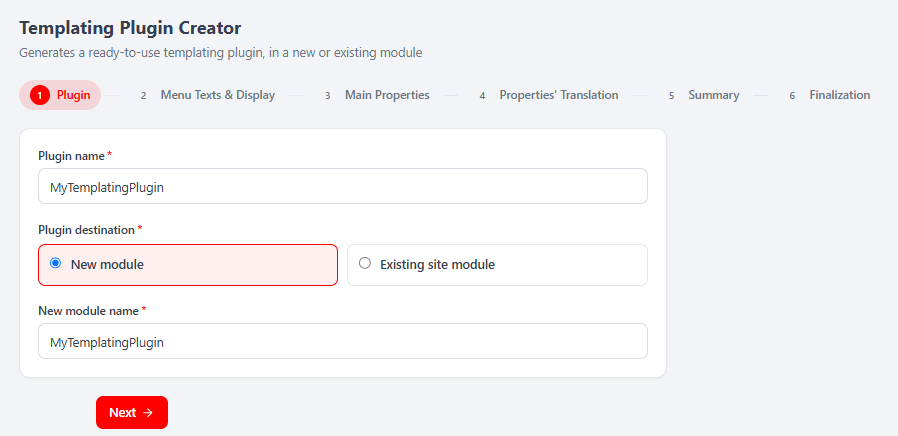
六个步骤:
- Plugin —— 插件名称 + 目标位置(New module,或从下拉菜单中选择一个 Existing site module)。服务端会据此计算出强制使用的
template_path。 - Menu Texts & Display —— 在页面编辑器插件列表中显示的每种语言的标题/描述,外加必需的缩略图(GIF/JPG/PNG,约 190×100,≤500 kB)。
- Main Properties —— 插件的可编辑字段(1–25 个,含
template_path)。字段 1 是锁定的template_path;字段 2..N 各自拥有一个技术名称、一个显示类型(text、Dropdown、DatePicker、NumericInput、Switch、Textarea、富文本…)、一个必填标志和一个默认值。 - Properties' Translation —— 每个属性、每种语言对应一个标签 + 提示(tooltip)(外加每个 Dropdown 选项一个标签)。
- Summary —— 以上所有内容的只读回顾;此处不写入任何内容。
- Finalization —— 选择一个要激活的 Site(可选),保持 Activate plugin after creation 开启,然后 Finish and create the plugin。激活会触发平台重新加载(向导会倒计时并重新加载)。
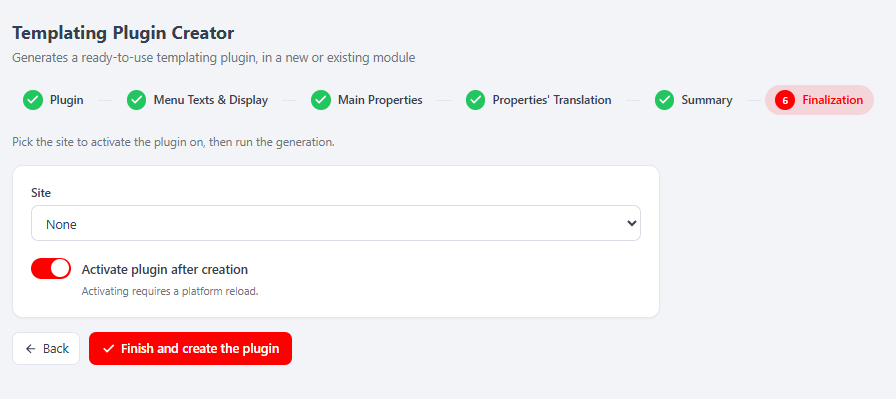
New / Old 切换开关。 New 是 React 向导(默认);Old 会在 iframe 中渲染经典的 jQuery 工具。切换到 Old 会重置共享的会话草稿,因此向导会先向你发出警告。
仪表盘插件(后台)
仪表盘小部件继承 MelisCore\Controller\DashboardPlugins\MelisCoreDashboardTemplatingPlugin。它在构造函数中设置自身所属的模块,并暴露一个 action 方法,该方法返回一个带 setTemplate() 的 ViewModel:
use MelisCore\Controller\DashboardPlugins\MelisCoreDashboardTemplatingPlugin;
use Laminas\View\Model\ViewModel;

class MyWidgetPlugin extends MelisCoreDashboardTemplatingPlugin
{
    public function __construct()
    {
        $this->pluginModule = 'mymodule';
        parent::__construct();
    }

    public function mywidget()   // the action referenced by the plugin config
    {
        $view = new ViewModel();
        $view->setTemplate('my-module/dashboard-plugin/my-widget');
        return $view;
    }
}
该小部件在 melis_dashboardplugin 接口下声明(名称、图标、缩略图、网格 width/height,以及一个指向 module / plugin / function 的 forward),并在 module.config.php 的 controller_plugins 下注册。参考: vendor/melisplatform/melis-core/src/Controller/DashboardPlugins/MelisCoreDashboardBubbleNewsMelisPlugin.php。
最小结构
MyModule/
├── config/module.config.php                 # declares the dashboard plugin + registers it
├── src/Controller/DashboardPlugins/MyWidgetPlugin.php
└── view/my-module/dashboard-plugin/my-widget.phtml
在 /melis-react 中生成脚手架
从左侧菜单项打开 Dashboard Plugin Creator(仪表盘插件创建器)——一个带有5 步进度条和同样的 New / Old 切换开关的顶部选项卡。与它的模板兄弟工具一样,它是一个由 MelisDashboardPluginCreatorService 支撑的 persistent React 向导,因此生成的 PHP 与经典工具的输出完全一致。
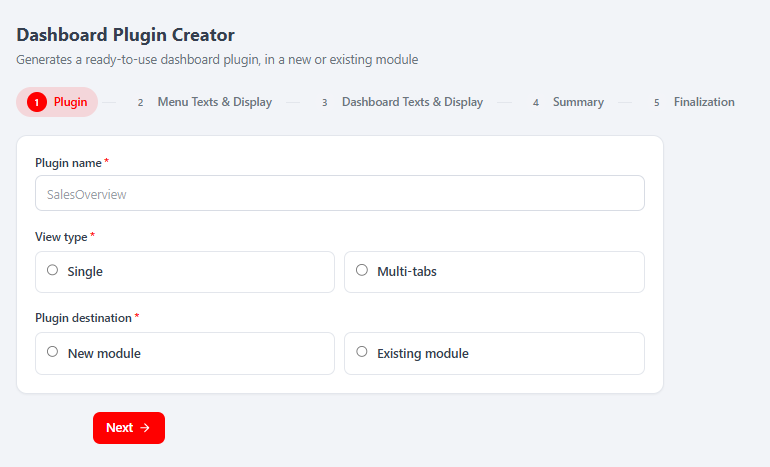
五个步骤:
- Plugin —— 名称、View type(Single 卡片或 Multi-tabs 多选项卡,2–25 个选项卡),以及目标位置(New module 或 Existing module 下拉菜单)。
- Menu Texts & Display —— 每种语言的菜单标题/描述 + 必需的缩略图。
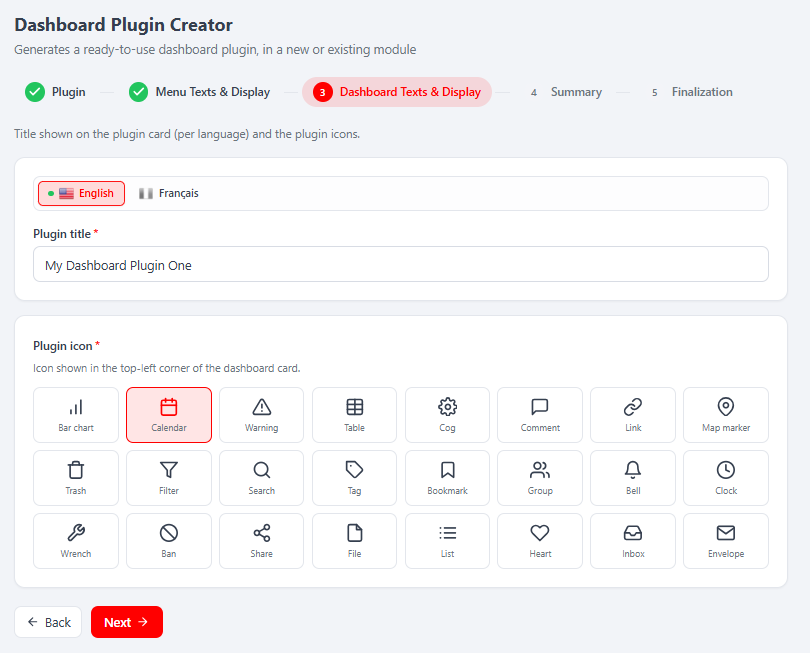
- Dashboard Texts & Display —— 每种语言的卡片标题以及插件图标(对于多选项卡插件,每个选项卡一个图标)。
- Summary —— 只读回顾。
- Finalization —— 保持 Activate plugin after creation 开启,然后 Finish and create the plugin;激活会重新加载平台。
模板插件 vs 仪表盘插件 —— 一览
| 模板插件 | 仪表盘插件 | |
|---|---|---|
| 基类 | MelisTemplatingPlugin | MelisCoreDashboardTemplatingPlugin |
| 所在目录 | src/Controller/Plugin/ | src/Controller/DashboardPlugins/ |
| 核心方法 | front() → 变量数组 | 一个 action → ViewModel |
| 显示位置 | 前台页面(拖放区) | 后台仪表盘 |
| 保存的配置 | 页面内容中的 XML | 仪表盘接口配置 |
| 脚手架向导 | 6 步(melis-templating-plugin-creator) | 5 步(melis-dashboard-plugin-creator) |
关键文件
| 相关内容 | 路径 |
|---|---|
| 模板插件基类 | vendor/melisplatform/melis-engine/src/Controller/Plugin/MelisTemplatingPlugin.php |
| 模板插件示例 | vendor/melisplatform/melis-cms-slider/src/Controller/Plugin/MelisCmsSliderShowSliderPlugin.php |
| 仪表盘插件基类 | vendor/melisplatform/melis-core/src/Controller/DashboardPlugins/MelisCoreDashboardTemplatingPlugin.php |
| 仪表盘插件示例 | vendor/melisplatform/melis-core/src/Controller/DashboardPlugins/MelisCoreDashboardBubbleNewsMelisPlugin.php |
| 脚手架工具 | vendor/melisplatform/melis-templating-plugin-creator/、vendor/melisplatform/melis-dashboard-plugin-creator/ |
关于模块参考页面,请参见 melis-templating-plugin-creator 和 melis-dashboard-plugin-creator。