

Plugins: templating & dashboard
Melis has two kinds of plugins, and they're different things:
- Templating plugins — reusable content blocks dropped into a page's
MelisDragDropZoneon the front office (a slider, a product list, a contact form). - Dashboard plugins — widgets shown on the back-office dashboard.
Both have a GUI scaffolder (melis-templating-plugin-creator, melis-dashboard-plugin-creator) — use it to generate the boilerplate, then read on to understand and customise it. In Melis v6 these scaffolders are native-React wizards in the /melis-react back-office (each still carries a New / Old toggle to the classic tool in an iframe). The framework, the module set and the generated PHP are unchanged — only the UI you drive them with is React now.
Templating plugins (front office)
A templating plugin extends MelisEngine\Controller\Plugin\MelisTemplatingPlugin and implements:
| Method | Role |
|---|---|
front() (required) | Returns the array of variables passed to the plugin's front .phtml. |
back() | Renders the back-office preview + editor (a sensible default is provided). |
createOptionsForms() | Builds the back-office form tabs from the plugin config. |
loadDbXmlToPluginConfig() / savePluginConfigToXml($params) | Decode/encode the plugin's saved parameters (stored as XML inside the page content). |
The constructor wires the plugin to its config:
use MelisEngine\Controller\Plugin\MelisTemplatingPlugin;

class MyBlockPlugin extends MelisTemplatingPlugin
{
    public function __construct($updatesPluginConfig = [])
    {
        $this->configPluginKey = 'mymodule';      // key in the plugin config file
        $this->pluginXmlDbKey  = 'myBlock';       // XML element name saved in the page
        parent::__construct($updatesPluginConfig);
    }

    public function front()
    {
        $id = $this->pluginFrontConfig['someParam'] ?? null;
        // … fetch data via a service …
        return ['pluginId' => $this->pluginFrontConfig['id'], 'items' => $items];
    }
}
The plugin config file
Each plugin ships a config/plugins/<Name>.config.php with a front section (rendering config: template_path, an id, custom params, css/js) and a melis section (back-office UI: name, thumbnail, and the modal_form tabs/fields). Reference: vendor/melisplatform/melis-cms-slider/config/plugins/MelisCmsSliderShowSliderPlugin.config.php.
Register the plugin as a controller plugin in module.config.php:
'controller_plugins' => ['invokables' => [
    'MyBlockPlugin' => \MyModule\Controller\Plugin\MyBlockPlugin::class,
]],
How it reaches a page
An editor drags the plugin into a MelisDragDropZone (see Build a site). The configured parameters are serialised as XML into the page's content; on render, the front engine calls the plugin's front() and renders its .phtml. MelisCmsSlider and MelisCmsNews are the canonical examples.
Minimal structure
MyModule/
├── config/plugins/MyBlockPlugin.config.php
├── src/Controller/Plugin/MyBlockPlugin.php
└── view/my-module/my-block.phtml             # front template
    view/my-module/my-block/melis/form.phtml  # back-office form
Scaffolding it in /melis-react
Open Templating Plugin Creator from its left-menu entry — it opens as a top tab with a 6-step bar and the New / Old toggle top-right (next to Restart). The New view is a real React wizard; the whole thing is persistent, so you can leave the tab and come back without losing your step or your inputs. (All the real work stays server-side — validation reuses the legacy Laminas forms and generation calls MelisTemplatingPluginCreatorService, which writes the same PHP/view/ config/language files as before.)
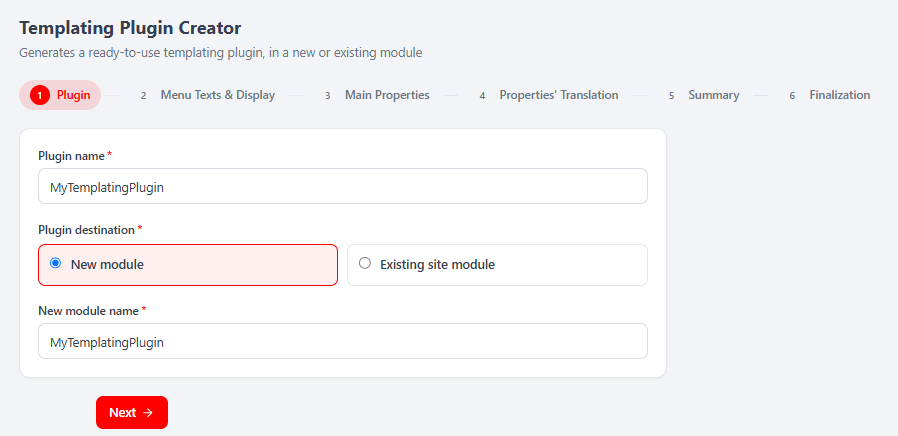
The six steps:
- Plugin — plugin name + destination (New module, or an Existing site module you pick from a dropdown). The server computes the enforced
template_pathfrom this. - Menu Texts & Display — per-language title/description shown in the page editor's plugin list, plus the required thumbnail (GIF/JPG/PNG, ~190×100, ≤500 kB).
- Main Properties — the plugin's editable fields (1–25,
template_pathincluded). Field 1 is the lockedtemplate_path; fields 2..N each get a technical name, a display type (text, Dropdown, DatePicker, NumericInput, Switch, Textarea, rich text…), a required flag and a default value. - Properties' Translation — a label + tooltip per property, per language (plus a label per Dropdown option).
- Summary — a read-only recap of everything above; nothing is written here.
- Finalization — pick a Site to activate on (optional), leave Activate plugin after creation on, then Finish and create the plugin. Activation triggers a platform reload (the wizard counts down and reloads).
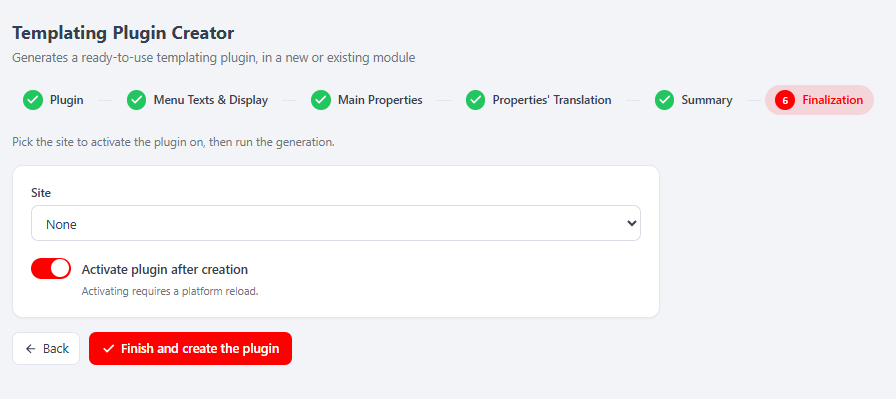
New / Old toggle. New is the React wizard (default); Old renders the classic jQuery tool in an iframe. Switching to Old resets the shared session draft, so the wizard warns you first.
Dashboard plugins (back office)
A dashboard widget extends MelisCore\Controller\DashboardPlugins\MelisCoreDashboardTemplatingPlugin. It sets its module in the constructor and exposes an action method that returns a ViewModel with setTemplate():
use MelisCore\Controller\DashboardPlugins\MelisCoreDashboardTemplatingPlugin;
use Laminas\View\Model\ViewModel;

class MyWidgetPlugin extends MelisCoreDashboardTemplatingPlugin
{
    public function __construct()
    {
        $this->pluginModule = 'mymodule';
        parent::__construct();
    }

    public function mywidget()   // the action referenced by the plugin config
    {
        $view = new ViewModel();
        $view->setTemplate('my-module/dashboard-plugin/my-widget');
        return $view;
    }
}
The widget is declared under the melis_dashboardplugin interface (name, icon, thumbnail, grid width/height, and a forward to module / plugin / function), and registered in module.config.php under controller_plugins. Reference: vendor/melisplatform/melis-core/src/Controller/DashboardPlugins/MelisCoreDashboardBubbleNewsMelisPlugin.php.
Minimal structure
MyModule/
├── config/module.config.php                 # declares the dashboard plugin + registers it
├── src/Controller/DashboardPlugins/MyWidgetPlugin.php
└── view/my-module/dashboard-plugin/my-widget.phtml
Scaffolding it in /melis-react
Open Dashboard Plugin Creator from its left-menu entry — a top tab with a 5-step bar and the same New / Old toggle. Like its templating sibling it is a persistent React wizard backed by MelisDashboardPluginCreatorService, so the generated PHP is identical to the classic tool's output.
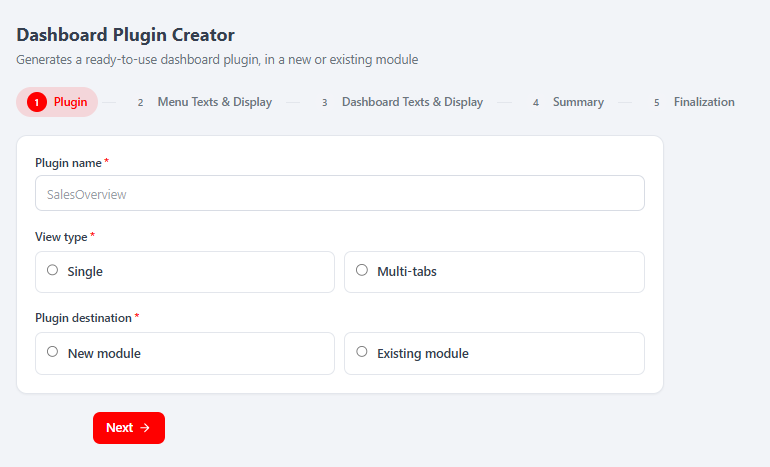
The five steps:
- Plugin — name, View type (Single card or Multi-tabs, 2–25 tabs), and destination (New module or an Existing module dropdown).
- Menu Texts & Display — per-language menu title/description + the required thumbnail.
- Dashboard Texts & Display — the per-language card title and the plugin icon (and, for multi-tab plugins, one icon per tab).
- Summary — read-only recap.
- Finalization — leave Activate plugin after creation on, then Finish and create the plugin; activation reloads the platform.
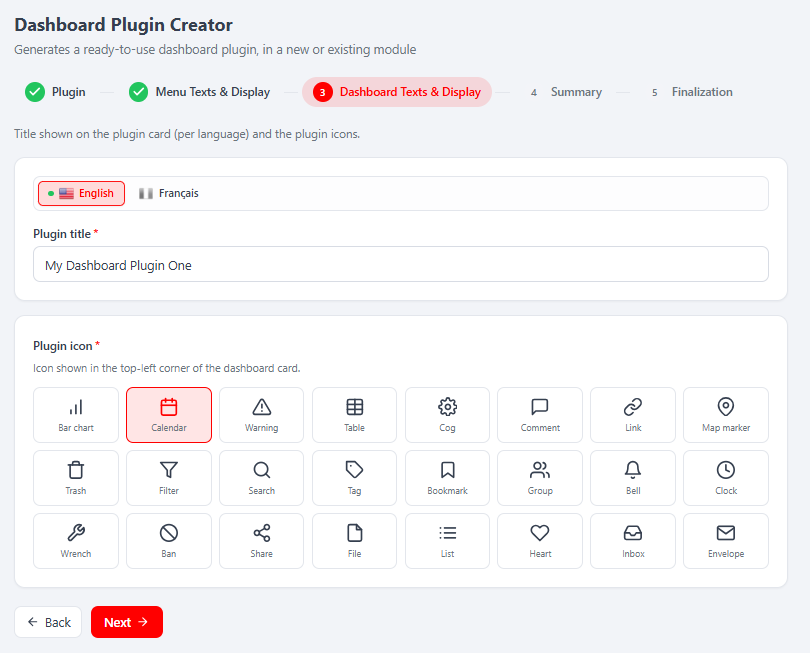
Templating vs dashboard — at a glance
| Templating plugin | Dashboard plugin | |
|---|---|---|
| Base class | MelisTemplatingPlugin | MelisCoreDashboardTemplatingPlugin |
| Lives in | src/Controller/Plugin/ | src/Controller/DashboardPlugins/ |
| Core method | front() → variables array | an action → ViewModel |
| Shown on | front-office pages (drag-drop zones) | back-office dashboard |
| Saved config | XML in the page content | dashboard interface config |
| Scaffolder wizard | 6 steps (melis-templating-plugin-creator) | 5 steps (melis-dashboard-plugin-creator) |
Key files
| Concern | Path |
|---|---|
| Templating base class | vendor/melisplatform/melis-engine/src/Controller/Plugin/MelisTemplatingPlugin.php |
| Templating example | vendor/melisplatform/melis-cms-slider/src/Controller/Plugin/MelisCmsSliderShowSliderPlugin.php |
| Dashboard base class | vendor/melisplatform/melis-core/src/Controller/DashboardPlugins/MelisCoreDashboardTemplatingPlugin.php |
| Dashboard example | vendor/melisplatform/melis-core/src/Controller/DashboardPlugins/MelisCoreDashboardBubbleNewsMelisPlugin.php |
| Scaffolders | vendor/melisplatform/melis-templating-plugin-creator/, vendor/melisplatform/melis-dashboard-plugin-creator/ |
For the module reference pages, see melis-templating-plugin-creator and melis-dashboard-plugin-creator.