

MCP (Model Context Protocol)
Melis integrates the Model Context Protocol so that AI agents can call tools — read/write files, run database operations, scaffold modules — during a run. Melis is also an MCP server: the same tools can be exposed over HTTP to external MCP clients. This page explains how it works, how to add your own MCP tool, and how to expose it.
Same engine, new back-office
Melis v6 kept the AI engine and its modules unchanged; it replaced the back-office with a React UI at /melis-react. Everything on this page about how MCP works — the client, the mcp.tools.php config, spawning servers over stdio, security — is identical to v5. Only the where you click parts moved into the new React tools (Melis AI → Admin → MCP Server, the agent AI Tools allow-list, and the MCP Inspector). Those are called out below.
Client and server
Melis acts as an MCP client: it launches local MCP servers (PHP processes, stdio transport) and invokes their tools when a model requests them.
Melis can now also act as an MCP server — the same tools are exposable over Streamable HTTP to external MCP clients (Claude Desktop, the MCP Inspector, your own integrations). Nothing is reachable until you explicitly expose it: see Expose tools to external clients.
Built-in MCP servers
Out of the box the platform ships six MCP servers, spread across three modules (declared in melis-ai-engine/config/app.interface.php and the modules' mcp.tools.php):
| Server (config key) | Directory | Module | Tools |
|---|---|---|---|
file_operations | mcp/filemcp | melis-ai | createFile, createDirectory, pathExists, readFile, updateFiles, deleteFile, deleteDirectory |
database_operations | mcp/dbmcp | melis-ai | get_table_structure, create_database_table, add_db_table_columns, update_db_table_columns, drop_db_table_columns, drop_database_table, selectData, insertData, updateData, deleteData, bulkInsertData |
module_documents | mcp/documentationmcp | melis-ai | getDocModuleList, getModuleDoc, getModuleDocImage |
navigation_operations | mcp/navigationmcp | melis-ai | listBackOfficeTools, openBackOfficeTool, listCmsPages, resolveHomepage, openCmsPage, navStep |
tool_creator | mcp/toolcreator | melis-ai-tool-creator | createModule, activateModule, deactivateModule, generateBundle |
minitemplate_creator | mcp/minitemplatecreator | melis-ai-community-extensions | readSiteAssets, getSitePublicUrl, uploadMinitemplateImages, renderMinitemplatePreview |
Each server ships two run modes from the same tool implementations:
- stdio —
bin/server.php, e.g.vendor/melisplatform/melis-ai/mcp/dbmcp/bin/server.php. This is what the engine spawns for in-platform agent runs, and what a local desktop client can attach to. Not network-reachable. - HTTP —
public/index.php, served bybin/serve.php(aphp -Swrapper). This is the network-exposable mode, and the only one that applies the exposure allow-list below.
Servers live in several modules
They are not all under melis-ai. To inventory what a given install actually has:
ls -d vendor/melisplatform/melis-ai*/mcp/*/navigationmcp is a special case — it has no vendor/ of its own and borrows dbmcp's autoloader.
How a tool call flows
When a model (Claude/Gemini) asks to call a function during an agent run:
- The provider service asks the MCP service whether it's an MCP tool —
MelisAIEngineMcpService::isMcpTool($name)(tools flagged'mcp' => true, or known to a server). - If yes,
invokeTool($name, $args)finds the right server, (re)uses its process, and sends a JSON-RPCtools/callrequest over stdio. - The server runs the tool and returns the result, which is fed back to the model.
The MCP client lives in melis-ai-engine/src/Service/MelisAIEngineMcpService.php (composed of traits for communication, server management, tool management, schema discovery, circuit-breaking and logging).
The mcp.tools.php config
A module exposes MCP tools by shipping a config/mcp.tools.php that declares (a) the tool schemas for the AI engine and (b) the server that handles them. Example (abridged, from melis-ai-tool-creator/config/mcp.tools.php):
return [
    'plugins' => ['melisaiengine' => ['datas' => [
        'function_declarations' => [
            [
                'name' => 'createModule',
                'description' => 'Create a Laminas module with all components.',
                'mcp' => true,                  // routed to an MCP server
                'input_schema' => [
                    'type' => 'object',
                    'properties' => [
                        'moduleName'    => ['type' => 'string'],
                        'functionality' => ['type' => 'string'],
                        'needDBTable'   => ['type' => 'boolean'],
                    ],
                    'required' => ['moduleName', 'functionality', 'needDBTable'],
                ],
            ],
        ],
    ]]],
    'mcp' => ['servers' => [
        'tool_creator' => [
            'enabled'  => true,
            'module'   => 'melis-ai-tool-creator',
            'args'     => [__DIR__ . '/../mcp/toolcreator/bin/server.php'],
            'timeout'  => 600,
            'tools'    => ['createModule', 'activateModule', 'deactivateModule'],
        ],
    ]],
];
Add your own MCP tool
1. Write the server
vendor/.../your-module/mcp/yourserver/bin/server.php:
#!/usr/bin/env php
<?php
require_once __DIR__ . '/../vendor/autoload.php';

use Mcp\Server;
use Mcp\Server\Transport\StdioTransport;
use YourNs\YourOperations;

$server = Server::builder()
    ->setServerInfo('your-mcp', '1.0.0')
    ->addTool([YourOperations::class, 'doSomething'])
    ->build();

$server->run(new StdioTransport());
2. Implement the operations
namespace YourNs;

use Mcp\Capability\Attribute\McpTool;

class YourOperations
{
    #[McpTool(name: 'doSomething', description: 'What this tool does')]
    public function doSomething(string $param1): array
    {
        return ['success' => true, 'result' => /* … */];
    }
}
3. Declare it & load the config
Add a config/mcp.tools.php (as above) declaring the function_declarations and the mcp.servers entry, then include it from your module's Module::getConfig().
The engine handles process spawning, JSON-RPC over stdio, timeouts, retries and circuit-breaking for you. Models that support tool calling can then invoke your tool during an agent run.
Allow a tool on an agent (React)
Declaring a tool makes it available; an agent only ever sees the tools you tick for it. In the React back-office, open Melis AI → AI Agents, open (or create) an agent, and go to the AI Tools tab — a checklist split into MCP tools (served by MCP servers) and Local tools (built-in PHP). Tick the ones this agent may call, and the engine offers exactly those to the model on each run. Database MCP tools also honour the per-table read/write/delete rights on the agent's DB Rights tab.
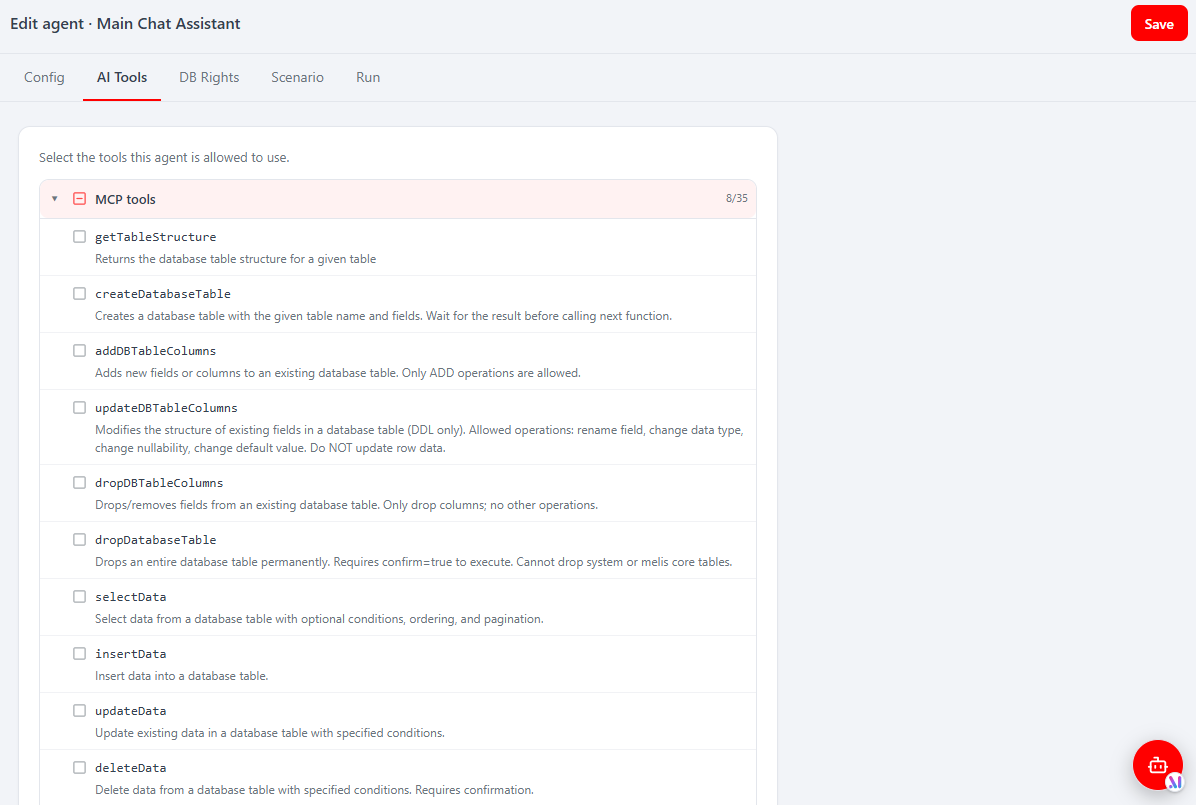 Melis AI → AI Agents → an agent → AI Tools: the MCP tools (getTableStructure, createDatabaseTable, selectData, insertData…) and Local tools an agent may call.
You configure which functions the built-in MCP server exposes under Melis AI → Admin → MCP Server (the MCP Exposition sub-tab); only checked tools are made available. See the AI guide for the full agent/instance model and the melis-ai reference for the tools and endpoints.
Expose tools to external clients (server mode)
Running a server in HTTP mode makes its tools callable by any MCP client that can reach it — so exposure is deliberately gated in several layers. The full operational walkthrough (local Docker, then Kubernetes) ships with the package as vendor/melisplatform/melis-ai/mcp/MCP-EXPOSURE-GUIDE.md; this is the summary.
The exposure allow-list
Each server's public/index.php reads the table melis_ai_mcp_exposed_tools at boot and registers only the tools listed there:
$names        = $pdo->query('SELECT met_tool_name FROM melis_ai_mcp_exposed_tools')
                    ->fetchAll(PDO::FETCH_COLUMN);
$exposedNames = array_flip($names);

foreach ($allTools as $toolName => $callable) {
    if (isset($exposedNames[$toolName])) {
        $builder->addTool($callable);
    }
}
An empty table — or an unreachable database — exposes nothing. That is the primary safety gate: destructive tools such as deleteData or drop_database_table simply stay out of the table. Values must match the camelCase keys of $allTools in each server's public/index.php.
Manage the list from the React back-office under Melis AI → Admin → MCP Server → MCP Exposition — a checklist of every declared function; ticking a tool inserts its row, unticking removes it. It is backed by MelisReactApiAiMcpServerController (GET /melis/react-api/ai-mcp-server/data, POST …/save-tools) and the MelisAIMcpExposedToolTable model.
Verify the entry point before exposing
A shipped public/index.php is not automatically safe. Some servers ship a plain Server::builder()->addTool(…)->build() chain that registers every tool with no database filtering. Open the file and confirm the $allTools + PDO + filtered loop above is present before putting it on a network.
Run a server over HTTP
bin/serve.php starts the built-in PHP web server against public/, reading MCP_HOST and MCP_PORT:
MCP_HOST=0.0.0.0 MCP_PORT=6276 php vendor/melisplatform/melis-ai/mcp/dbmcp/bin/serve.phpIn a Docker stack each server runs as a long-lived supervisord program. The reference port layout (internal only — externally everything is 443):
| Port | Server |
|---|---|
| 6274 | MCP Inspector UI |
| 6275 | filemcp |
| 6276 | dbmcp |
| 6277 | MCP Inspector proxy |
| 6278 | documentationmcp |
| 6279 | navigationmcp |
| 6280 | toolcreator |
| 6281 | minitemplatecreator |
The HTTP entry point needs nyholm/psr7, nyholm/psr7-server and laminas/laminas-httphandlerrunner. The servers under melis-ai/mcp/* already ship them; servers in other modules usually need them added.
Verify
Every server answers GET /healthz with ok, but healthz alone proves nothing — it returns before the PSR-7 bootstrap, so a server with a stale Composer autoloader passes healthz and fatals on the first real request. Always send a real handshake too:
curl -s -X POST http://127.0.0.1:6276/ \
  -H 'Content-Type: application/json' \
  -H 'Accept: application/json, text/event-stream' \
  -d '{"jsonrpc":"2.0","id":1,"method":"initialize","params":{"protocolVersion":"2025-03-26","capabilities":{},"clientInfo":{"name":"curl","version":"1.0"}}}'
A JSON-RPC "result" in the response means the server is genuinely up.
Publish remotely
In Kubernetes the servers sit behind the nginx ingress with TLS on 443 and an IP allow-list (whitelist-source-range), so the 627x ports are never reachable directly. Two routing strategies are available: one hostname per server (https://dbmcp.<domain>/), or — recommended when exposing several — a single host with path routing (https://mcp.<domain>/dbmcp), where use-regex + rewrite-target strip the prefix so each backend still sees / and /healthz. Switching between them later is an ingress-only change.
Vendor edits are wiped by composer update
These entry points live under vendor/. Running composer update melisplatform/melis-ai (or the other MCP-bearing modules) re-extracts the package and can revert a DB-filtered public/index.php to expose-all. Re-verify after every update, and land durable changes upstream in the package repos rather than in vendor/.
Inspect MCP servers (MCP Inspector)
The React back-office ships an MCP Inspector tool under Melis AI → MCP Inspector (route /melis-ai/mcp-inspector). It lists the connected MCP servers and lets you launch / check status / read logs so you can confirm a server is up and the tools you expect are discoverable before you allow them on an agent. Like every React tool it carries a New / Old toggle (New = the React page; Old = the classic tool in an iframe), which launches the official MCP Inspector UI against a chosen server via vendor/melisplatform/melis-ai/src/Controller/McpInspectorController.php.
The Inspector's React endpoints (servers, launch, status, log) live in MelisReactApiMcpInspectorController — see the melis-ai reference.
Security
File/DB MCP operations are sandboxed via allowed_paths / forbidden_paths configured in melis-ai-engine/config/app.interface.php (e.g. module, public, config, /tmp allowed; /etc, /bin, /root… forbidden). Review these before enabling write tools. On top of the sandbox, an agent's reach is bounded by its AI Tools allow-list and DB Rights (above), so a model can only touch what you explicitly granted.
For server mode the layers stack: a tool must be present in melis_ai_mcp_exposed_tools to be registered at all, the ingress restricts callers by source IP over TLS, and the filesystem/DB sandbox still applies to whatever runs. Expose the smallest useful set — read-only tools first — and keep destructive ones off the list.
Key files
| Concern | Path |
|---|---|
| MCP client service | vendor/melisplatform/melis-ai-engine/src/Service/MelisAIEngineMcpService.php |
| Tool management trait | vendor/melisplatform/melis-ai-engine/src/Service/Traits/Mcp/McpToolManagementTrait.php |
| Server config | vendor/melisplatform/melis-ai-engine/config/app.interface.php |
Example mcp.tools.php | vendor/melisplatform/melis-ai-tool-creator/config/mcp.tools.php |
| Example server (stdio) | vendor/melisplatform/melis-ai/mcp/dbmcp/bin/server.php |
| Example server (HTTP) | vendor/melisplatform/melis-ai/mcp/dbmcp/public/index.php |
| HTTP launcher | vendor/melisplatform/melis-ai/mcp/dbmcp/bin/serve.php |
| Exposure guide | vendor/melisplatform/melis-ai/mcp/MCP-EXPOSURE-GUIDE.md |
| Exposed-tools model | vendor/melisplatform/melis-ai/src/Model/Tables/MelisAIMcpExposedToolTable.php |
| MCP Server tab (React API) | vendor/melisplatform/melis-ai/src/Controller/React/MelisReactApiAiMcpServerController.php |
| Inspector (classic) | vendor/melisplatform/melis-ai/src/Controller/McpInspectorController.php |
| Inspector (React API) | vendor/melisplatform/melis-ai/src/Controller/React/MelisReactApiMcpInspectorController.php |