

Create your first tool
A tool is a backoffice screen (a list, a form, a dashboard…) packaged inside a module and attached to the left-hand menu. This page shows how to create one in Melis v6 and explains the anatomy of a tool so you can extend it confidently.
Read this first
Make sure you've skimmed Architecture & concepts — tools are built on modules, the config tree, forwards and rights. Those foundations are unchanged in v6.
v6 kept the framework, replaced the UI
Melis v6 runs the same Laminas framework, modules and config tree as v5. What changed is the back-office: the classic /melis UI has been superseded by a React shell at /melis-react. Tools now appear there as native-React "bricks", and any tool that hasn't been rewritten in React still runs, unchanged, inside an iframe. So the way you build a tool below is the same; only the way you use it in the back-office is new. See MelisReactApi and MelisReactOverride for the plumbing.
The fast path: the code-generation wizards
Melis ships GUI generators that scaffold a complete, working tool for you. In v6 the two most commonly used ones are native-React wizards in the /melis-react shell:
- Dashboard Plugin Creator — scaffolds a widget that shows up on the back-office home dashboard.
- Templating Plugin Creator — scaffolds a front-end CMS block you drop onto pages in the page editor.
Both open from their left-menu entry as a top tab with a step bar across the top and a New / Old toggle (top-right, next to Restart): New is the React wizard (default), Old opens the classic tool in an iframe. Each step is validated server-side (reusing the legacy Laminas forms) so the business rules — reserved PHP keywords, duplicate module/plugin names — are exactly the same as before.
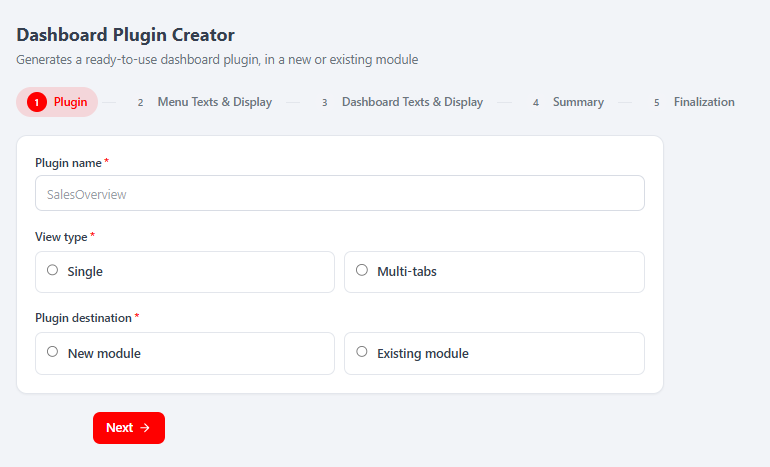 Step 1 of the Dashboard Plugin Creator: Plugin name, View type (Single / Multi-tabs) and Plugin destination (New module / Existing module), with Next at the bottom.
Walk the wizard: name your plugin, choose a new or existing module, localise its titles per language, upload a thumbnail, pick icons, then review a read-only Summary. The Finalization step is the only mutating action — it writes the PHP/view/config/language files to disk, and for the new module branch it scaffolds the module (via the underlying MelisToolCreator service), registers it, activates it and reloads the platform.
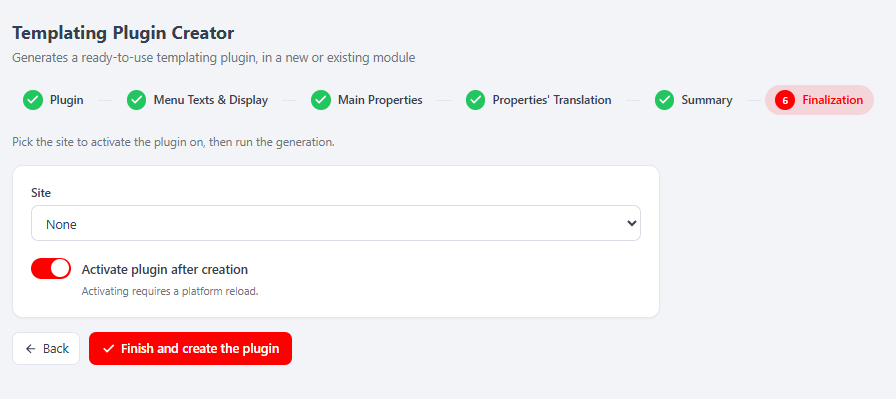 The Templating Plugin Creator's Finalization step: pick a Site to activate on, keep Activate plugin after creation on, then Finish and create the plugin — the wizard counts down and reloads the platform.
Restart / New vs Old
Restart (top toolbar) clears the draft and returns to step 1. Switching to Old opens the classic tool in an iframe and resets the shared draft — the wizard warns you first.
For a plain back-office tool (a list/form screen, not a dashboard or CMS block), the underlying MelisToolCreator still scaffolds a full module skeleton (config, controllers, service, table model and views). The rest of this page explains what these generators produce — so you can read, tweak and hand-write tools too.
Anatomy of a tool (what gets generated)
This part is unchanged from v5: a tool is still a Laminas module. A typical one looks like this:
module/MyTool/
├── src/Module.php                 # merges the config files below
├── config/
│   ├── module.config.php          # routes, services, controllers, view paths
│   ├── app.interface.php          # the tool's internal UI zones + forwards
│   ├── app.tools.php              # table columns, filters, action buttons
│   └── app.toolstree.php          # where the tool sits in the left menu
├── src/MyTool/
│   ├── Controller/                # *Controller.php (extend MelisAbstractActionController)
│   ├── Service/                   # *Service.php   (extend MelisGeneralService)
│   └── Model/Tables/              # *Table.php      (Laminas TableGateway wrappers)
├── view/melis-my-tool/            # .phtml templates
└── language/{en_EN,fr_FR}.interface.php
📎 The best reference implementations to copy from are the real modules
vendor/melisplatform/melis-cms-news/andvendor/melisplatform/melis-cms-prospects/. Open them side by side as you build.
1. Register the module
config/melis.module.load.php:
return [
  // … core modules …
  'MyTool',
];
2. Module.php — assemble the config
namespace MyTool;

use Laminas\ModuleManager\Feature\ConfigProviderInterface;
use Laminas\Stdlib\ArrayUtils;

class Module implements ConfigProviderInterface
{
    public function getConfig()
    {
        $config = [];
        foreach ([
            __DIR__ . '/../config/module.config.php',
            __DIR__ . '/../config/app.interface.php',
            __DIR__ . '/../config/app.tools.php',
            __DIR__ . '/../config/app.toolstree.php',
        ] as $file) {
            $config = ArrayUtils::merge($config, include $file);
        }
        return $config;
    }
}
3. app.toolstree.php — show it in the left menu
This attaches your tool under a left-menu section and forwards to its controller. The melisKey is the stable identifier; the forward points at the action that renders the tool. The React shell reads this same tree (via GET /melis/react-api/menu), rights-filtered, to build its sidebar — so declaring your tool here is what makes it show up in /melis-react.
return ['plugins' => ['meliscore' => ['interface' => ['meliscore_leftmenu' => ['interface' => [
  'meliscustom_toolstree_section' => ['interface' => [
    'mytool_tool' => [
      'conf' => [
        'id'       => 'id_mytool_tool',
        'melisKey' => 'mytool_tool',
        'name'     => 'tr_mytool_title',   // translation key
        'icon'     => 'fa fa-puzzle-piece',
      ],
      'forward' => [
        'module'     => 'MyTool',
        'controller' => 'MyTool',
        'action'     => 'render-mytool',
      ],
    ],
  ]],
]]]]]];
4. Controller + service
// src/MyTool/Controller/MyToolController.php
namespace MyTool\Controller;

use Laminas\View\Model\ViewModel;
use Laminas\View\Model\JsonModel;
use MelisCore\Controller\MelisAbstractActionController;

class MyToolController extends MelisAbstractActionController
{
    public function renderMytoolAction()
    {
        $view = new ViewModel();
        $view->melisKey = $this->params()->fromRoute('melisKey', '');
        return $view; // renders view/melis-my-tool/my-tool/render-mytool.phtml
    }

    public function getListAction()
    {
        $items = $this->getServiceManager()->get('MyToolService')->getList();
        return new JsonModel(['data' => $items]);
    }
}
Services extend MelisGeneralService and reach the database through a TableGateway wrapper registered in module.config.php.
How your tool renders in /melis-react
A tool declared this way needs no React code to appear in v6. The React shell simply shows your existing .phtml UI inside an iframe served at /melis/react-tool-page?key=<melisKey> — with its own DataTables, forms, modals and save buttons behaving exactly as under classic /melis. This is handled entirely by MelisReactOverride; you don't touch it. Rewriting a tool as a native-React brick (with a brick.manifest.json and /melis/react-api/… endpoints) is an optional upgrade — the two wizard creators above are examples of it — not a requirement.
5. Make it visible — rights
Even when a tool is correctly declared, the left-menu section only appears for users whose rights include it. Rights are stored as an XML allow-list in melis_core_user.usr_rights: a section is visible when its *_toolstree_section is listed there. The /melis-react menu is filtered by exactly these rights, so an unlisted section is hidden in the React shell too.
Grant access from the back-office Users → Rights editor (check your tool for the role/user and save). For automation, you can also inject the section into the rights XML with a migration — see how the platform does it for the AI menu in flyway/sql/V3__add_melisai_rights.sql.
v6 also has "advanced rights" (capabilities)
On top of tool access, v6 adds fine-grained capabilities (list / create / edit / delete, or nested tabs) that gate the internal parts of an already-authorised tool. They're default-allow — a tool that declares none keeps full CRUD, so this is opt-in. If you want it, declare a config/react.capabilities.php in your module and guard your React-API actions with denyUnlessCan('edit'). The full contract lives in MelisReactApi.
Recap
- Generate with a wizard (Dashboard / Templating Plugin Creator) or copy
melis-cms-news. - Register the module in
config/melis.module.load.php. - Declare it in
app.toolstree.php(menu) andapp.interface.php(internal zones). - Implement controller + service + view.
- Grant rights so it shows up in the menu.
You now have a working tool that appears in the /melis-react back-office — as an iframe for a classic .phtml tool, or as a native brick if you rewrote it in React. From here, explore app.tools.php to wire a full data table (columns, filters, action buttons) like the CMS modules do.