

Build a website (CMS)
Melis is, first and foremost, a CMS. This page explains the content model — sites, pages, templates and plugins — and how a page is rendered on the front office. It's the mental model you need before editing templates or building a site module.
v6 — React back-office
Melis v6 keeps the same framework, modules and data model described here. What changed is the back-office UI: it now runs as a React application at /melis-react. The CMS ships as native-React "brick" tools — a page-tree sidebar plus a tabbed page editor and a set of side tools (Sites, Templates, Styles, Languages…). The one exception is the page Edition tab, which still loads the classic drag-and-drop editor in an iframe. Every side tool carries a New / Old toggle so you can flip to the classic tool if you need it. The concepts below are unchanged; only where you click is new.
The content model
| Concept | What it is | Main table(s) |
|---|---|---|
| Site | A website. Has a home page, languages and one or more domains per environment. | melis_cms_site, melis_cms_site_domain |
| Page | A node in the site's page tree. Has a type (site/folder/page), a template and content. | melis_cms_page_tree, melis_cms_page_published, melis_cms_page_saved |
| Template | The layout a page uses — it points at a site-module controller/action/view. | melis_cms_template |
| SEO | Per-page URL slug and meta tags. | melis_cms_page_seo |
| Language | A page can have translations linked together. | melis_cms_lang, melis_cms_page_lang |
These tables are owned by MelisEngine, the CMS engine — the single source of truth for the page/site model. The React back-office reads and writes them only through the engine's services and table gateways; it never touches the schema directly. See MelisEngine.
Pages are versioned
Every page exists in two versions:
- Saved (
melis_cms_page_saved) — the working draft you edit in the back-office. - Published (
melis_cms_page_published) — the live version served on the front office.
You edit the draft, then publish when ready. The page's editable content (see zones and plugins below) is stored on the page record.
Templates
A template (melis_cms_template) is the bridge between a page and the code that renders it. For the common ZF2 template type, it stores:
tpl_zf2_website_folder— the site module (e.g.MelisDemoCms),tpl_zf2_controller,tpl_zf2_action— which controller/action renders the page,tpl_zf2_layout— the layout to wrap it in.
So a page → references a template → which routes to a .phtml view inside a site module.
In the React back-office you manage templates in the Templates side tool (§ Creating a new site) — a native React list and form for name, type, site, layout, controller and action.
Editable content: zones & plugins
Templates expose two kinds of editable areas, via view helpers:
MelisTag — simple editable zones
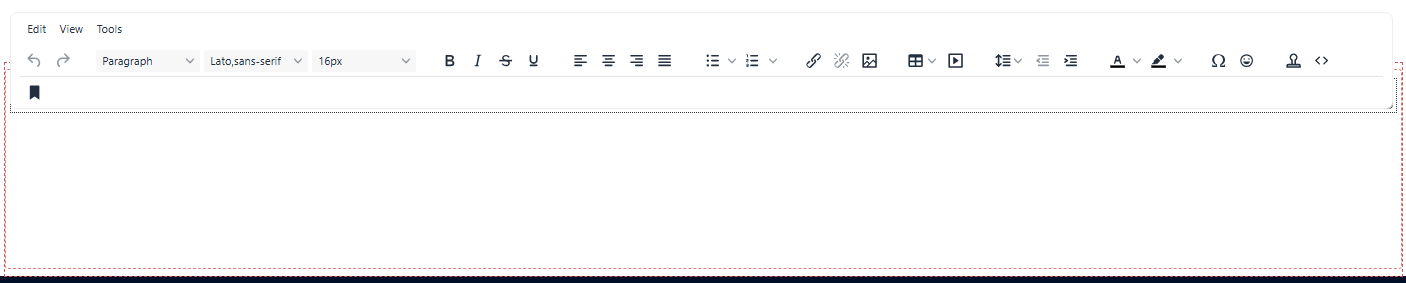
A named HTML/text/media zone an editor edits inline (TinyMCE) in the back-office:
<?= $this->MelisTag($this->idPage, 'home-html-1', 'html', '<h1>Default heading</h1>') ?>The default content shows until an editor overrides it; the saved value is stored on the page. Helper: vendor/melisplatform/melis-front/src/View/Helper/MelisTagsHelper.php.
MelisDragDropZone — templating plugins
A drop zone where editors drag templating plugins — reusable content blocks (a slider, a news list, a contact form):
<?= $this->MelisDragDropZone($this->idPage, 'dragdropzone_home_1') ?>Helper: vendor/melisplatform/melis-front/src/View/Helper/MelisDragDropZoneHelper.php.
A templating plugin extends MelisEngine\Controller\Plugin\MelisTemplatingPlugin and implements:
front()— returns the data/view rendered on the live site,back()— the configuration form shown in the back-office editor.
MelisCmsSlider and MelisCmsNews are good reference plugins; use MelisTemplatingPluginCreator to scaffold your own. Editors drop these blocks in the page editor's Edition tab — see below.
How a page renders on the front office
The front office is served by MelisFront (the engine that displays sites) on top of MelisEngine (page/data services). This rendering is entirely server-side and unchanged in v6 — the React back-office only hosts the editable preview, it does not re-render the page in the browser. Roughly:
- The vhost sets
MELIS_MODULE→ selects the site module to serve. - A URL like
…/id/5resolves to page id 5 (route invendor/melisplatform/melis-front/config/module.config.php). SEO URLs map to page ids too. - MelisEngine loads the page + its template (
vendor/melisplatform/melis-engine/src/Service/MelisPageService.php). - The template's
ZF2controller/action renders the site module's.phtmlview. MelisTagzones andMelisDragDropZoneplugins are filled from the page's published content.- The result is wrapped in the site layout.
Edit / preview modes
The same page can be requested in different modes: …/id/5 (live), …/id/5/preview (saved draft), …/id/5/renderMode/melis (in-back-office editing — this is what the Edition iframe shows).
Anatomy of a site module
A site module is a normal Laminas module that holds a website's templates, views and assets. The reference is vendor/melisplatform/melis-demo-cms/ (see MelisDemoCms); custom sites usually live under module/MelisSites/<YourSite>/:
MelisDemoCms/
├── config/
│   ├── module.load.php           # modules this site needs (MelisEngine, MelisFront, plugins…)
│   ├── module.config.php         # routes / controllers / services
│   ├── assets.config.php         # front-office CSS & JS
│   └── melis.plugins.config.php  # templating plugins available to templates
├── src/Controller/               # Home, Contact… (render the template views)
├── view/
│   ├── layout/                   # site layouts
│   └── melis-demo-cms/home/index.phtml   # a page template (uses MelisTag / MelisDragDropZone)
└── public/                       # css / js / images
Working in the React back-office
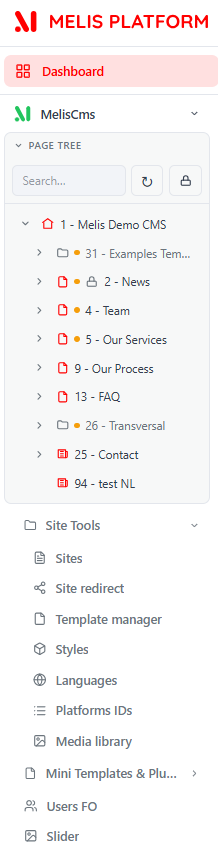
In v6 you build sites from the React back-office at /melis-react. Open the MelisCms section in the left sidebar: it shows the page tree panel (your sites and their pages) plus a Site Tools group.
The page tree
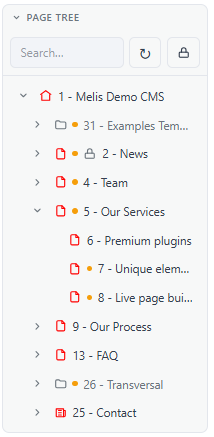
The page tree is the map of your sites and every page inside them. It lives in the left sidebar, so it stays visible while you work. Click a page to open it in the editor; type a name to search; right-click a node to add a child page, see details, duplicate, move or delete it. You can also move a page by drag-and-drop (server-side rights decide what you may move).
The page editor — put content on a page
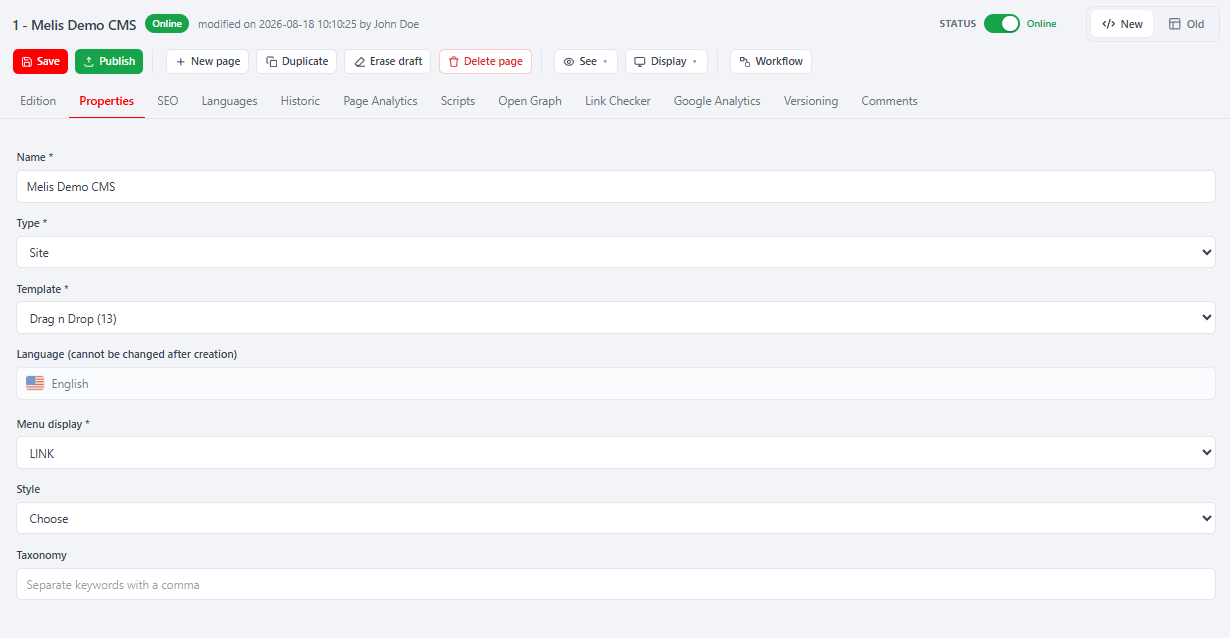
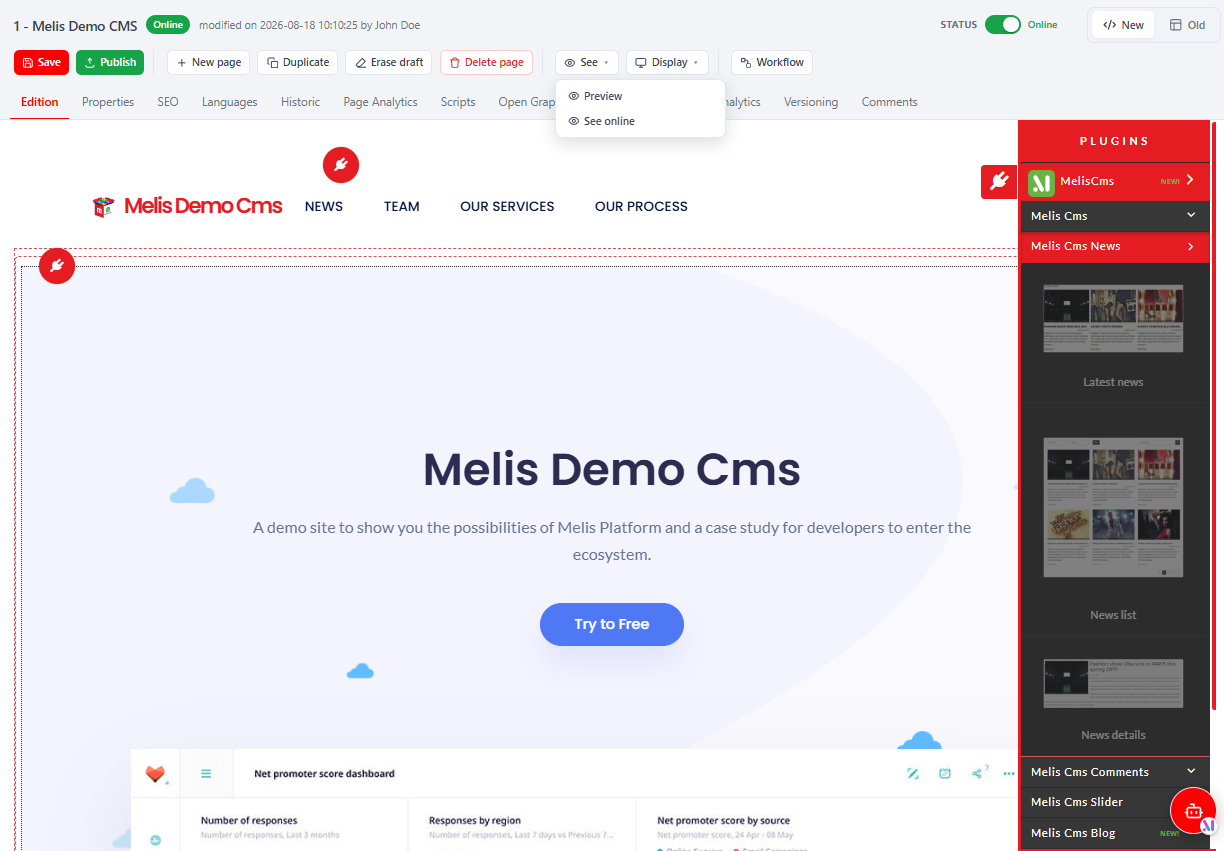
Opening a page shows the editor: a native React chrome (page title + status, action buttons, tab bar) around the current tab's content. The tabs are Properties · Edition · SEO · Languages (plus tabs contributed by other modules — Historic, Analytics, Scripts…). The action buttons include Save, Publish, See (Preview / See online), Duplicate, Erase draft and Delete.
Properties (native React) — the page name, type (Page / Folder / Site), template (layout), language, menu display, style and taxonomy.
Edition (classic editor in an iframe) — fill the page. It renders live and you drag content blocks (plugins) into the template's zones (the
MelisDragDropZoneareas). This tab is the classic drag-and-drop editor loaded inside the React chrome, so the plugins panel, drop-zone layouts and rich-text editors are exactly as before.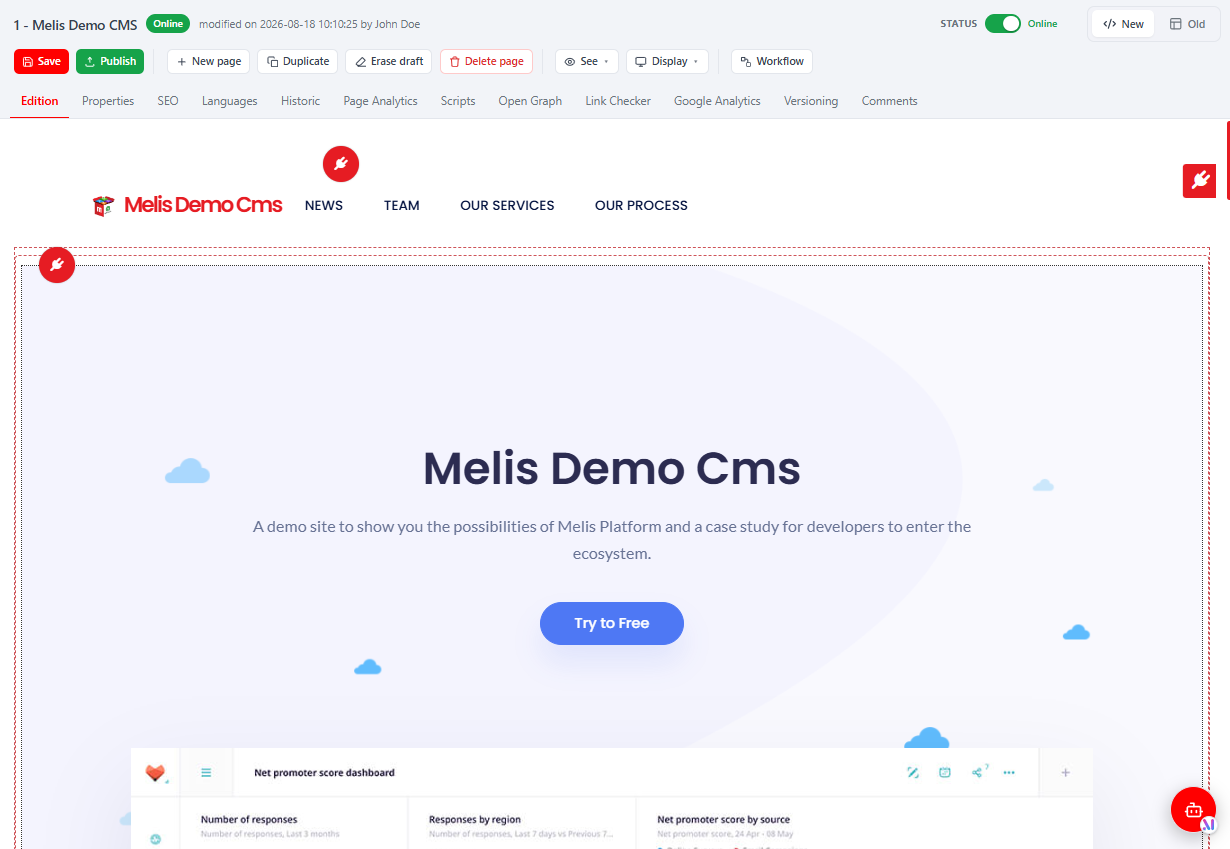
SEO (native React) — the friendly URL, meta title/description and redirect fields.
Languages (native React) — create and manage the page's language versions.
Save vs Publish. Save writes the draft (Properties + SEO + the drag-drop content, all in one action); See → Preview shows the draft; Publish makes the current draft live; Erase draft reverts to the published version. Rule of thumb: edit freely, Save as you go, Preview to check, then Publish.
The standard content blocks
The blocks you drop on the page in the Edition tab come from MelisFront. The most common ones: an HTML (Text) block and a Media block (both edited in place), plus config blocks set up through a small Properties modal — Menu, Breadcrumb, List-from-folder and the GDPR banner. See MelisFront for the full catalogue.
Creating a new site (overview)
At a high level:
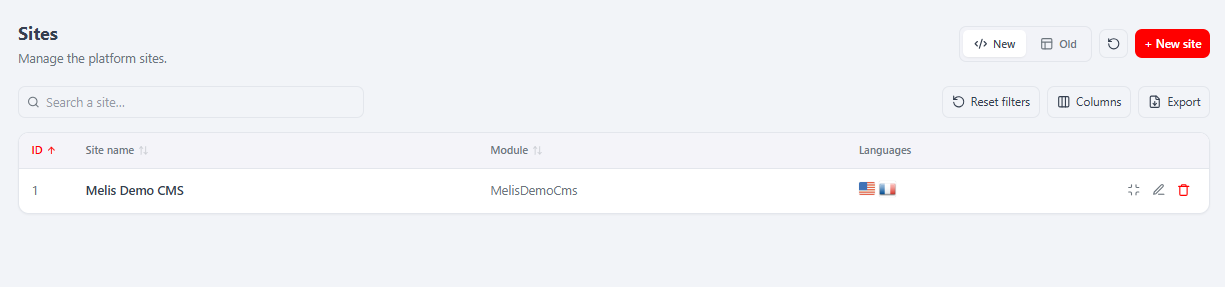
Create the site in the back-office — sidebar → Site Tools → Sites → + New site, then the 5-step wizard (Multilingual → Languages → Domains → Module → Summary), which creates the site and its home page.
Provide a site module under
module/MelisSites/<YourSite>/(controllers +.phtmltemplates + assets).Declare templates (
melis_cms_template) pointing at your module's controller/action — Site Tools → Templates.Build the page tree and assign templates; add
MelisTag/MelisDragDropZoneto your views.Point a vhost at
public/withSetEnv MELIS_MODULE "<YourSite>"(see Installation).Publish and browse the front office.
Once a site exists, open it from the Sites tool to manage it through native React tabs: Properties · Module Loading · Domains · Languages · Site Config · Translations · Scripts. The Module Loading tab is where you turn a feature on for a given site (with drag-to-reorder load order).
Start by reading
vendor/melisplatform/melis-demo-cms/end to end — it's the canonical, working example of every concept on this page.
Key files
| Concern | Path |
|---|---|
| CMS services (pages/sites) | vendor/melisplatform/melis-cms/src/Service/ |
| React CMS bricks (page editor + side tools) | vendor/melisplatform/melis-cms/ui-react/src/ |
| Page service (engine) | vendor/melisplatform/melis-engine/src/Service/MelisPageService.php |
| Front rendering | vendor/melisplatform/melis-front/ |
| Editable-zone helpers | vendor/melisplatform/melis-front/src/View/Helper/ |
| Templating plugin base | vendor/melisplatform/melis-engine/src/Controller/Plugin/MelisTemplatingPlugin.php |
| Reference demo site | vendor/melisplatform/melis-demo-cms/ |
The React modules that own the interface — MelisCms, MelisFront and MelisEngine — document the tools, plugins and data model in full.