

AI: agents & engine
Melis ships an AI engine that lets you build agents — scripted, multi-step AI workflows — and surface them anywhere in the back-office or your own modules. Different providers (Anthropic Claude, Google Gemini, Ollama, OCI) plug in behind a single engine.
The modules involved: melis-ai (React back-office tools + the global AI Assistant), melis-ai-engine (the engine and the shared chat UI), melis-ai-engine-claude / melis-ai-engine-gemini (providers), and melis-ai-community-extensions (ready-made example agents).
In v6 the framework and modules are unchanged; what changed is the back-office, now a React UI at /melis-react. The AI logic stays server-side — React is presentation plus API calls.
Core concepts
| Concept | What it is | Table |
|---|---|---|
| Company / provider | The AI vendor (Anthropic, Google…). | melis_ai_companies |
| Model | A concrete model of a company (e.g. a Claude or Gemini model). | melis_ai_models (mam_generative_model) |
| Platform key | The API key used to call a provider. | melis_ai_platform_keys |
| Agent | A workflow = an ordered list of scenario steps. | melis_ai_agents, melis_ai_scenario_steps |
| Instance | A reusable, named handle to run an agent (used as the chat session id). | melis_ai_instances (mai_instance_id) |
| Daily usage | Token/usage accounting per model/agent/instance. | melis_ai_daily_usage |
An agent is a scenario: a sequence of steps such as ENTRY PARAMS, AI CONTEXT, AI CHAT, CODE, EXIT PARAMS. The engine walks the steps, calls the model when needed, and produces a final answer — optionally writing it back to the page that launched it (via exit parameters).
Providers
The engine picks a provider from the model's company name (MelisAIEngine\Service\MelisAIEngineService::getActiveModelClass()):
- company contains "Anthropic" →
MelisAIEngineModelClaudeService(modulemelis-ai-engine-claude) - company contains "Google" →
MelisAIEngineModelGeminiService(modulemelis-ai-engine-gemini) - plus Ollama (local) and OCI (OCI GenAI) provider modules following the same contract
Every provider extends melis-ai-engine's MelisAIEngineModelService and implements the same contract (setClient(), payload/message formatting, tool calls). Adding a new provider means adding a module with its own model service — no change to the engine. Providers have no UI of their own: installing one seeds its company + models into the catalog, which then appear as choices in the MelisAI admin.
Where it lives in the React back-office
In /melis-react, MelisAI ships one brick bundle exposing three native-React tools in the left sidebar under the Melis AI section — Admin, AI Agents, MCP Inspector — plus a global AI Assistant overlay. Each menu tool carries a New / Old toggle: New is the React UI, Old opens the classic tool in an iframe.
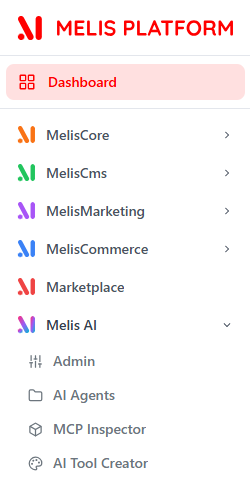
The tools appear only when MelisAI is active. A fourth entry — AI Tool Creator — is contributed by a different module (melis-ai-tool-creator).
Configure it (Admin)
Open Melis AI → Admin. A single New/Old toggle applies to the whole tool; the React view is a tab shell — Usage · Platform AI · Instances · MCP Server · Chat dev tool — with one Save for the active tab.
Platform AI — pick a Company + Model, paste the API key(s) (
melis_ai_platform_keys), and set the platform Active + Default. A model must have a key to be active. The right panel manages file uploads — including Upload mode: File API vs Embed in request (Gemini defaults to File API, Claude to embed).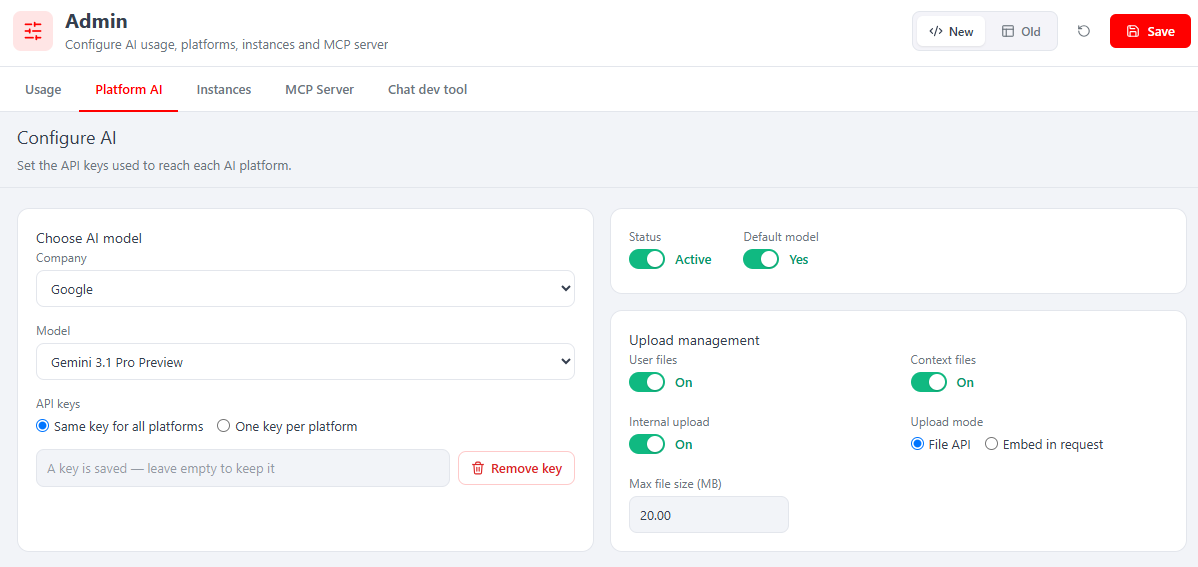
Instances — manage the named instances used to launch agents. The table lists each instance's Name ID (the
mai_instance_id) and its linked agent; + New instance opens a React form (Name, Instance ID, Status, Agent, per-language label).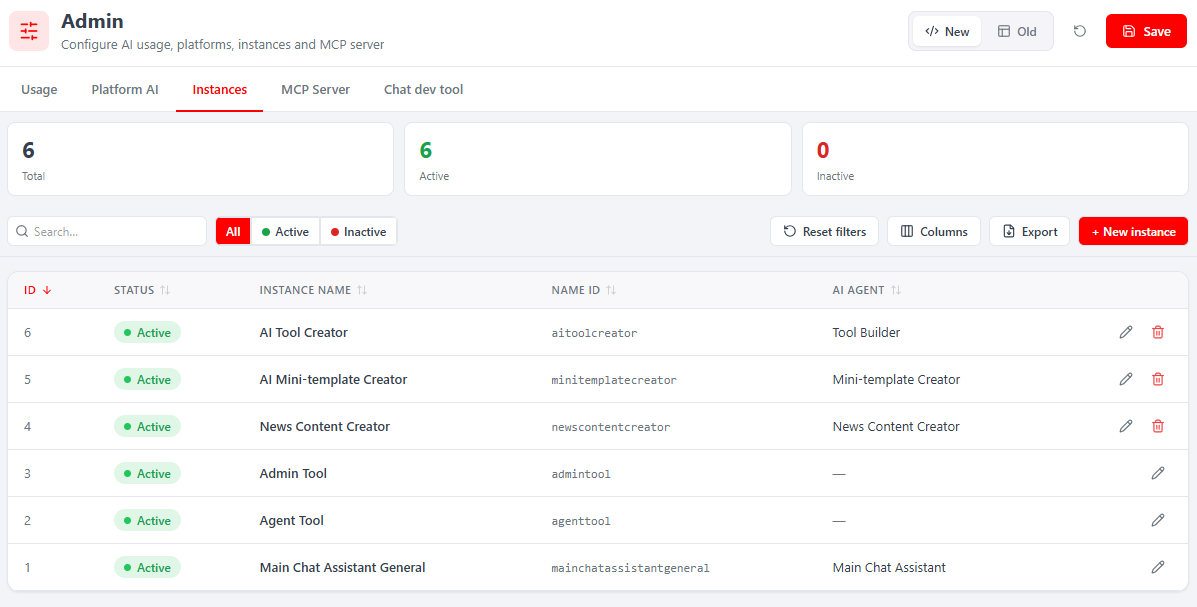
Usage — token/query consumption, total and per instance, over a selectable range.
MCP Server — choose which MCP functions the server exposes, and mark sensitive tables.
Chat dev tool — a developer chat console that shows the raw AI payload and response side by side; the fastest way to see what the model actually received and answered.
Build an agent (AI Agents)
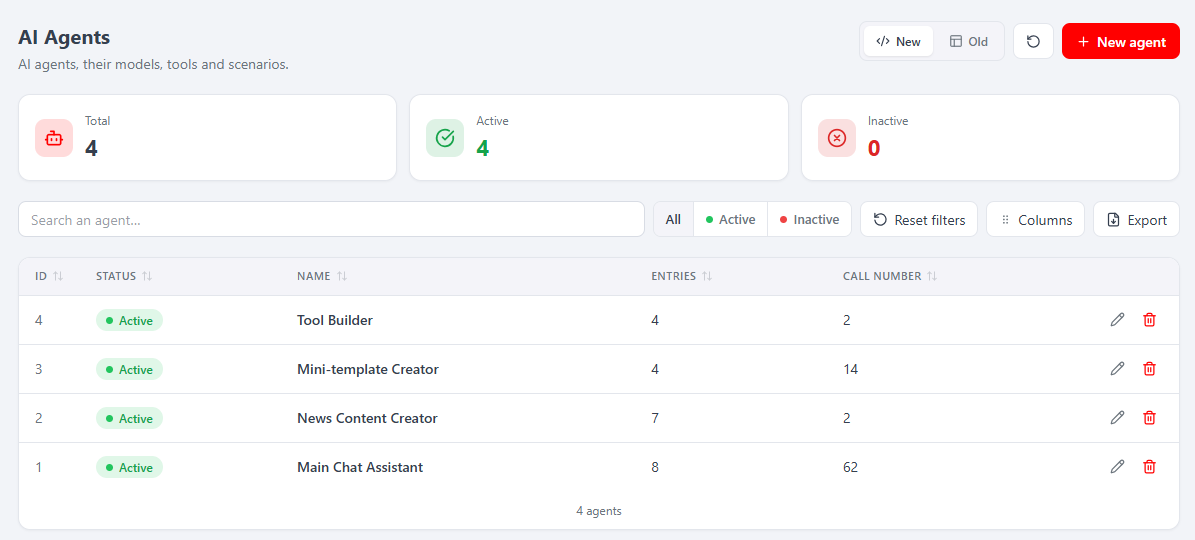
Under Melis AI → AI Agents you build an agent's scenario. The list shows the shipped agents with their step count and lifetime call number; opening one adds a sub-tab with a five-tab editor — Config · AI Tools · DB Rights · Scenario · Run.
Config — name, code, description, an optional model override, and file-upload toggles.
AI Tools — tick the tools this agent may call, grouped MCP tools and Local tools; the engine then offers exactly those to the model.
DB Rights — per-table read / write / delete / drop, plus a global Allow table creation switch. Write, row deletion and dropping are irreversible.
Scenario — the ordered, typed steps: ENTRY PARAMS → one or more AI CONTEXT (silent system/knowledge) → AI CHAT (the visible turn) → EXIT PARAMS, with optional CODE steps. Drag to reorder; each step has a Code you reference with
[CODE]to pull a prior step's answer into a later prompt.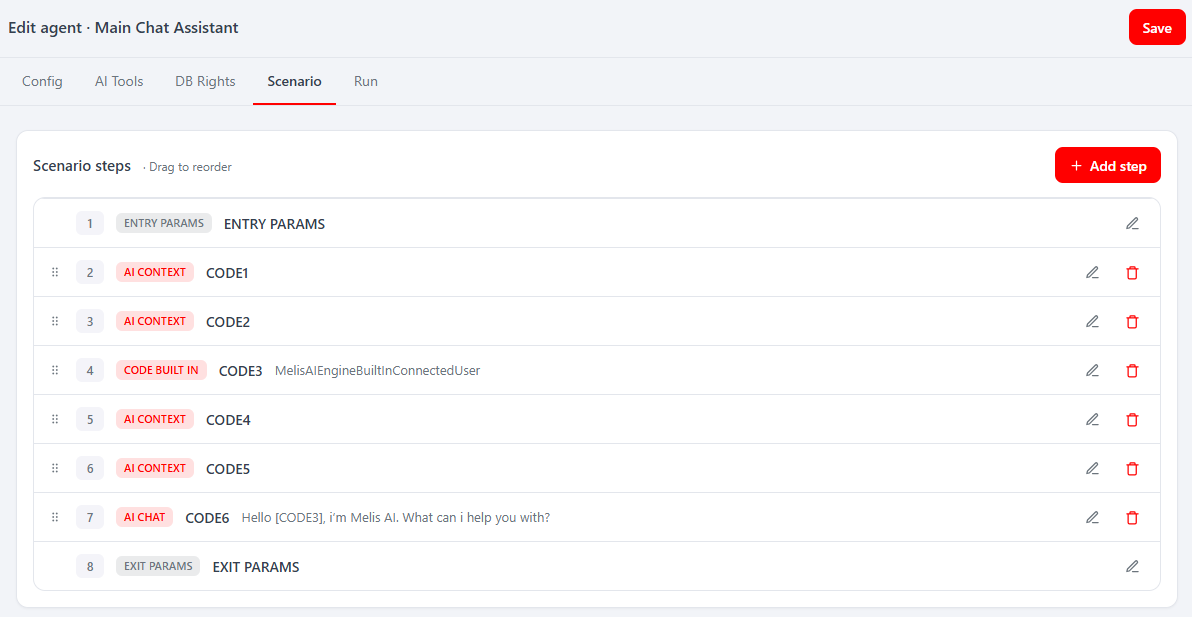
Run — a live test chat against the agent (the
agenttoolinstance), so you can iterate on the scenario and tools without leaving the editor.
The AI Assistant
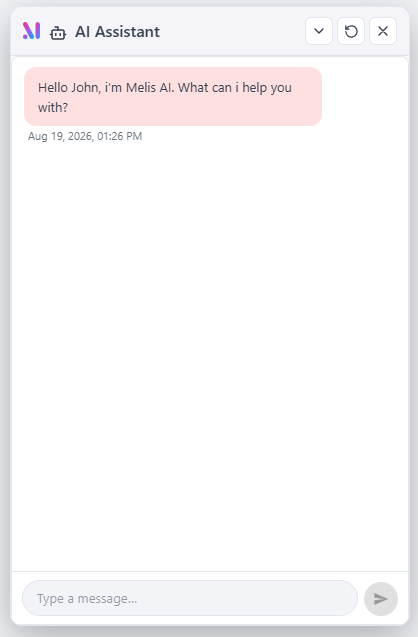
The global AI Assistant is a floating button at the bottom-right of every screen (it has no menu entry). It opens a chat panel running the general Main Chat Assistant (instance mainchatassistantgeneral), and can drive the back-office — open a tool, open a page — straight from the conversation. It stays mounted across navigations, so an open session survives switching tools.
Use an agent from your code
The simplest server-side integration is still the AIChatViewHelper view helper (melis-ai-engine/src/View/Helper/MelisAIChatViewHelper.php). Drop it into a .phtml view to render a ready-to-use chat bound to an instance:
<?= $this->AIChatViewHelper(
    $maiInstanceId,        // instance id from melis_ai_instances.mai_instance_id
    $agentId = null,       // optional explicit agent id
    $extraEntryParams = [],// custom_text / custom_files / custom_data
    $debugMode = false,
    $exitParamArr = []     // where to write the result back (fields, js/route callbacks)
) ?>
A common pattern is to scope the session per object by suffixing the instance id with an id, e.g. "newscontentcreator|".$newsId — so each news item keeps its own conversation.
In the React back-office, the equivalent is the AiChatContainer component exported by melis-ai-engine (via the @melis-ai-engine Vite alias). Mount it with a maiInstanceId and it runs the whole init → run → (continue×N) → validate loop against the /melis/react-api/ai-engine/* endpoints — no backend work needed:
import { AiChatContainer } from '@melis-ai-engine'

<AiChatContainer maiInstanceId="newscontentcreator|42" clearSession autoRun />
Real example
melis-ai-community-extensions ships working agents — e.g. a news content creator that takes a prompt + images and writes the generated copy back into the news form via an exit callback. Read vendor/melisplatform/melis-ai-community-extensions/src/Controller/NewsController.php to see the helper used end to end.
Programmatically, the engine is driven through MelisAIEngine\Service\MelisAIEngineAgentService (runAgent(), validateAnswer(), continueConversation(), restartAgent(), getFinalAnswer()), built per agent + instance, with conversation state persisted in a DB-backed store (MelisAIEngineConversationStore) rather than PHP sessions. Both the classic view helper and the React chat container call this same service.
Tools
Agents can call tools (functions) during a run — including MCP tools for file and database operations. Use MCP Inspector (Melis AI → MCP Inspector) to confirm a server is up and its tools are discoverable before you allow them on an agent. See the dedicated MCP page.
Key files
| Concern | Path |
|---|---|
| Engine service | vendor/melisplatform/melis-ai-engine/src/Service/MelisAIEngineService.php |
| Agent execution | vendor/melisplatform/melis-ai-engine/src/Service/MelisAIEngineAgentService.php |
| Chat view helper | vendor/melisplatform/melis-ai-engine/src/View/Helper/MelisAIChatViewHelper.php |
| React chat container | vendor/melisplatform/melis-ai-engine/ui-react/src/AiChatContainer.tsx |
| React chat backend | vendor/melisplatform/melis-ai-engine/src/Controller/React/MelisReactApiAiEngineController.php |
| Claude provider | vendor/melisplatform/melis-ai-engine-claude/src/Service/MelisAIEngineModelClaudeService.php |
| Gemini provider | vendor/melisplatform/melis-ai-engine-gemini/src/Service/MelisAIEngineModelGeminiService.php |
| React back-office bricks | vendor/melisplatform/melis-ai/ui-react/src/ |
| Example agents | vendor/melisplatform/melis-ai-community-extensions/ |
For the classic (iframe) back-office of any of these tools, use each tool's Old toggle — the legacy behaviour is documented under /legacy. Read the modules' code for the exact, current API — see the Module reference.