

Architecture & concepts
Melis Platform is a Laminas (ZF2-lineage) MVC application. On top of standard Laminas it adds a handful of conventions that power the backoffice. Understanding these five concepts is enough to read — and extend — almost any part of the platform.
In v6, the framework and modules are unchanged: the same Laminas modules, the same config tree, the same services and events. What changed is the back-office UI: v6 ships a new React back-office at /melis-react on top of that unchanged foundation (see §6). The five concepts below still describe how everything works underneath.
1. Modules
Everything in Melis is a module (a standard Laminas module). The list of backoffice modules loaded by the application lives in:
config/melis.module.load.phpreturn [
'MelisAssetManager',
'MelisDbDeploy',
'MelisCore',
'MelisCms',
'MelisFront',
// … your own modules go here
];At bootstrap, config/application.config.php assembles the final module list via MelisCore\MelisModuleManager (which merges these modules with component modules and the site module selected by MELIS_MODULE).
A module bundles its own controllers, services, views, translations and a set of Melis-specific config files (see below). Its Module::getConfig() merges them together. In v6 a module may also ship a React "brick" (a small React UI) and its own react-api endpoints — these are still just extra config and source inside the same module (see §6).
2. The config tree & "melis keys"
Beyond the usual module.config.php, each backoffice module publishes app config files that are merged into a single, queryable tree under a plugins root:
| File | Declares |
|---|---|
app.interface.php | UI zones/sections and their forwards (see §3) |
app.tools.php | Tools: data tables, columns, filters, action buttons |
app.toolstree.php | Where a tool attaches in the left menu |
app.forms.php | Form definitions |
You query this tree through the MelisCoreConfig service (vendor/melisplatform/melis-core/src/Service/MelisCoreConfigService.php):
$config = $sm->get('MelisCoreConfig');

// Fetch a node by path:
$node = $config->getItem('meliscore_leftmenu');

// Resolve all the "melis keys" → full config paths:
$keys = $config->getMelisKeys();
A melis key is a stable, human-friendly alias for a deeply nested config path, declared on a node via 'conf' => ['melisKey' => 'my_key']. It lets modules reference each other's UI without hard-coupling to a path. This same melisKey is what the React back-office uses to identify a tool — both to route to it and to gate it by rights (see §6).
3. Zones & forwards (how the backoffice renders)
The backoffice UI is config-driven. A page is a tree of zones; each zone can declare a forward — a module / controller / action triplet that renders that zone:
'forward' => [
  'module'     => 'MelisCms',
  'controller' => 'PageTree',
  'action'     => 'render-page-tree',
],
MelisCore\Controller\PluginViewController walks the config tree, dispatches each forward, and assembles the resulting HTML. This is why the left menu, headers and tools are all declared in config rather than hard-coded — and why adding a tool is mostly a matter of declaring the right config and providing a controller + view.
In v6 this zone/forward machinery is still the source of truth, and it powers the React shell in two ways: any classic tool that has no native React screen is rendered as a standalone zone and shown inside the shell in an iframe, and the left menu the shell displays is built from the same interface config, filtered by rights (see §6).
4. Services & factories
Melis relies on the Laminas service manager. Services are registered in each module's module.config.php (service_manager → aliases / factories) and resolved by name:
$svc = $this->getServiceManager()->get('MelisCoreConfig');Common core services include MelisCoreConfig, MelisCoreAuth, MelisCoreRights, MelisCoreUser, MelisCoreTool. Business services typically extend MelisGeneralService (which adds event dispatching); database access goes through Laminas TableGateway wrappers. The v6 React screens don't change this: a React brick is just presentation — every action it takes calls back into these same server-side services through react-api endpoints (see §6).
5. Events
Modules hook into the request lifecycle in Module::onBootstrap() and via listeners on the shared event manager. Core behaviour (authentication, rights checks, flash messages, caching…) is wired this way, and you can publish/subscribe to custom Melis events — e.g. melis_core_auth_login_ok fires after a successful login.
6. The React back-office (v6)
v6 keeps the framework and modules but replaces the back-office UI with a React single-page app served at /melis-react (the classic /melis UI is still there underneath). Two ideas are enough to picture it:
- Bricks — a native-React tool. A module ships a
public/ui-react/brick.manifest.jsonand a built bundle; the shell discovers every active module's bricks and mounts them. A brick appears if and only if its module is enabled — the same modularity rule as everywhere else. - New / Old toggle — most tools carry a top-right switch: New = the native React screen, Old = the classic tool rendered inside an iframe. So nothing is lost while modules are progressively rewritten in React.
Everything the shell shows around your tools — who you are, the left menu (already filtered by your rights), the language switcher, the dashboard tiles, the tool discovery — is assembled at boot from a small set of generic JSON endpoints under /melis/react-api/…, each returning a { success, data, error? } payload. A global floating AI Assistant overlay is available on every screen.
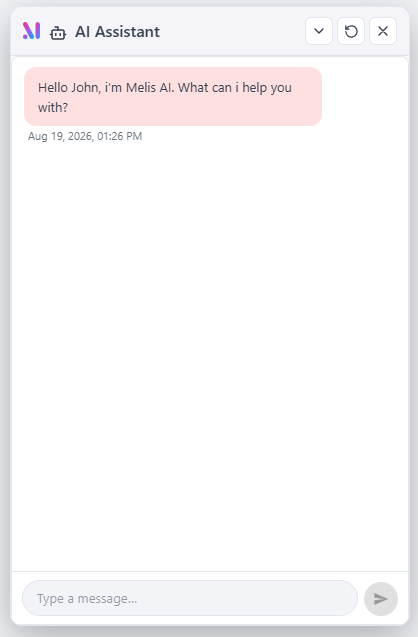 The floating AI Assistant is available from every screen of the React back-office.
Three modules make this work, and none of them is a tool you navigate to:
- MelisReactApi — the JSON API backbone. It draws no UI; it serves the boot set (
/me,/menu,/langs,/assets,/react-modules) plus the dashboard and rights endpoints, and hosts the capability engine (see below). A tool's own data endpoints live in that tool's module, not here. - MelisReactOverride — the plumbing that (a) serves the React shell for
/melis-reactand its deep links, and (b) renders any classic tool as a standalone page (/melis/react-tool-page?key=<melisKey>) so the Old toggle and any not-yet-rewritten tool still work inside the shell. - Each feature module (e.g.
MelisCms) ships its own bricks,react-apiroutes and capabilities.
Capabilities are v6's fine-grained "advanced rights": inside an already-authorised tool, individual actions (list, create, edit, delete, or a nested tab) can be denied per user/role. They are default-allow and subordinate to the classic tool-access check (MelisCoreRights::canAccess, unchanged) — a tool with no capability declaration keeps full CRUD. A module declares the capabilities that exist for its tool melisKey in config/react.capabilities.php; its controllers gate each action with denyUnlessCan($cap).
Rule of thumb: if the React shell shows it (menu, header, dashboard, tool list, rights matrix) but it isn't a specific tool's own screen, it came from a MelisReactApi endpoint. If you're looking at a classic Bootstrap-style tool inside
/melis-react, you're seeing MelisReactOverride render that tool in an iframe.
For the full contract and internals see the module references: MelisReactApi and MelisReactOverride; for a worked example of a multi-brick module, MelisCms.
Bonus: database changes (dbdeploy & flyway)
Schema and seed changes are versioned:
- dbdeploy (
MelisDbDeploy): each module ships numbered SQL deltas; applied deltas are tracked in achangelogtable so they run once. Module deltas are published intodbdeploy/. - flyway (
flyway/sql/): project-level migrations (e.g.V3__add_melisai_rights.sql), applied withflyway migrate.
Where to look in the code
| Concern | Path |
|---|---|
| Module list | config/melis.module.load.php |
| App bootstrap | config/application.config.php |
| Platform DB config | config/autoload/platforms/<MELIS_PLATFORM>.php |
| Config service | vendor/melisplatform/melis-core/src/Service/MelisCoreConfigService.php |
| Zone/forward render | vendor/melisplatform/melis-core/src/Controller/PluginViewController.php |
| Module manager | vendor/melisplatform/melis-core/src/MelisModuleManager.php |
| React shell (SPA) | vendor/melisplatform/melis-core/public/ui-react/ |
| React API + capabilities | vendor/melisplatform/melis-react-api/ |
| React shell & iframe plumbing | vendor/melisplatform/melis-react-override/ |
Next: put it together by creating your first tool.