

MelisTemplatingPluginCreator
A back-office wizard that scaffolds a complete front-office templating plugin — config, controller, view, modal form, assets and translations — into a new or existing module. In v6 it ships as a native React brick calling a JSON
react-api, with a New/Old toggle to the legacy tool. Packagemelisplatform/melis-templating-plugin-creator.
Purpose
MelisTemplatingPluginCreator is a code generator, not a runtime feature. It walks you through a 6-step wizard — plugin name, destination module, localised menu texts, properties (fields), translations — then writes a ready-to-use templating plugin into the target module. The generated plugin extends MelisEngine\Controller\Plugin\MelisTemplatingPlugin, so once created it behaves like any hand-written templating plugin — read Plugins to understand and customise the output.
Enable it
It's a standard Laminas module. Add it to config/melis.module.load.php:
return [
    // …
    'MelisTemplatingPluginCreator',
];
Composer dependencies (composer.json): melis-core, melis-tool-creator, melis-cms. When the destination is a new module, the tool delegates to MelisToolCreatorService::createTool() to scaffold the module first. No database is required, but the module/ directory and a tpc/temp-thumbnail/ folder under the public document root must be writable (the GD extension is also needed for thumbnail validation). The React brick surfaces these as blocking preflight notices when the filesystem isn't writable or GD is missing.
The React back-office
The wizard is a native full-React brick (not an iframe) mounted in /melis-react. It opens as a top tab named Templating Plugin Creator with a 6-step bar and a New / Old toggle (top-right, next to Restart). Old falls back to the legacy jQuery tool in an iframe; New (default) is the React wizard. The brick is persistent: leaving the tool tab and coming back loses neither the draft nor the current step. The 6 steps are CSS-shown/hidden panes on a single mounted page.
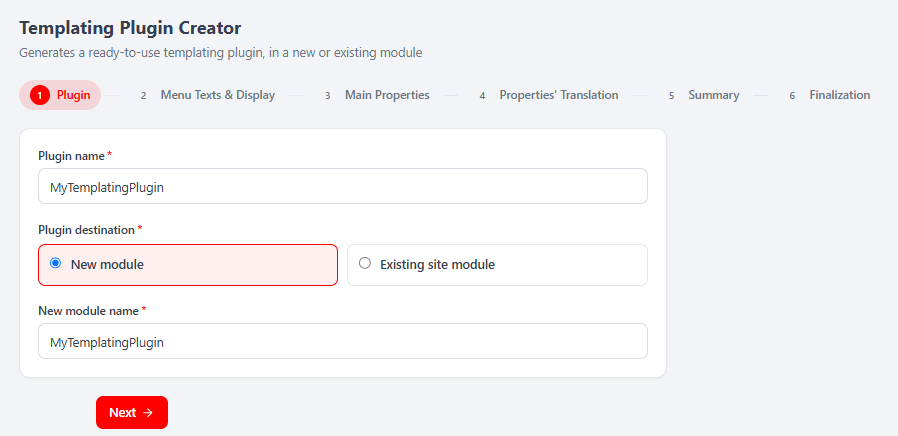
All business logic stays server-side: validation rebuilds the legacy Laminas forms (same validators, messages and rules) and generation calls MelisTemplatingPluginCreatorService. React is presentation
- API calls.
The 6 steps
| Step | Name | What you do |
|---|---|---|
| 1 | Plugin | Plugin name + destination: New module (reveals a new-module name field) or Existing site module (module dropdown). |
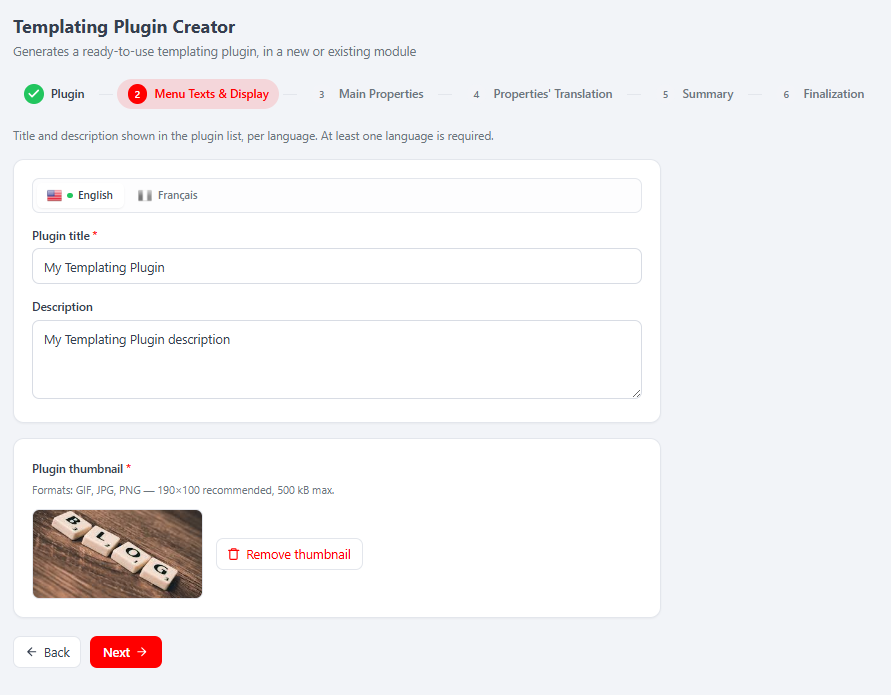
| 2 | Menu Texts & Display | Per-language title/description shown in the page editor's plugin list (≥1 language) + required thumbnail upload (GIF/JPG/PNG, ~190×100, ≤500 kB). |
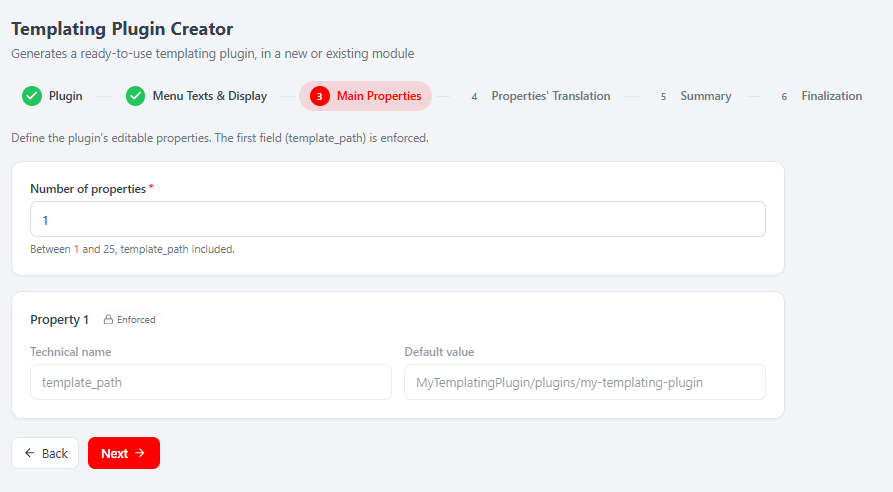
| 3 | Main Properties | Number of properties (1–25, template_path included); per field a technical name, display type, required flag and default. Property 1 is the enforced, read-only template_path. |
| 4 | Properties' Translation | Per-language label + tooltip for each field (plus a label per Dropdown option); one complete language is enough. |
| 5 | Summary | Read-only recap of steps 1→4, target module and computed template path. Nothing is written here. |
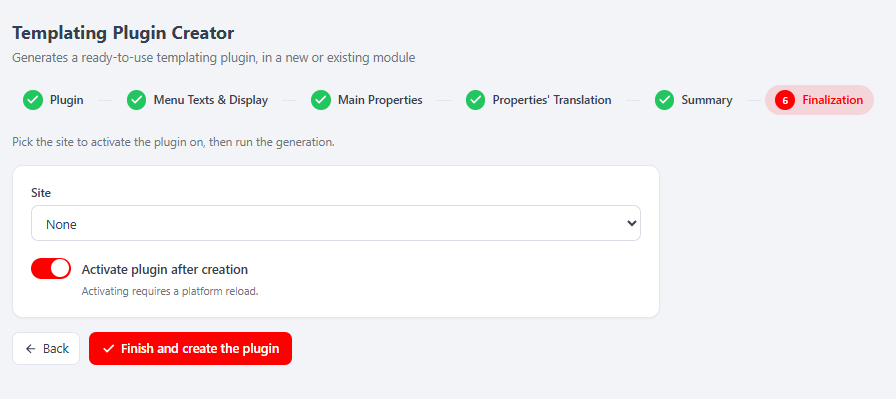
| 6 | Finalization | Optionally pick a Site to activate on and toggle Activate plugin after creation, then Finish and create the plugin. |
template_path is always the enforced first property, computed server-side as <Module>/plugins/<plugin-view-name> and never posted by the client. Step 6 is the only mutating operation: it writes the plugin files and — for the new-module branch — scaffolds the module, optionally registers it in the chosen site's module.load.php, activates it and invalidates the module-paths cache (activation requires a platform reload, shown as a countdown). Available display types include MelisText, Dropdown, DatePicker, DateTimePicker, PageInput, NumericInput, Switch, Textarea, MelisCoreTinyMCE.
React API
Routes live in config/react-api.php, served by MelisReactApiTemplatingPluginCreatorController, all under /melis/react-api/tpc, contract { success, data, error }. Validation failure is not an HTTP error: POST /tpc/step/:step returns { valid:false, errors:{…} } so the UI can show per-field messages.
| Method & URL | Purpose |
|---|---|
GET /tpc/context | Preflight (FS-writable + GD checks → blocking[]), step meta, languages, site modules, sites, display types, maxFields (25), thumbnail limits. |
GET /tpc/state | Restore the wizard from the shared session. |
POST /tpc/reset | Restart: clear session draft + temporary thumbnail. |
POST /tpc/step/:step (1–4) | Validate + persist a step → { valid, errors }. |
POST /tpc/thumbnail · POST /tpc/thumbnail/remove | Upload / remove the plugin thumbnail. |
GET /tpc/translation-fields | Fields to translate (derived from step 3). |
GET /tpc/summary | Read-only recap of steps 1→4 + target module + template path. |
POST /tpc/generate | Generate the plugin (writes files, optionally scaffolds + activates a module). |
Capabilities (advanced rights)
Declared in config/react.capabilities.php under the rights-bearing melisKey melistemplatingplugincreator_tool (the same key used by the manifest and the controller access guard). Semantics are default-allow. Flattened capability strings:
| Capability | Gates |
|---|---|
wizard · wizard.edit | Configure/validate steps 1→4 (without wizard.edit the whole wizard is read-only). |
thumbnail · thumbnail.create · thumbnail.delete | Upload / remove the thumbnail (step 2). |
summary · summary.list | Read the summary (step 5). |
finalization · finalization.create | Generate the plugin (step 6) — the sensitive capability. |
Every controller action is guarded twice — denyUnlessAccess() (auth + canAccess) then denyUnlessCan(cap). Hiding controls in the UI is UX only; the server refuses regardless.
Key services
Registered as a service_manager alias in config/module.config.php.
| Alias | Role |
|---|---|
MelisTemplatingPluginCreatorService | Generates (and rolls back) the templating plugin from the wizard data saved in the session. |
MelisTemplatingPluginCreatorService (extends MelisCore\Service\MelisGeneralService) notably exposes:
| Method | Role |
|---|---|
generateTemplatingPlugin() | Entry point: reads the session steps and writes all plugin files; rolls back on any failure. Returns a boolean. |
getSiteTemplatingPluginNames($siteModule) | Lists existing templating-plugin names of a site module (used to reject duplicate plugin names). |
generateModuleNameCase($str) / convertToViewName($string) | Normalise a name to a valid module name / view directory name. |
getTempThumbnail() | Resolves the temp path of the uploaded plugin thumbnail for the current session. |
Internally generateTemplatingPlugin() runs performGeneration(), which writes the plugin config (config/plugins/<Module><Plugin>Plugin.config.php), updates the target module.config.php (template_map + controller_plugins), appends translations per language, generates assets (css/js + thumbnail), the controller (src/<Module>/Controller/Plugin/<Module><Plugin>Plugin.php), the front view and the modal form, and includes the new config from the module's Module.php. The React controller writes its wizard state into the same session container as the legacy tool (templatingplugincreator), because the service snapshots it in its constructor.
Front office
This module adds no runtime front-office plugin or view helper of its own. Instead, it generates a templating plugin into the destination module: a controller-plugin class extending MelisEngine\Controller\Plugin\MelisTemplatingPlugin with loadDbXmlToPluginConfig() / savePluginConfigToXml() wired to the configured fields, a config/plugins/*.config.php (front + melis sections, one Properties tab), a front .phtml, a modal-form .phtml, and css/js assets. The generated plugin then appears in the CMS page editor's plugin menu and is dropped into a MelisDragDropZone like any other templating plugin — see Plugins and Build a site.
Database tables
None. This tool generates source files only and stores its in-progress wizard state in a Laminas session container (templatingplugincreator); no melis_* tables are installed.
Example
The generated plugin is consumed like any templating plugin. From the service side, the wizard's final step calls:
$tpcService = $serviceManager->get('MelisTemplatingPluginCreatorService');
$result = $tpcService->generateTemplatingPlugin(); // true on success, files written to the target module
Key files
| Concern | Path |
|---|---|
| Module / config loading | vendor/melisplatform/melis-templating-plugin-creator/src/Module.php |
| Wiring (service, form elements, views) | vendor/melisplatform/melis-templating-plugin-creator/config/module.config.php |
| React API routes + invokable | vendor/melisplatform/melis-templating-plugin-creator/config/react-api.php |
| React capabilities | vendor/melisplatform/melis-templating-plugin-creator/config/react.capabilities.php |
| Wizard forms + steps config (reused for validation) | vendor/melisplatform/melis-templating-plugin-creator/config/app.tools.php |
| React API controller | vendor/melisplatform/melis-templating-plugin-creator/src/Controller/MelisReactApiTemplatingPluginCreatorController.php |
| Legacy wizard controller (Old-view iframe) | vendor/melisplatform/melis-templating-plugin-creator/src/Controller/TemplatingPluginCreatorController.php |
| Generator service | vendor/melisplatform/melis-templating-plugin-creator/src/Service/MelisTemplatingPluginCreatorService.php |
| React brick (source + built) | vendor/melisplatform/melis-templating-plugin-creator/ui-react/ · public/ui-react/ |
See also: Module reference · Plugins · Create a tool · Build a site.