

MelisDashboardPluginCreator
A step-by-step wizard that scaffolds a new back-office dashboard plugin (widget) into a new or existing module, now delivered as a native React brick. Package
melisplatform/melis-dashboard-plugin-creator.
Purpose
MelisDashboardPluginCreator is a code-generation assistant: a 5-step wizard that generates a ready-to-use dashboard widget — its controller, view, config, assets and translations — and wires it into the target module. You choose a single-tab or multi-tab widget, a destination (create a brand-new module or extend an existing one), per-language titles/descriptions, an icon and a thumbnail; the tool then writes the files and (optionally) activates the plugin.
The generated widget extends MelisCore\Controller\DashboardPlugins\MelisCoreDashboardTemplatingPlugin and is declared under the melis_dashboardplugin interface, so it appears on the back-office dashboard. The module depends on melis-core and melis-tool-creator (the latter is reused to scaffold the new module). For the concepts behind dashboard plugins, see Plugins; for back-office tools in general, see Create a tool.
Enable it
It is a standard Laminas module. Add it to config/melis.module.load.php:
return [
    // …
    'MelisDashboardPluginCreator',
];
Install via Composer (composer require melisplatform/melis-dashboard-plugin-creator); melis-core and melis-tool-creator are pulled in automatically. No database is required.
The tool writes files on disk, so the following must be writable by the web server (checked at runtime, surfaced to the wizard as context.blocking[]): config/melis.module.load.php, the module/ directory, and the temp-thumbnail path <DOCUMENT_ROOT>/dpc/temp-thumbnail/ (configured in config/app.tools.php under melisdashboardplugincreator/datas/plugin_thumbnail/path).
React back-office
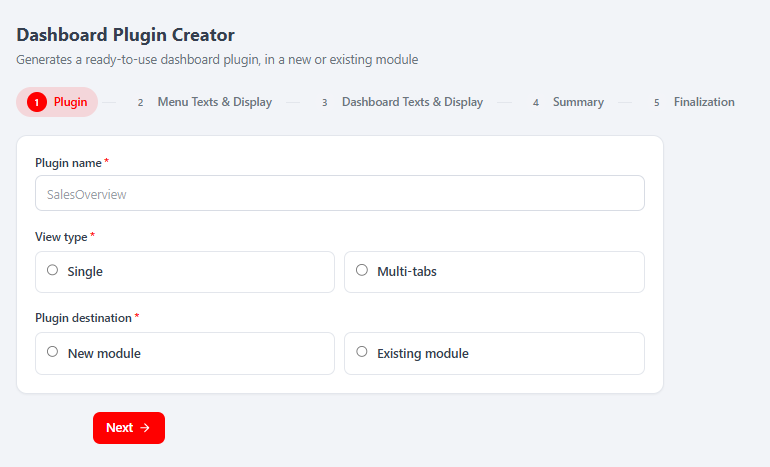
In the React back-office (/melis-react) the tool ships as a native full-React brick — a real React wizard calling a JSON react-api, with a New / Old toggle that falls back to the legacy jQuery tool in an iframe. All the real work stays server-side: validation reuses the legacy Laminas forms and generation calls MelisDashboardPluginCreatorService. React is presentation plus API calls.
| Item | Value |
|---|---|
| Brick kind | Native full-React (5-step wizard, with a New/Old legacy-iframe fallback) |
| Brick id | dashboard-plugin-creator |
Manifest route | /melis-core/dashboard-plugin-creator (fallback mount) |
label | Dashboard Plugin Creator |
forwardKey | MelisDashboardPluginCreator/DashboardPluginCreator |
melisKey | melisdashboardplugincreator_tool |
subTabs / persistent | false / true |
| API base | /melis/react-api/dpc |
The brick is discovered by GET /melis/react-api/react-modules and appears only if the module is active in config/melis.module.load.php. It is persistent: the wizard is mounted once and its 5 steps are CSS-shown/hidden panes, so leaving the tool tab and coming back loses neither the draft nor the current step. A Restart button (top toolbar) clears the session draft and temporary thumbnail. Switching the New / Old toggle to Old renders the legacy controller in an iframe (/melis/react-tool-page?key=melisdashboardplugincreator_tool) and resets the shared session draft; the wizard warns first if a draft exists.
The 5-step wizard
| Step | React component | What you do |
|---|---|---|
| 1 — Plugin | Step1Plugin | Plugin name, View type (Single / Multi-tabs, 2–25 tabs), Plugin destination (New module + name, or Existing module dropdown). |
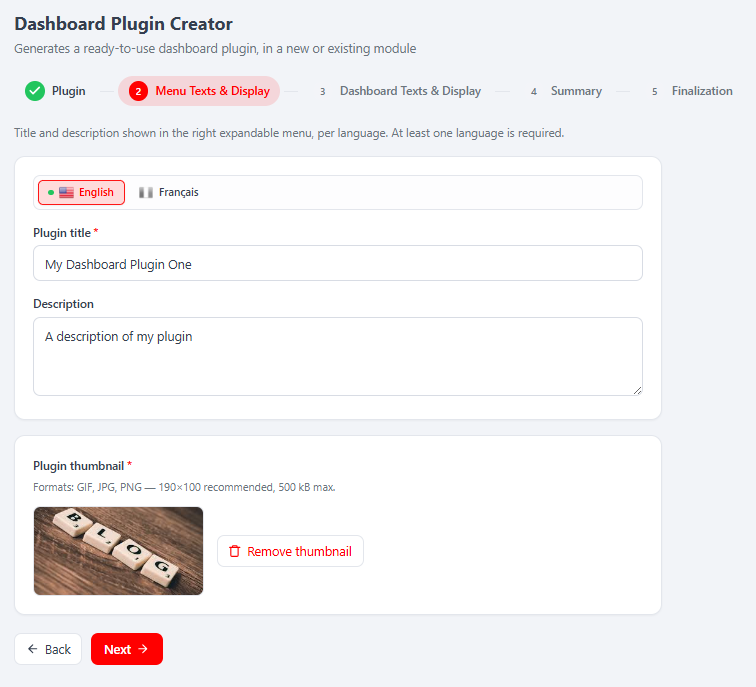
| 2 — Menu Texts & Display | Step2Menu | Per-language Plugin title + Description (language tab bar, at least one required); upload the required Plugin thumbnail (GIF/JPG/PNG, ~190×100, ≤500 kB). |
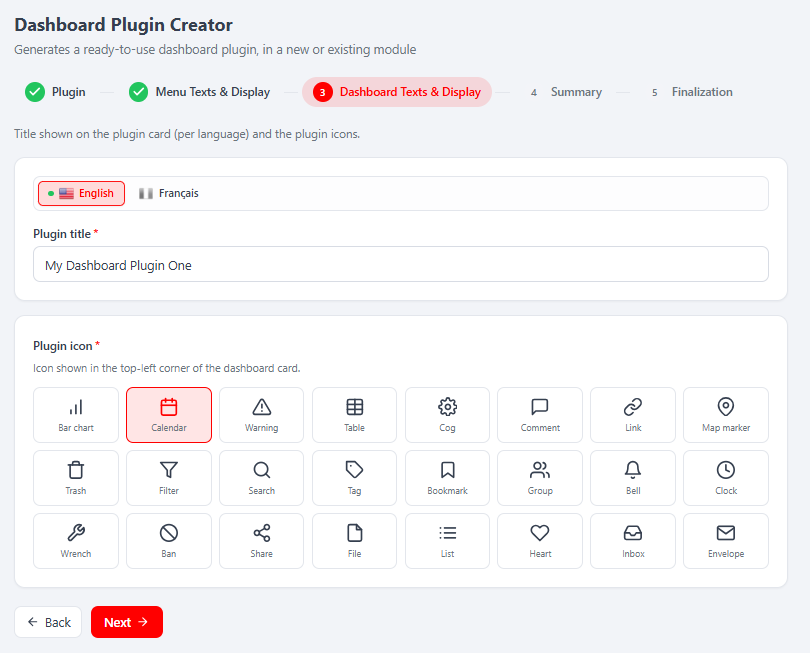
| 3 — Dashboard Texts & Display | Step3Dashboard | Per-language card title, pick the Plugin icon from a grid; multi-tab plugins pick one icon per tab. |
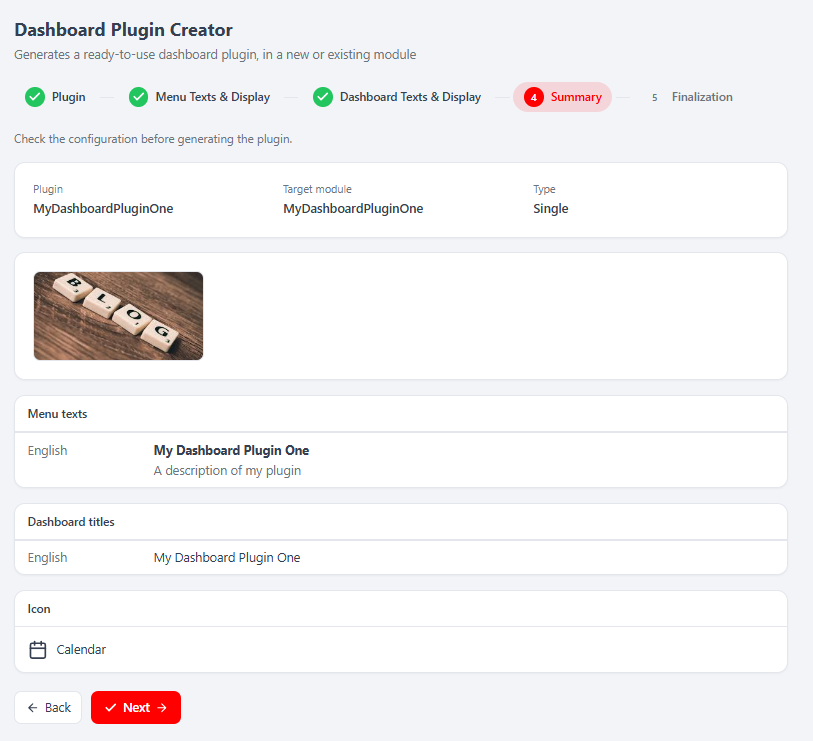
| 4 — Summary | Step4Summary | Read-only recap of steps 1→3 + target module (fetched from /dpc/summary); nothing is written. |
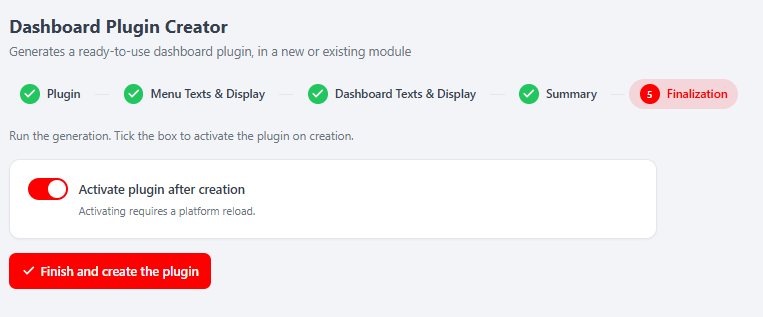
| 5 — Finalization | Step5Finalize | Activate plugin after creation toggle (on by default) + Finish and create the plugin → generation; on activation a countdown reloads the platform. |
Step 5 is the only mutating operation. Business rules (reserved PHP keyword, module already exists, plugin name/title already taken) are validated server-side against the legacy Laminas forms; the React components only render the returned per-field messages.
React API
Routes live in config/react-api.php, served by MelisReactApiDashboardPluginCreatorController. All under /melis/react-api/dpc, contract { success, data, error }. A validation failure is not an HTTP error — POST /dpc/step/:step returns { success:true, data:{ valid:false, errors:{…} } } so the UI can show per-field messages.
| Method & URL | Purpose |
|---|---|
GET /dpc/context | Preflight (FS-writable → blocking[]), step meta, languages, existing modules, icons, tab min/max, thumbnail limits |
GET /dpc/state | Current wizard state from the shared session (restores the UI) |
POST /dpc/reset | Restart: clears session draft + temporary thumbnail |
POST /dpc/step/:step (1–3) | Validate + persist a step → { valid, errors } |
POST /dpc/thumbnail | Multipart upload of the plugin thumbnail |
POST /dpc/thumbnail/remove | Remove the thumbnail |
GET /dpc/summary | Read-only recap of steps 1→3 + target module |
POST /dpc/generate | Generate the plugin → { generated, module, plugin, restartRequired, notices } |
const BASE = '/melis/react-api/dpc'

// validate + save step 1
await postJson('/step/1', {
  dpc_plugin_name: 'SalesOverview', dpc_plugin_type: 'single',
  dpc_plugin_destination: 'new_module', dpc_new_module_name: 'MyDashboards',
}) // → { valid: true, errors: {} }

// generate (step 5) — the ONLY mutating call
await postJson('/generate', { dpc_activate_plugin: true })
// → { generated:true, module:'MyDashboards', plugin:'SalesOverview', restartRequired:true }
The controller does not reimplement the tool's logic: validation rebuilds the legacy Laminas forms from config/app.tools.php (getFormMergedAndOrdered), and state is written into the same session container as the legacy tool (dashboardplugincreator), which the service reads in its constructor.
Capabilities
Declared in config/react.capabilities.php under the rights-bearing node melisdashboardplugincreator_tool. Semantics are default-allow (an undeclared cap is permitted, so legacy roles keep working). Flattened capability strings:
| Tab | Actions | Guards |
|---|---|---|
wizard | edit | Configure/save steps 1→3 (without wizard.edit the whole wizard is read-only) |
thumbnail | create, delete | Upload / remove the thumbnail (step 2) |
summary | list | Read the summary (step 4) |
finalization | create | Generate the plugin (step 5) — the sensitive capability |
Each controller action is guarded twice — access first (denyUnlessAccess), then the relevant capability (denyUnlessCan('finalization.create')). Hiding controls in React is UX only; the server refuses regardless.
Key services
Registered in config/module.config.php and aliased:
| Service alias | Role |
|---|---|
MelisDashboardPluginCreatorService | Generates the dashboard plugin from the data saved in the wizard session. |
MelisDashboardPluginCreatorService extends MelisCore\Service\MelisGeneralService. Notable methods:
generateDashboardPlugin()— the entry point: reads the session steps, resolves the target module/plugin name, then runsperformGeneration(), rolling back on failure (rollbackPluginGeneration()). Firesmelisdashboard_plugin_creator_service_generate_dashboard_plugin_start/endevents.- Internal generation steps:
generateDashboardPluginConfig()(writesconfig/dashboard-plugins/<Plugin>Plugin.config.php),generateDashboardPluginController(),generateDashboardPluginView()(single- or multi-tab template),generateDashboardPluginAssets()(CSS/JS + copies the thumbnail),setTranslations()(per-language menu/title keys),updateModuleConfig()(injectstemplate_map+controller_plugins) andupdateModuleFile()(adds the configincludetoModule.php). - Helpers:
getModuleExistingPlugins()/getExistingTranslatedPluginTitle()(duplicate-name checks),getTempThumbnail(),generateFile(),generateModuleNameCase(),removeDir().
When the destination is a new module, generation delegates module creation to melis-tool-creator (MelisToolCreatorService::createTool() with a blank tool), then activates it (ModulesService::activateModule()) and invalidates the module-paths and dashboard-menu caches. Activation requires a platform reload.
Front office
This module has no front-office templating plugins or view helpers — it is a back-office-only tool. (The widgets it generates, however, are back-office dashboard plugins.)
Database tables
MelisDashboardPluginCreator defines no tables of its own — no install SQL or dbdeploy delta ships with it. All state is held in the wizard session; output is written directly to the target module's files.
Example
Trigger generation from the data already stored in the wizard session (this is what step 5 / POST /dpc/generate does under the hood):
/** @var \MelisDashboardPluginCreator\Service\MelisDashboardPluginCreatorService $dpc */
$dpc = $serviceManager->get('MelisDashboardPluginCreatorService');

$success = $dpc->generateDashboardPlugin(); // true on success, false (and rolled back) on failure
The generated widget follows the template in template/DashboardPluginController.php — a class extending MelisCoreDashboardTemplatingPlugin with an action that returns a ViewModel:
class MyModuleMyWidgetPlugin extends MelisCoreDashboardTemplatingPlugin
{
    public function __construct()
    {
        $this->pluginModule = 'mymodule';
        parent::__construct();
    }

    public function myWidget()
    {
        $view = new ViewModel();
        $view->setTemplate('my-module/dashboard-plugins/my-widget');
        return $view;
    }
}
Key files
| Concern | Path |
|---|---|
| Module manifest | vendor/melisplatform/melis-dashboard-plugin-creator/composer.json |
| Routes / service / controller / form | vendor/melisplatform/melis-dashboard-plugin-creator/config/module.config.php |
| React API routes | vendor/melisplatform/melis-dashboard-plugin-creator/config/react-api.php |
| React capabilities | vendor/melisplatform/melis-dashboard-plugin-creator/config/react.capabilities.php |
| Wizard steps, forms, icons, thumbnail config | vendor/melisplatform/melis-dashboard-plugin-creator/config/app.tools.php |
| Generation service | vendor/melisplatform/melis-dashboard-plugin-creator/src/Service/MelisDashboardPluginCreatorService.php |
| React API controller | vendor/melisplatform/melis-dashboard-plugin-creator/src/Controller/MelisReactApiDashboardPluginCreatorController.php |
| Legacy wizard controller (Old view) | vendor/melisplatform/melis-dashboard-plugin-creator/src/Controller/DashboardPluginCreatorController.php |
| React brick source | vendor/melisplatform/melis-dashboard-plugin-creator/ui-react/src/ |
| Built brick + manifest | vendor/melisplatform/melis-dashboard-plugin-creator/public/ui-react/ |
| Generated-plugin templates | vendor/melisplatform/melis-dashboard-plugin-creator/template/ |
Related
This is the dashboard counterpart of melis-templating-plugin-creator (front-office templating plugins). To understand the artefacts it generates, read Plugins.