

MelisAI
React back-office for the MelisAI suite — connect providers, design agents, deploy instances, watch usage, inspect MCP servers, and chat from anywhere. Package
melisplatform/melis-ai.
Purpose
MelisAI is the back-office management layer of the MelisAI suite. It does not run AI models itself — that is the role of melis-ai-engine and its provider modules. It provides the UI and services to wire up the whole AI system: connect a provider (Platform AI), build behaviours (AI Agents with scenarios and tool allow-lists), deploy them as named Instances, monitor Usage, debug with a raw-payload chat (Chat Dev Tool), and inspect connected MCP servers.
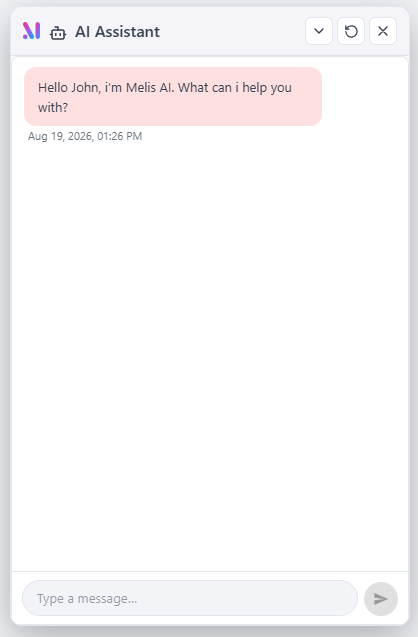
In the React back-office (/melis-react) MelisAI ships a single multi-brick bundle exposing three native-React menu tools — Admin, AI Agents, MCP Inspector — each with a New / Old toggle to its legacy tool in an iframe, plus a global AI Assistant overlay (a floating chat button on every screen, no menu entry). AI logic stays server-side in melis-ai-engine.
Enable it
Add to config/melis.module.load.php (provider modules must be listed before MelisAI):
return [
    'MelisAIEngine',
    'MelisAIEngineClaude',   // Anthropic provider
    'MelisAIEngineGemini',   // Google provider
    'MelisAI',
];
MelisAI requires melisplatform/melis-ai-engine, which owns all melis_ai_* database tables and the agent/scenario runtime. Provider modules (melis-ai-engine-claude, melis-ai-engine-gemini, -ollama, -oci) implement the provider contract and must be installed for their respective companies.
The four core nouns
| Noun | Table | Key column | Description |
|---|---|---|---|
| model | melis_ai_models (mam_*) | mam_generative_model | A provider model row: company (Anthropic / Google), model string, API-key link, default flag, file-upload settings. |
| agent | melis_ai_agents (maa_*) | maa_agent_tools (JSON allow-list) | A behaviour: name, agent code, optional model override, ordered scenario steps, allow-list of tools. |
| instance | melis_ai_instances (mai_*) | mai_instance_id | A named deployment of an agent. The mai_instance_id string is the stable key every UI references (e.g. mainchatassistantgeneral, aitoolcreator). |
| tool | melis_ai_tools (mat_*) | — | A callable function the model may invoke. Either MCP (external MCP server, mcp: true) or Local (built-in PHP). |
One-sentence mental model: an instance points at an agent, an agent points at a model, a model names a company — that picks the provider; a chat on the instance runs the agent's scenario, calling the agent's allowed tools.
Where it lives in the React back-office
MelisAI ships one brick bundle (public/ui-react/brick.js) whose manifest declares a bricks: [...] array — four registrations self-registering in brick.tsx:
| Brick id | Route | melisKey | Kind |
|---|---|---|---|
ai-admin | /melis-ai/admin | melisadmin_tool | native React tab shell (Usage / Platform AI / Instances / MCP Server / Chat dev tool) |
ai-agents | /melis-ai/ai-agents | melisagent_tool | native React list + editor (sub-tabs) |
mcp-inspector | /melis-ai/mcp-inspector | melis_mcp_inspector_tool | native React (single function) |
ai-assistant | (none) | — | Overlay — the global floating chat FAB, no route, no menu entry |
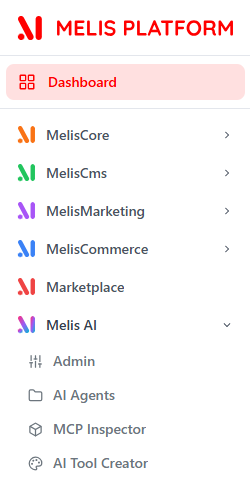
The three routed tools appear in the left menu under Melis AI (alongside AI Tool Creator, contributed by the separate melis-ai-tool-creator module). The assistant is rendered once at the shell root so the floating chat survives navigation. All appear only when MelisAI is active (brick discovery via GET /melis/react-api/react-modules). Every menu tool carries a New / Old toggle: New = the React UI, Old = the classic tool in an iframe.
Admin — configure the AI
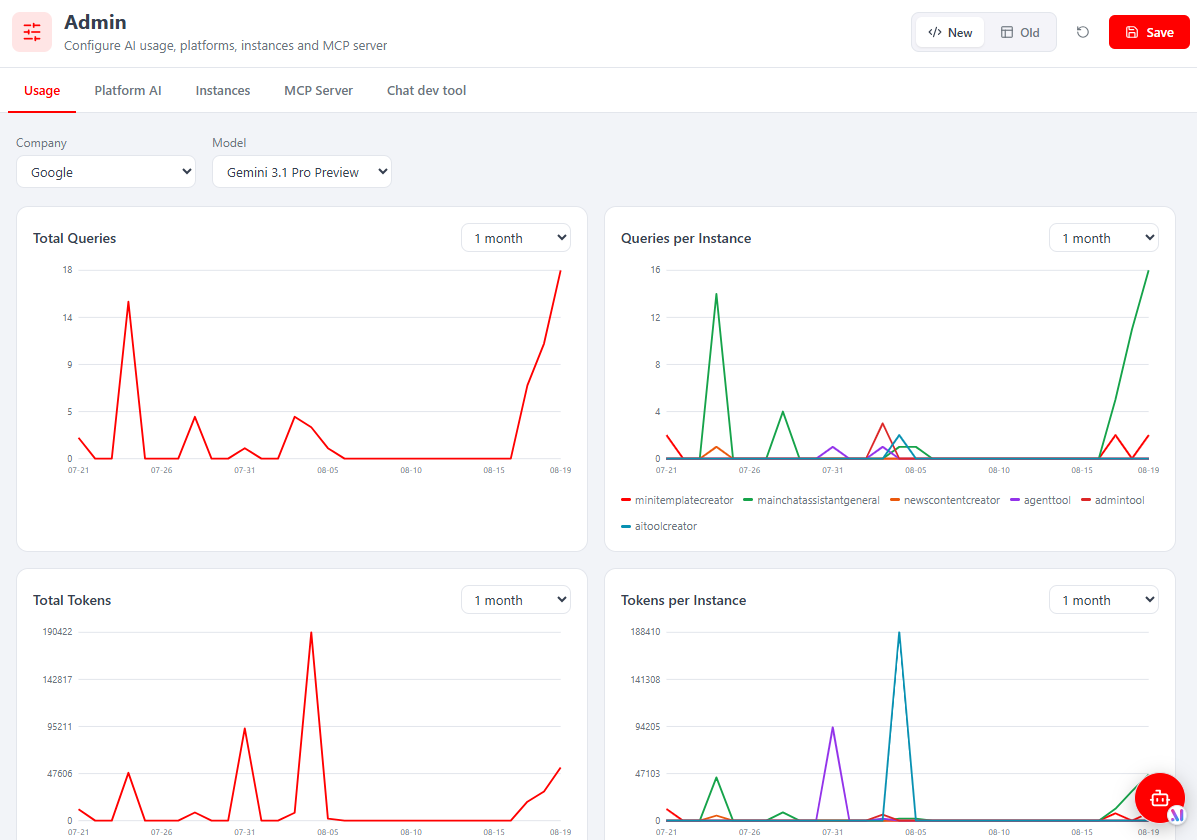
Route /melis-ai/admin. A native React tab shell — Usage · Platform AI · Instances · MCP Server · Chat dev tool — with a single Save (saves the active tab) and a whole-tool New/Old toggle.
- Usage — filter by Company/Model over a range; four charts: Total Queries, Queries per Instance, Total Tokens, Tokens per Instance (per-instance series are your deployed instances). Backed by
melis_ai_daily_usage.
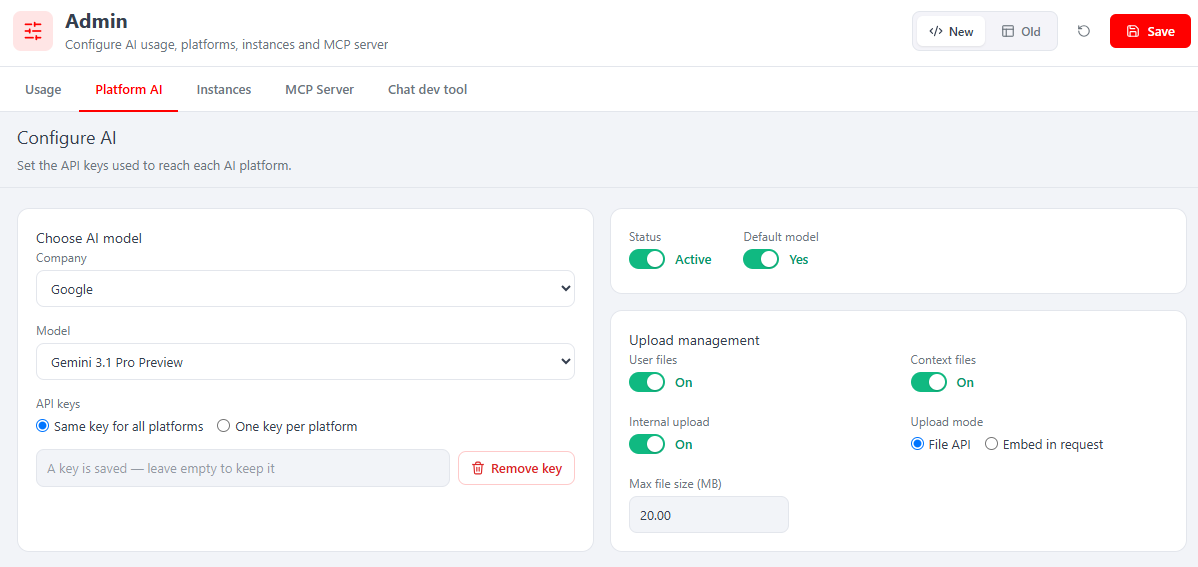
- Platform AI — switch the AI on: pick Company + Model, choose Same key for all platforms or One key per platform, paste the key(s), set Status: Active + Default model: Yes. Plus Upload management — user/context file toggles and Upload mode: File API vs Embed in request (the
mam_file_upload_modeproviders read; Gemini defaults to File API, Claude to embed) and max file size.
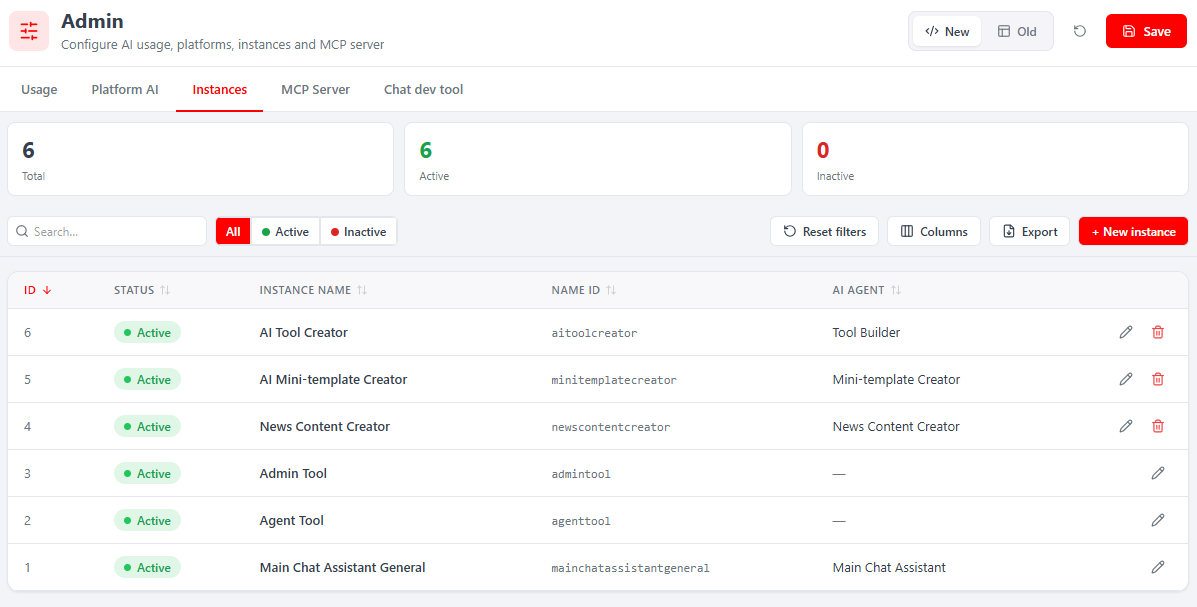
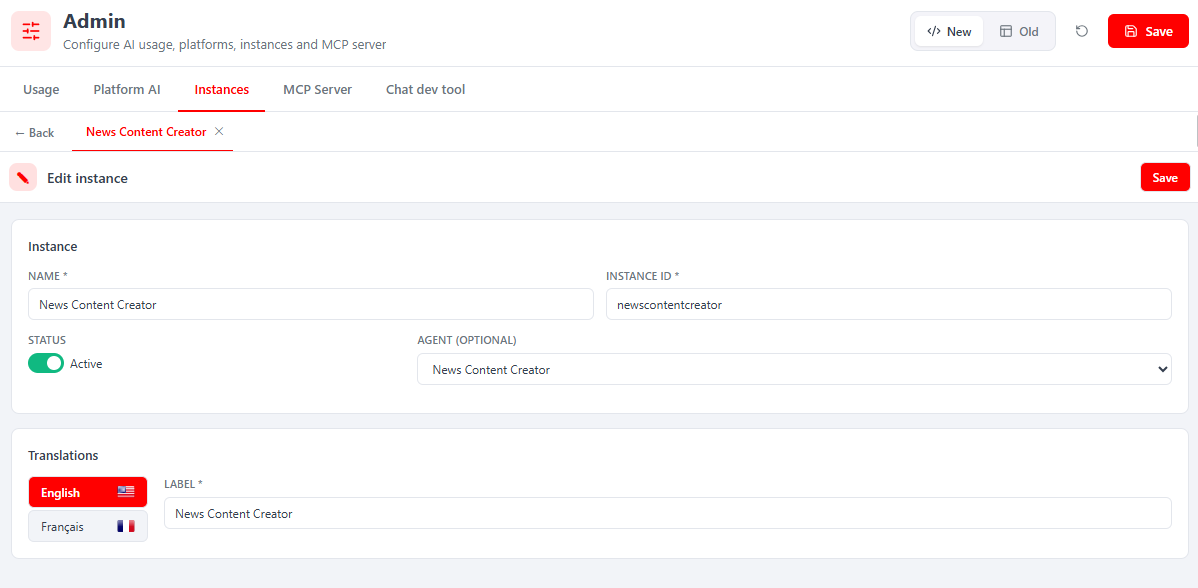
- Instances — KPI cards (Total / Active / Inactive), search, filters and + New instance. Six ship out of the box: three system instances (edit-only, no delete:
admintool,agenttool,mainchatassistantgeneral) and three app instances (deletable:aitoolcreator,minitemplatecreator,newscontentcreator). Editing opens a sub-tab form: Name, Instance ID (themai_instance_id), Status, Agent (optional) and a per-language Label.
- MCP Server — two sub-tabs: MCP Exposition (tick which MCP functions the MCP server exposes to clients) and a DB / sensitive tables tab; each has its own Save.
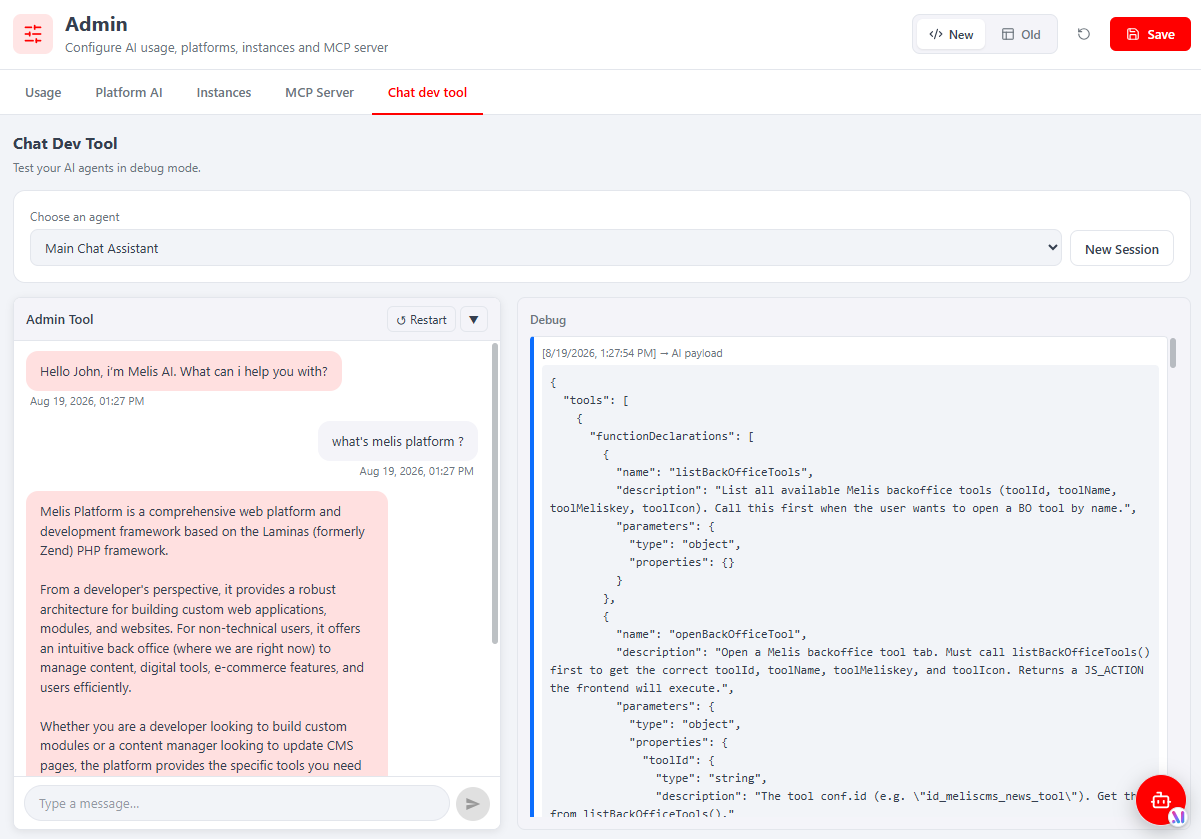
- Chat Dev Tool — a debugging chat: pick an agent, chat, and read the exact raw AI PAYLOAD (
tools/functionDeclarations, context) and AI RESPONSE JSON side by side.
AI Agents — design the behaviour
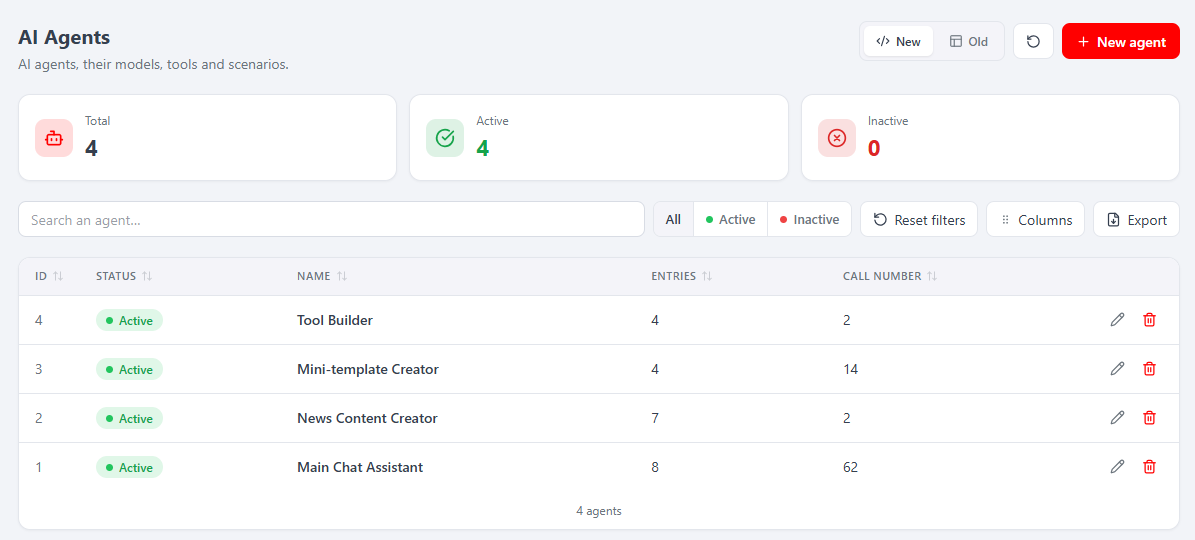
Route /melis-ai/ai-agents. The list shows ID / Status / Name / Entries / Call number (Entries = scenario steps, Call number = lifetime AI calls) with KPI cards, search, filters and Export. Opening an agent adds a sub-tab with a five-tab editor and a single Save.
| Tab | Purpose |
|---|---|
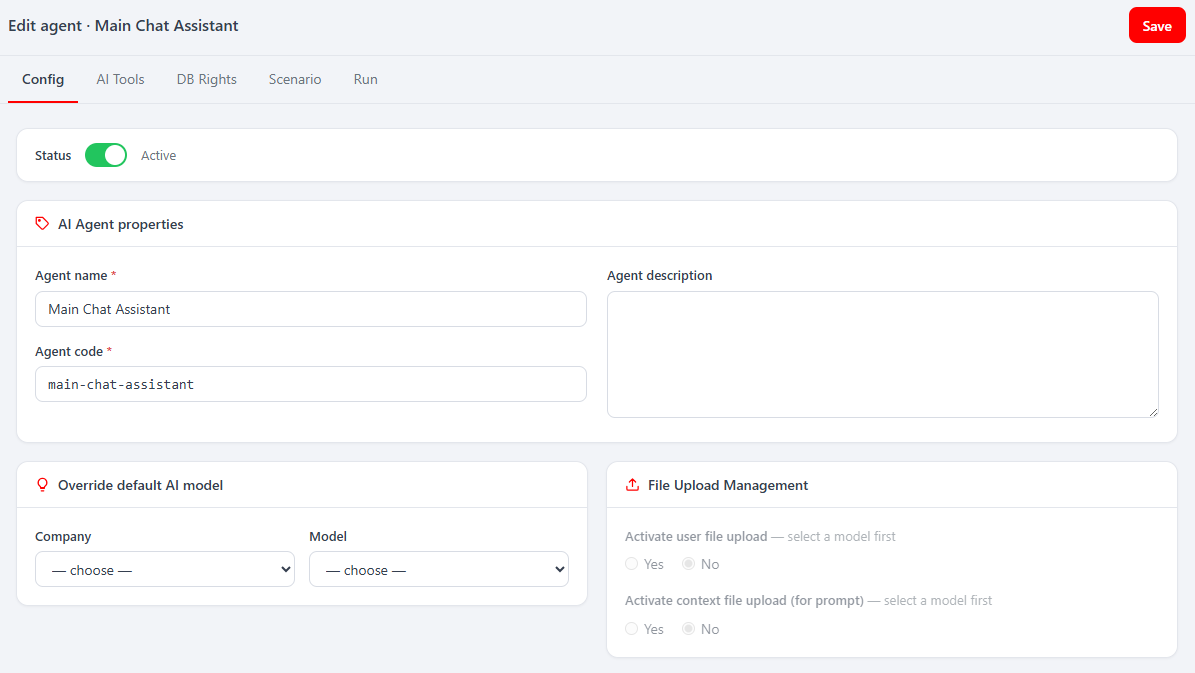
| Config | Agent name, agent code (stable slug), description, Override default AI model (Company + Model), file-upload toggles, Active switch. |
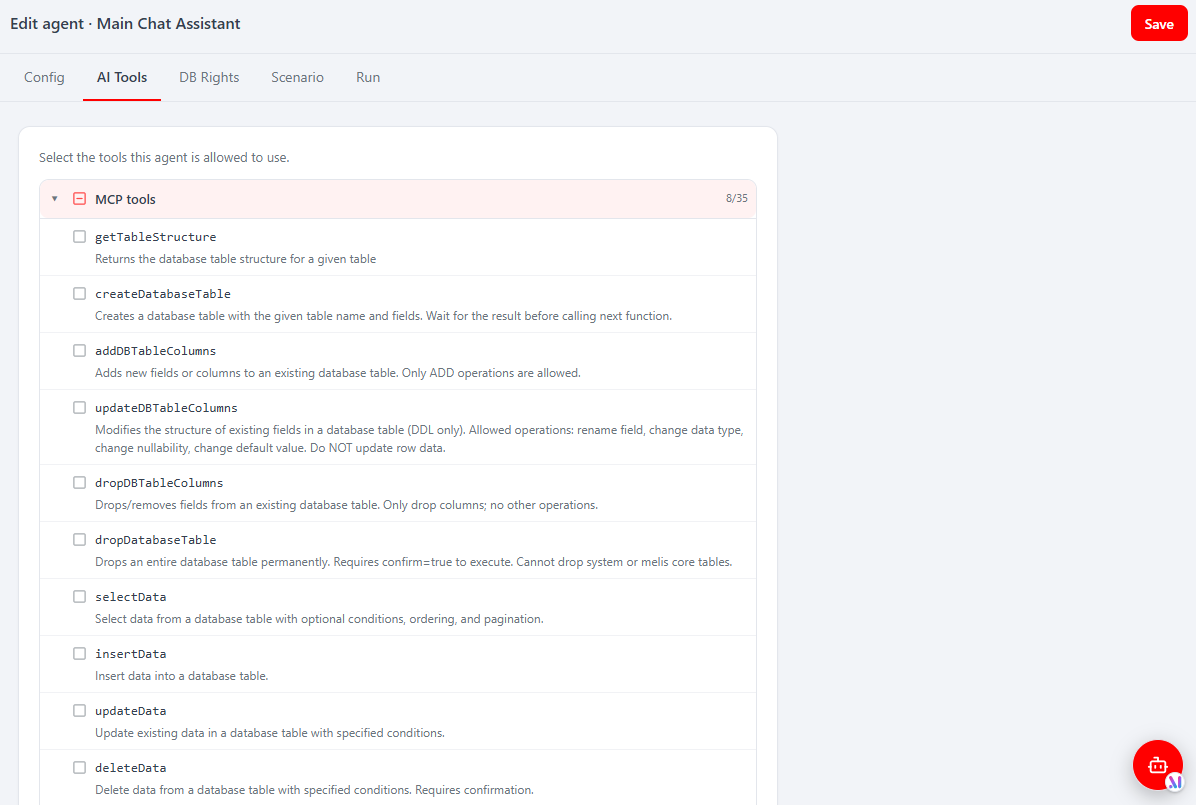
| AI Tools | The capability allow-list — tick the tools this agent may call, grouped MCP tools (served by MCP servers) and Local tools (built-in PHP). The engine offers exactly the ticked tools to the model. |
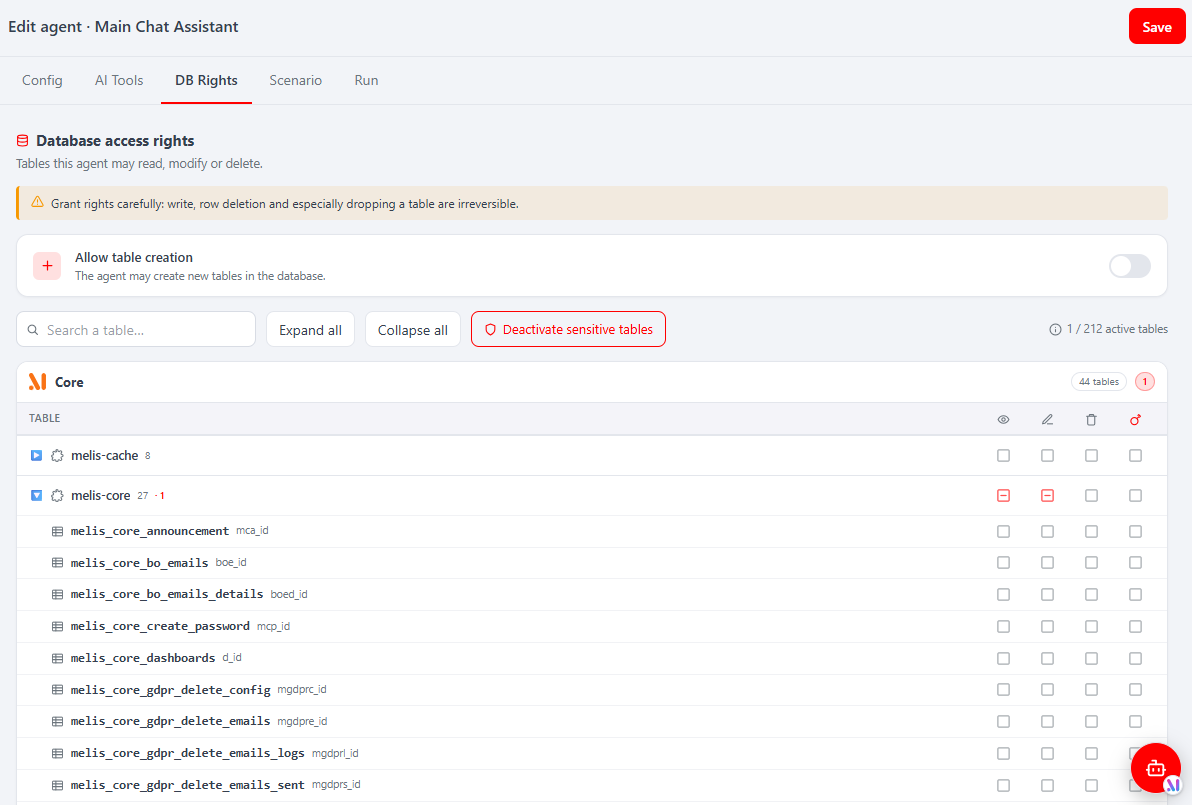
| DB Rights | Per-table read / write / delete row / drop checkboxes grouped by module, a global Allow table creation switch, sensitive-table handling, search and Expand/Collapse all. |
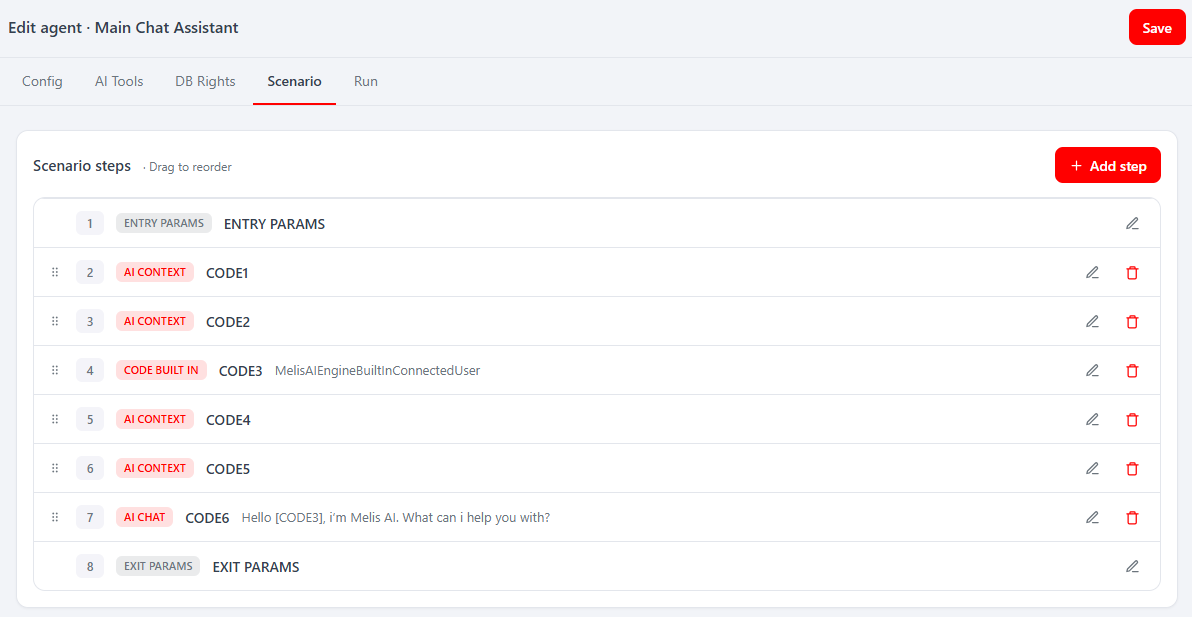
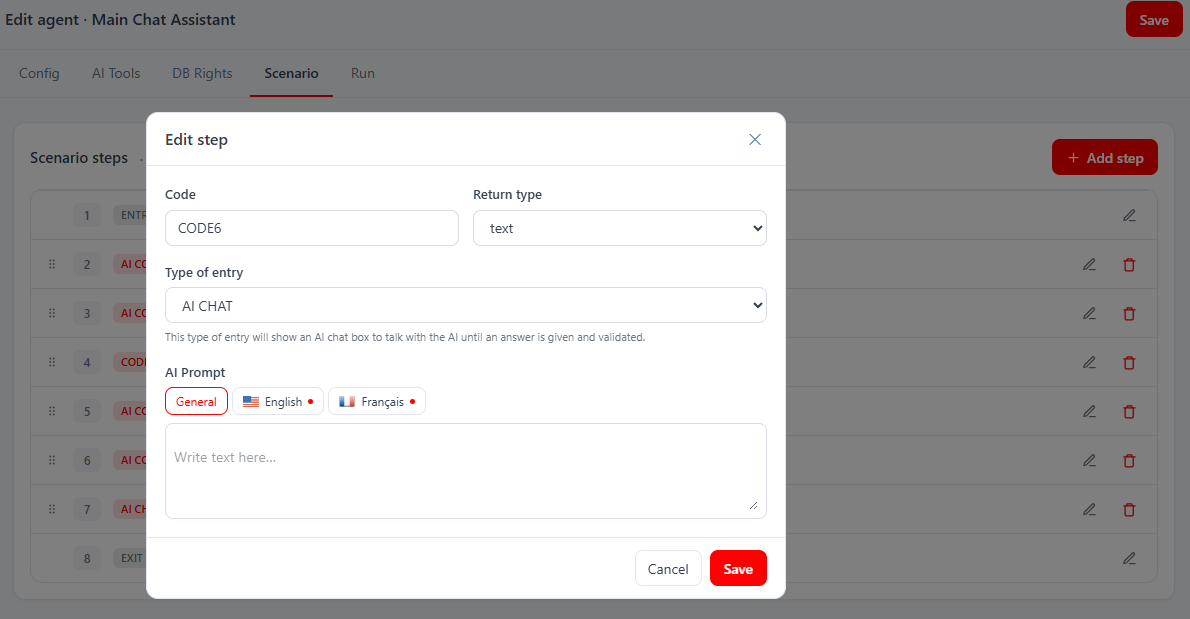
| Scenario | Ordered typed steps with drag-to-reorder and per-row edit/delete: ENTRY PARAMS → AI CONTEXT (silent) → AI CHAT (visible) → EXIT PARAMS, plus optional CODE steps. Each step has a Code you reference with [CODE] to pull a prior step's answer. Editing a step opens a modal (Code, Return type, Type of entry, AI Prompt with a General editor + per-language overrides). |
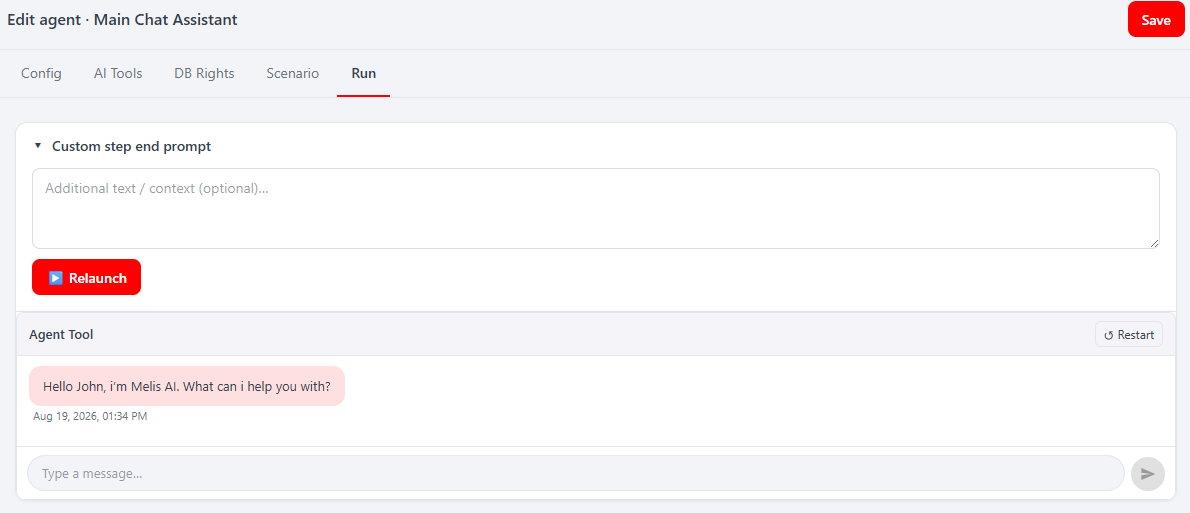
| Run | An in-place test chat against the agent (with an optional Custom step end prompt), running the same native chat as the assistant. |
Shipped tool catalogue
| Group | Tools |
|---|---|
| MCP — DB schema/data | getTableStructure, createDatabaseTable, addDBTableColumns, updateDBTableColumns, dropDBTableColumns, selectData, insertData, updateData, deleteData, bulkInsertData |
| MCP — filesystem | createFile, createDirectory, pathExists, readFile, updateFiles, deleteFile, deleteDirectory |
| MCP — site/mini-template (CommunityExtensions) | readSiteAssets, getSitePublicUrl, uploadMinitemplateImages, renderMinitemplatePreview |
| MCP — module builder (ToolCreator) | createModule, activateModule, deactivateModule, generateBundle |
| Local | activate_module |
MCP Inspector
Route /melis-ai/mcp-inspector. A native React page (with New/Old toggle) that lists the connected MCP servers and lets you launch / check status / read logs — to confirm a server is up and its tools are discoverable before allowing them on an agent. Backed by the engine's MelisAIEngineMcpService.
AI Assistant — chat from anywhere
The floating AI Assistant button (bottom-right, on every screen) opens a chat panel running the general Main Chat Assistant (agent id 1, instance mainchatassistantgeneral). It can drive the back-office (open a tool, open a page) from the conversation, dispatched host-side via window.melisReactActionMap. Minimise keeps the session, New session starts fresh, Close ends it.

React API — endpoints
There is no config/react-api.php: the react-api routes are declared inline in config/module.config.php, grafted onto the melis-react-api parent route (prefix /melis/react-api). Controllers live in src/Controller/React/MelisReactApiAi*Controller.php. Contract everywhere: { success, data } on OK, { success:false, error } on failure; every fetch sends X-Requested-With: XMLHttpRequest + credentials.
Each controller rolls its own access guard (not the generic trait):
private const MELIS_KEY = 'melisadmin_tool'; // or melisagent_tool / melis_mcp_inspector_tool
if ($deny = $this->denyUnlessAccess()) { return $deny; }
// → 401 if !isAuthenticated() ; else 403 unless MelisCoreRights::canAccess(self::MELIS_KEY)| Surface (guard) | Representative endpoints (/melis/react-api/…) |
|---|---|
Admin (melisadmin_tool) | ai-usage/bootstrap · ai-usage/charts · ai-platform/data · ai-instances/{bootstrap,stats,list,save,:id,delete/:id} · ai-mcp-server/{data,save-tools,save-sensitive} · ai-chat-dev/{agents,run,continue} |
AI Agents (melisagent_tool) | agents (list) · agents/{stats,options,:id,save,delete/:id,db-rights/:id} · agents/scenario/{list,options,step/:id,…} |
MCP Inspector (melis_mcp_inspector_tool) | mcp-inspector/{servers,launch,status,log} |
Scenario writes reuse the legacy /melis/MelisAI/AgentProperties/* endpoints (delete / reorder / save) so all validation, file-handling and code-uniqueness stays server-side. Example (from agent-api.ts):
const BASE = '/melis/react-api/agents'
await apiFetch<{ id: number }>(`${BASE}/save`, {
  method: 'POST',
  headers: { 'X-Requested-With': 'XMLHttpRequest', 'Content-Type': 'application/json' },
  credentials: 'same-origin',
  body: JSON.stringify({
    id: 4, name: 'Tool Builder', code: 'aitoolcreator', modelId: null, status: 1,
    dbCanCreateTable: 1, tools: ['createModule', 'activateModule'],
    dbRights: { melis_cms_page: { read: true, write: false, delete_row: false, drop: false } },
  }),
})
Capabilities (advanced rights)
Declared in config/react.capabilities.php under melisReactToolCapabilities, keyed by each tool's rights-bearing melisKey. Default-allow, declarative only: they drive the checkboxes in Users → Rights and gate which React tabs/actions show (useCaps(melisKey).can(cap)); they are not enforced server-side (controllers gate only on tool access via canAccess).
melisadmin_tool— granularity per tab (usage,platform_ai.edit,instances+create/edit/delete,chat_dev,mcp_serverwith nestedtools.edit/db.edit).melisagent_tool— tool-level CRUD (list/create/edit/delete) plus editor tabs (general,tools,dbrights,scenario+ CRUD,run).melis_mcp_inspector_tool— declares nothing; access is the single menu tool-access checkbox.
The chat UI dependency
Every chat surface (the assistant overlay, the Agent Run tab, the Admin Chat Dev Tool) renders <AiChatContainer> imported from @melis-ai-engine — a Vite alias to ../../melis-ai-engine/ui-react/src, so the chat component is bundled from melis-ai-engine sources into this brick (not externalised). Key props: maiInstanceId, agentId, autoRun, showHeader, clearSession, extraEntryParams.
For developers embedding a chatbox in a legacy / server-rendered view, melis-ai-engine still provides the AIChatViewHelper($maiInstanceId, …) view helper — see the legacy MelisAI page and melis-ai-engine.
Chat flow (what happens on send)
- A chat surface posts user turns to the engine for the given
mai_instance_id. MelisAIEngineAgentService::runAgent()resolves instance → agent → model, then picks the provider viagetActiveModelClass($company, $modelId, $agentId)(companyGoogle→ Gemini,Anthropic→ Claude).- The engine walks the agent's scenario steps in order;
MelisAIEngineModelService::send()calls the AI API; tool calls route viaMelisAIEngineMcpService(JSON-RPC for MCP tools, direct PHP call for Local tools). - State persists to
melis_ai_conversation_state; token/call counts tomelis_ai_daily_usage.
MelisAI never calls the AI APIs itself — the engine and provider modules do.
Extension pattern (how app modules plug in)
- dbdeploy inserts an agent (with scenario + tool allow-list) and an instance with a fixed
mai_instance_id. - Register an MCP server under
config['mcp']['servers']and declare its tools infunction_declarationswithmcp: true. - Add a UI entry that opens a chat on
<mai_instance_id>with the right entry/exit params.
Database tables
MelisAI owns no schema of its own — all tables are installed by melis-ai-engine. Prefix is melis_ai_*.
| Table | Holds |
|---|---|
melis_ai_models (mam_*) | Provider model rows (company, model string, API-key link, file-upload settings). |
melis_ai_companies (macp_*) | Company definitions (Google, Anthropic, …). |
melis_ai_platform_keys (mapk_*) | Provider API keys. |
melis_ai_agents (maa_*) | Agent definitions (code, model override, maa_agent_tools JSON allow-list). |
melis_ai_agents_tools (maat_*) | Agent-to-tool join. |
melis_ai_tools (mat_*) | Tool catalogue (MCP / Local). |
melis_ai_instances (mai_*) | Named deployments (stable mai_instance_id). |
melis_ai_instance_trans (mait_*) | Per-language instance labels. |
melis_ai_scenario_steps (mas_*) | Ordered scenario steps per agent. |
melis_ai_scenario_steps_datas (massd_*) | Step data (context text, form path, …). |
melis_ai_scenario_steps_datas_entryexit (masse_*) | Entry/exit param definitions per step. |
melis_ai_return_types (mart_*) | Exit return type definitions. |
melis_ai_files (maf_*) | Files attached to scenario steps. |
melis_ai_daily_usage (mau_*) | Token and query usage counters. |
melis_ai_conversation_state (macs_*) | Per-user conversation state. |
See also: melis-ai-engine · melis-ai-engine-claude · melis-ai-engine-gemini · melis-ai-tool-creator · melis-ai-community-extensions