

MelisCmsCategory2
Multi-site, multilingual content categories for the CMS, with a native React back-office — package
melisplatform/melis-cms-category2.
Purpose
MelisCmsCategory2 provides a hierarchical category system in the Melis backoffice. Categories form a tree (each node points to a parent), carry per-language translations (name and description), can be scoped to one or more sites, have a validity window and a status, and can hold media files. The module ships a front-office templating plugin to render a category tree on a page and a reusable category picker embedded by other modules (e.g. News, Commerce) to classify their records.
In the v6 React back-office (/melis-react) the tool ships as a native full-React brick: a real master-detail UI — category tree on the left, tabbed editor on the right — reading and writing through its own react-api JSON layer. A New / Old toggle can fall back to the legacy tool in an iframe. The underlying data model, services and front plugin are unchanged from v5.
Enable it
Add to config/melis.module.load.php:
return [
    'MelisCmsCategory2',
];
Requires melis-core and melis-cms. The module is dbdeploy-enabled so its tables are created on deploy. melis-engine is needed for front rendering. The React brick appears in the sidebar only while the module is listed here (modular brick discovery).
Back-office (React)
Where: left sidebar → MelisCms group → Categories (Catégories). It opens as a single master-detail page — not the multi-tab slider — at route /melis-cms/category-v2. The New / Old toggle top-right switches between the React UI (default) and the classic tool in an iframe.
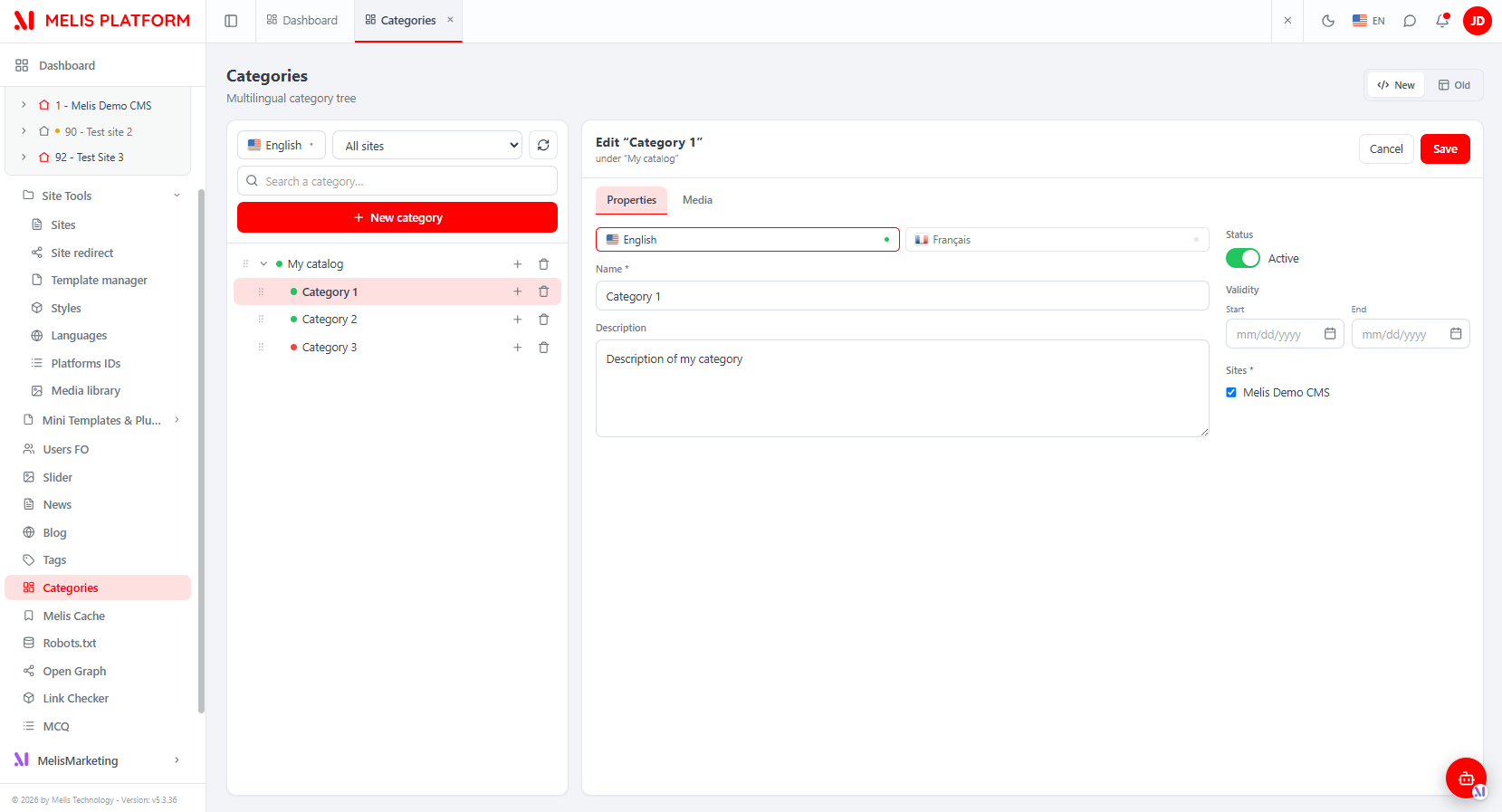
Category tree (left pane)
The left column shows the whole tree. Its toolbar has a language dropdown (flags — picks which language node names are shown in), a site filter, a refresh button, a search box (prunes but keeps ancestors), and + New category (creates a root/catalog). Each row shows a status dot (green = active, red = inactive), the node name, and — on hover — a + (add a sub-category) and a trash (delete). Drag a node's grip to reorder or re-parent it: near the top edge = drop before, bottom edge = drop after (sibling), middle = drop inside (last child). Drag is offered only in the full unfiltered view. A node with sub-categories cannot be deleted.
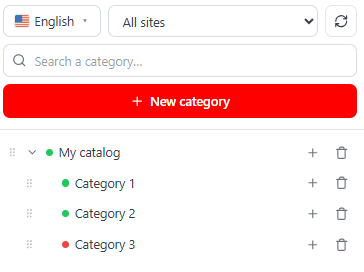
Editor (right pane)
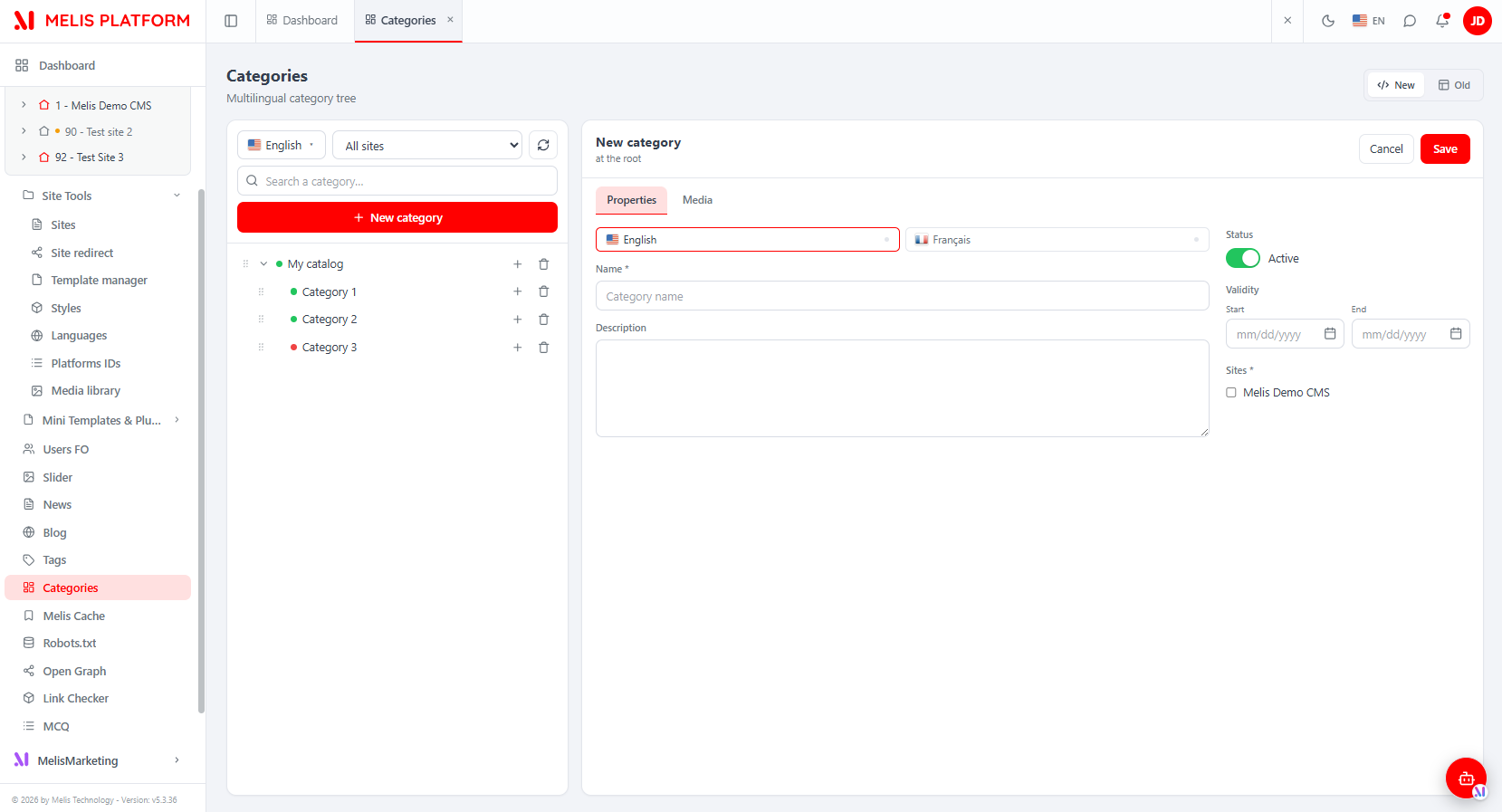
Selecting a node — or clicking + New category / a row's + — loads the editor. The header shows the title, its context ("at the root" or "under «parent»"), and Cancel / Save.
- Properties tab — per-language Name and Description (language tabs with a filled/empty dot per language), a Status toggle, Validity dates (Start / End), and the Sites the category belongs to. Name (in at least one language) and at least one Site are required; if both dates are set, Start must precede End.
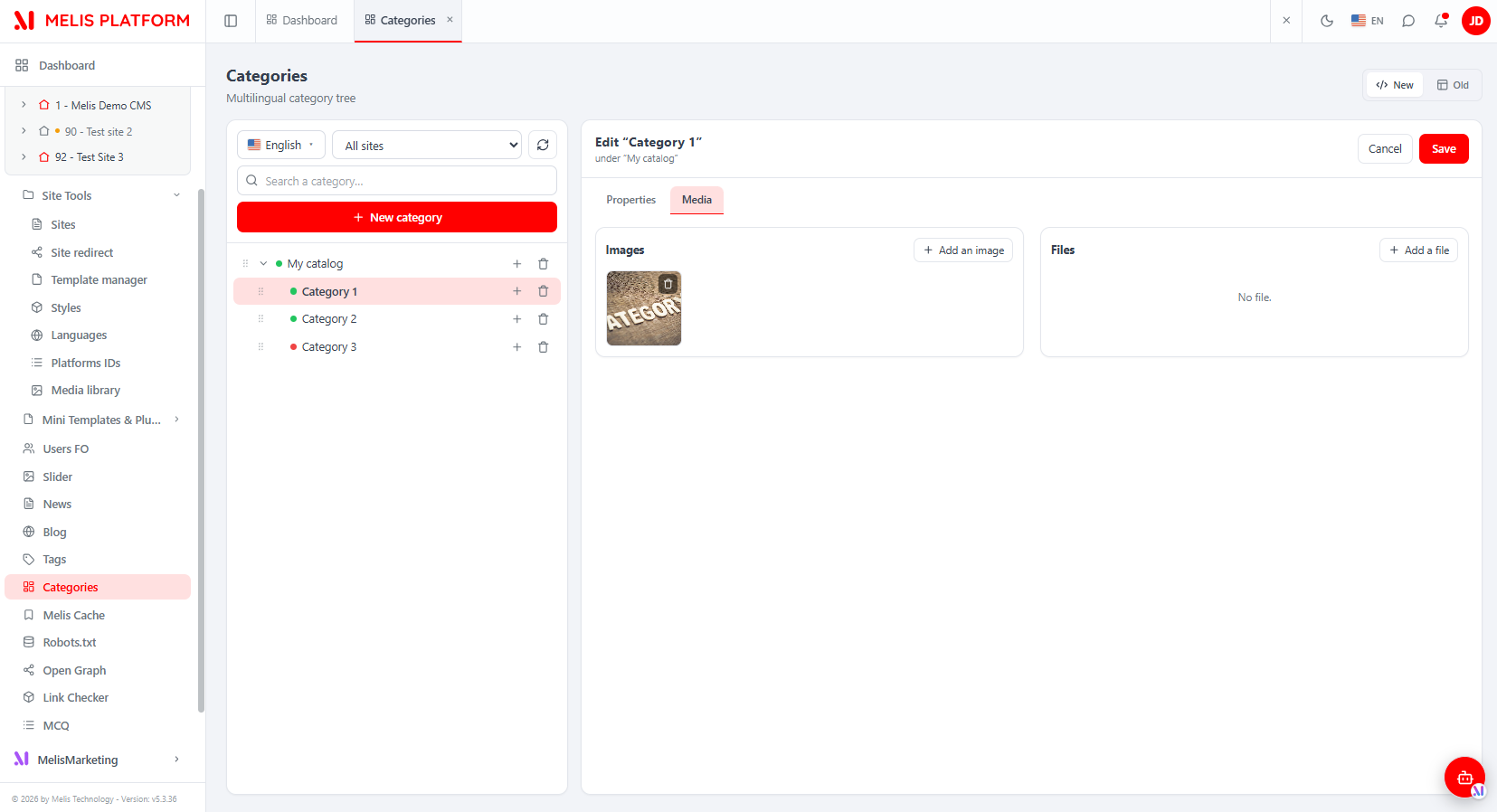
- Media tab — attach Images and Files (two columns, each with + Add and per-item delete). Save the category first before adding media.
React API
Routes live in config/react-api.php, served by MelisCmsCategory2\Controller\MelisCmsCategoryReactApiController, nested under the module's back-office base so the effective prefix is /melis/MelisCmsCategory2/react-api. Every response follows the { success, data, error } contract. The controller talks to the tables directly via parameterised SQL, reproducing the legacy business rules (name in ≥1 language, ≥1 site, start ≤ end, order auto = max+1, -1 = root father, no delete of a node with children, cascade-delete of trans/sites/media, hardened media upload).
| Method & URL (relative to base) | Purpose |
|---|---|
GET /tree?lang= | Full category tree → {langId, nodes:[TreeNode]} (name resolved to lang, fallback flagged) |
GET /langs | CMS languages → {langs:[{id,locale,name}]} |
GET /sites | Sites (filter + form) → {sites:[{id,name}]} |
GET /category/:id | One category → {id,parentId,status,dateStart,dateEnd,sites,translations} |
POST /save | Create / update a category → {id} |
DELETE /delete/:id | Delete a category (blocked if it has children) + re-sequence siblings |
POST /reorder | Resequence siblings of a parent ({parentId, orderedIds:[…]}) — also re-parents |
GET /category/:id/media | Category media → {images:[MediaItem], files:[MediaItem]} |
POST /media/upload | Multipart upload (catId, type image|file, file) → {id,type,path,name} |
DELETE /media/delete/:id | Delete a media row + its file on disk |
Capabilities
Declared in config/react.capabilities.php under the rights-bearing node melis_cms_category_v2_tools_section (this is also the controller's MELIS_KEY — not the manifest zone key melis_cms_categories_v2, which only targets the Old iframe). Every controller action guards access with canAccess(MELIS_KEY). Capabilities::flatten() turns the tree into dotted strings passed to makeCan(...) in React:
| Capability | Gates |
|---|---|
tree.create | "+ New category" and per-node "+" buttons |
tree.order | Drag-reorder handle (also requires the unfiltered view) |
tree.delete | Per-node trash |
edition | Loading the editor for an existing category (creation stays allowed) |
edition.properties | Properties tab |
edition.media | Media tab |
The brick
The UI is authored in ui-react/ (Vite IIFE, React / ReactRouter externalised to host globals, output to public/ui-react/brick.js beside brick.manifest.json). brick.tsx registers one routed component under brick id category2.
{
  "id": "category2",
  "route": "/melis-cms/category-v2",
  "label": "Catégories",
  "forwardKey": "MelisCmsCategory2/MelisCmsCategoryList",
  "melisKey": "melis_cms_categories_v2",
  "entry": "brick.js",
  "persistent": true
}| Component | Role |
|---|---|
CategoryPage.tsx | Container: loads langs + sites, (re)loads the tree per language, owns the selected node and the New/Old mode, renders the master-detail layout + the Old iframe |
CategoryTree.tsx | Left pane — tree, language dropdown, site filter, search, per-node add/delete, drag-reorder / re-parent |
CategoryEditor.tsx | Right pane — Properties + Media tabs, client validation, inline/banner errors |
ViewToggle.tsx | New (React) / Old (iframe) toggle |
category-api.ts | Typed API client for the endpoints above |
The host discovers the brick via GET /melis/react-api/react-modules and mounts it; useNavMenu maps the forwardKey to the tree route. The brick reads the active language from document.documentElement.lang and ships an in-file {fr,en} dictionary. Business logic stays server-side (parity with the legacy tool); React is presentation + API calls.
Key services
| Service alias | Role |
|---|---|
MelisCmsCategory2Service | Main category service: create/read category nodes, tree retrieval, translations and site links. |
MelisCmsCategory2MediaService | Per-category file storage on disk and in the database. |
Notable methods on MelisCmsCategory2Service:
getCategoryTreeview($fatherId, $langId, $onlyValid, $siteId)— recursive tree.getCategoryById($categoryId, $langId, $onlyValid)— full category node.getCategoryNameById($categoryId, $langId)— name lookup.getCategoriesPerSite($siteId, $langId),getFirstLevelCategoriesPerSite($siteId, $langId).saveCategory(...),saveCategoryTexts(...),saveCategorySites(...)— persist node/translation/site.reOrderCategories($parentId, $currentOrder)— persist drag-reorder.validateDates($dateStart, $dateEnd).
MelisCmsCategory2MediaService handles the filesystem side: uploadFile, deleteFile, getMediaFilesByCategoryId, getFilesInDir, removeCategoryDir.
The React
react-apicontroller uses direct SQL rather than these services, but the front plugin and the reusable category picker still callMelisCmsCategory2Service.
Front office
- Templating plugin
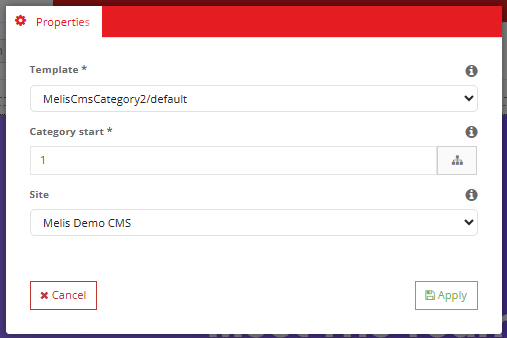
MelisCmsCategoryDisplayCategoriesPlugin— renders a category tree on a page. Its config exposes one Properties tab with three fields:template_path,site_id,category_start. Default template:MelisCmsCategory2/default. In the React page editor, drop the Display Categories block and set the template, starting category (tree picker) and site. - View helper
renderTreeRec— recursively renders a category tree array inside a view.
Hardcoded usage:
$display = $this->MelisCmsCategoryDisplayCategoriesPlugin();
echo $display->render([
    'template_path' => ['MelisCmsCategory2/default'],
    'site_id'        => 1,
    'category_start' => 1,
]);
Database tables
| Table | Holds |
|---|---|
melis_cms_category2 | Category node: cat2_id, cat2_father_cat_id, order, status, reference, validity dates, audit. |
melis_cms_category2_trans | Per-language translation: name and description, keyed by catt2_id. |
melis_cms_category2_sites | Category-to-site link, keyed by cats2_id. |
melis_cms_category2_media | Media attached to a category: catm2_type, catm2_path, catm2_cat_id. |
A seed root node (cat2_id = 1, "My catalog" / "Mon catalogue") is inserted on install.
Key files
| Concern | Path |
|---|---|
| React API routes + invokable controller | vendor/melisplatform/melis-cms-category2/config/react-api.php |
| React capabilities declaration | vendor/melisplatform/melis-cms-category2/config/react.capabilities.php |
| React API controller (10 actions, direct SQL, upload hardening) | vendor/melisplatform/melis-cms-category2/src/Controller/MelisCmsCategoryReactApiController.php |
| React brick (Vite IIFE) | vendor/melisplatform/melis-cms-category2/ui-react/ and built public/ui-react/ |
| Brick manifest | vendor/melisplatform/melis-cms-category2/public/ui-react/brick.manifest.json |
| Main service | vendor/melisplatform/melis-cms-category2/src/Service/MelisCmsCategoryService.php |
| Media service | vendor/melisplatform/melis-cms-category2/src/Service/MelisCmsCategoryMediaService.php |
| Templating plugin | vendor/melisplatform/melis-cms-category2/src/Controller/Plugin/MelisCmsCategoryDisplayCategoriesPlugin.php |
| Install SQL | vendor/melisplatform/melis-cms-category2/install/sql/ |
See also: melis-cms, melis-core, melis-cms-news