

MelisCmsSiteRobot
Per-domain
robots.txtediting and dynamic serving, with a native full-React back-office. Packagemelisplatform/melis-cms-site-robot.
Purpose
MelisCmsSiteRobot lets you manage the robots.txt of each site domain from the back-office and serves it dynamically at https://<domain>/robots.txt — straight from the database, with no static file to maintain. Changes take effect immediately after saving. The robots text is stored one row per domain in a dedicated table; there is no per-page or per-language variant.
In the v6 React back-office (/melis-react) the tool ships as a native full-React brick — a real React list + editor calling a react-api JSON layer — with a New / Old toggle that falls back to the legacy tool in an iframe. The underlying data model, engine table gateways and the dynamic /robots.txt front route are unchanged from v5.
Enable it
Add to config/melis.module.load.php:
return [
    'MelisCmsSiteRobot',
];
Dependencies: melis-core and melis-cms. The module is dbdeploy: true, so its table is created automatically, and it reuses table gateways provided by melis-engine at runtime. The React brick appears only if the module is activated — the host discovers it via brick.manifest.json (GET /melis/react-api/react-modules); removing the module from melis.module.load.php makes it disappear from the menu.
Back-office (React)
Where: left sidebar → MelisCms group → Robots.txt (tree route /melis-cms/site-robot). It opens as a top tab named Robots.txt, with two levels surfaced as native host sub-tabs: list of site domains → the robots.txt editor of one domain.
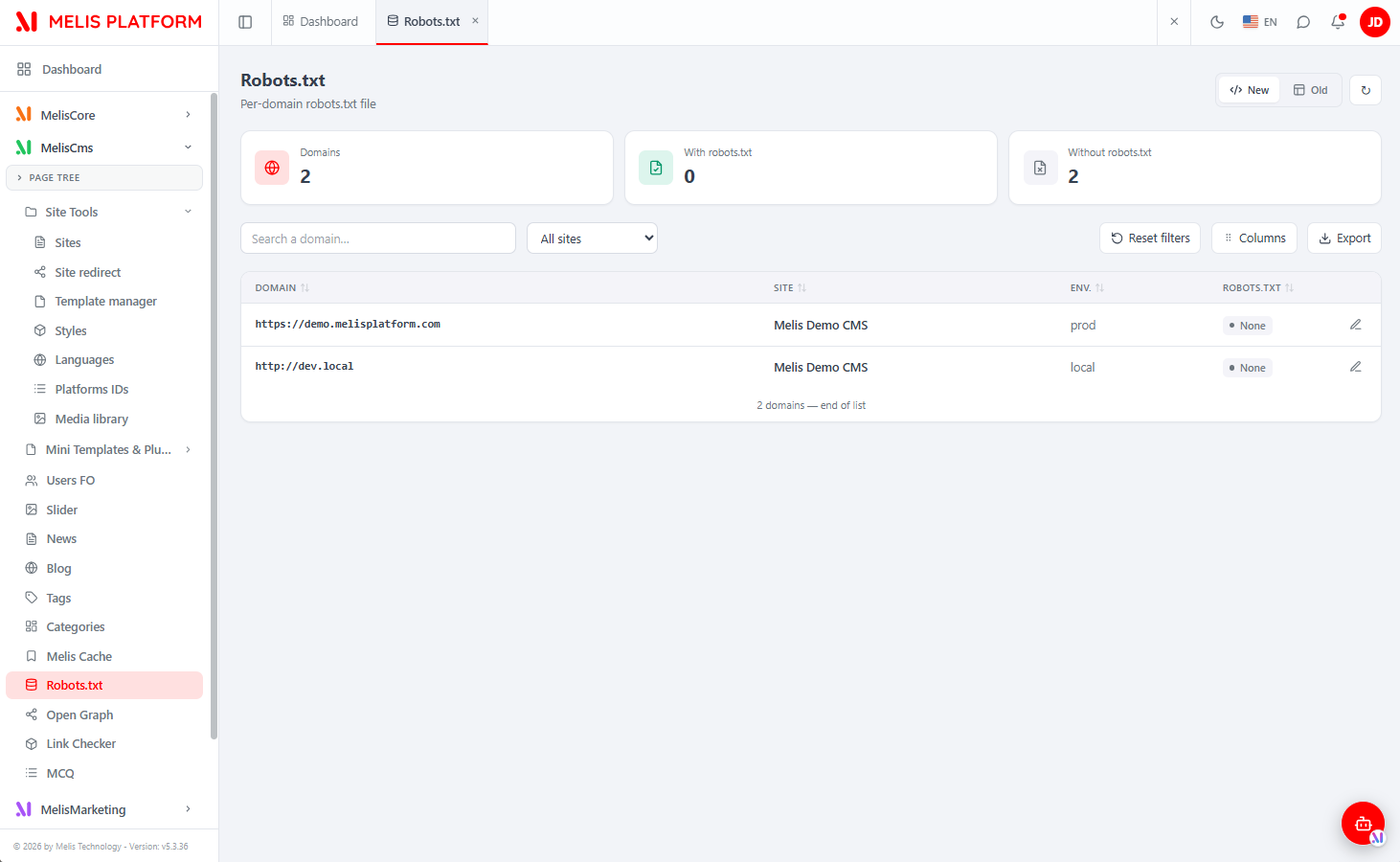
Level 1 — the domains list
The list shows every site domain on the platform (one row per domain, fed from the Sites tool). It offers KPI cards (Domains / With robots.txt / Without robots.txt), a search box (matches domain or site name), an All sites filter, a Columns manager, an Export button and Reset filters. The list scrolls infinitely (keyset) with server-side sort. Columns: ID, Domain, Site, Env., robots.txt (a per-row Set / None badge). Each row has an edit (pencil) action and, when content exists, a delete (clear) action.
There is no "+ New" and no delete-domain — domains come from the Sites tool; you only edit or clear each domain's robots.txt.
Level 2 — editing a domain's robots.txt
Opening a domain adds a sub-tab (with a ← Back button). The editor shows the Domain and Site read-only, plus a large monospace robots.txt content text area for the body. Save (top-right) persists it, and it is served live at that domain's /robots.txt. Leaving it empty serves nothing.
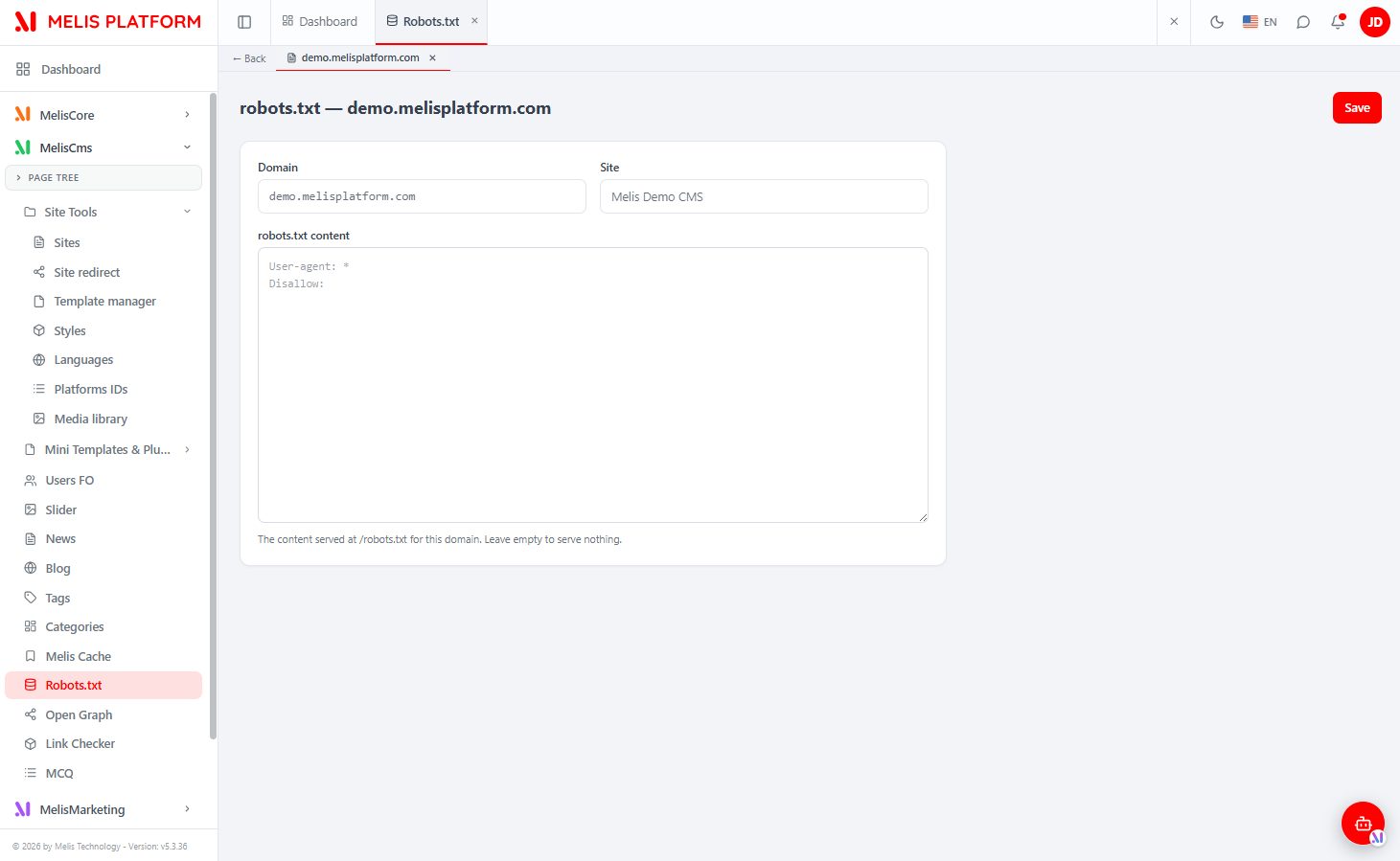
New / Old toggle
The top-right New / Old toggle switches the whole tool between the React UI (New, default) and the classic tool rendered in an iframe (Old, at /melis/react-tool-page?key=site_robot_tool_display).
React brick
| Item | Value |
|---|---|
| Brick kind | Native full-React (with a New/Old legacy-iframe fallback) |
| Brick id | siterobot (brick.tsx ⇄ brick.manifest.json) |
Manifest route | /melis-cms/site-robot |
label | Robots.txt |
forwardKey | MelisCmsSiteRobot/ToolSiteRobot |
melisKey (iframe / renderable zone) | site_robot_tool_display |
subTabs / persistent | true / true |
| Capabilities melisKey | meliscms_site_robot_tools_section |
| API base | /melis/react-api/site-robots |
The brick is a Vite IIFE bundle (React externalised to host globals). SiteRobotPage.tsx is the container: it parses /[section]/site-robot[/:id] and switches between DomainList (no id) and RobotForm (id present), holding the New/Old mode, KPI cards, filters, column manager, Export and the delete-confirm modal. Sub-tabs are driven through the window bridge (window.__melisOpenSubTab / __melisUpdateSubTabLabel).
React API
Routes live in config/react-api.php; controller MelisCmsSiteRobot\Controller\MelisReactApiSiteRobotController. All under /melis/react-api/site-robots, JSON contract { success, data, error }. The controller talks to the tables directly via parameterised SQL (no module service — matching the legacy tool).
| Method & URL | Action | Purpose |
|---|---|---|
GET /site-robots | list | List site domains (keyset: limit, search, site, sort, dir, after); each item carries hasRobots |
GET /site-robots/stats | stats | KPI { total, withRobots, withoutRobots } |
GET /site-robots/sites | sites | Site options for the filter |
GET /site-robots/:id | get | One domain (sdom_id) + its robotText |
POST /site-robots/save | save | Upsert the robots.txt of a domain ({ id, robotText }) |
DELETE /site-robots/delete/:id | delete | Clear a domain's robots.txt (the domain stays) |
list LEFT-JOINs melis_cms_site_domain to melis_cms_site and melis_cms_domain_robots (joined on the domain name, robot_site_domain = sdom_domain). save upserts the robots row keyed by domain name and caps the stored body at 65535 characters. Route order matters: /stats, /sites, /save, /delete/:id are declared before the catch-all /:id (constrained to [0-9]+).
Capabilities
Declared in config/react.capabilities.php under the rights-bearing node meliscms_site_robot_tools_section:
return [
    'melisReactToolCapabilities' => [
        'meliscms_site_robot_tools_section' => ['list', 'edit', 'delete', 'export'],
    ],
];list— view the domains list (also gatesstats+sites).edit— open (get) and save (save) a domain's robots.txt.delete— clear a domain's robots.txt.export— the Export button (UI gate, reuses the list).
There is no create capability — you cannot add a domain from this tool. Each controller action is guarded twice: denyUnlessAccess() (auth + MelisCoreRights::canAccess) then denyUnlessCan(cap) (default-allow; the server stays the enforcement point).
Key services
The module registers no service of its own. The legacy tool and the React API share the same data model; the engine gateways remain available:
| Service alias | Role |
|---|---|
MelisEngineTableRobot | Table gateway over melis_cms_domain_robots — reads and writes robot_text by domain. |
MelisEngineTableSiteDomain | Feeds the list of site domains (sdom_id, site_label, sdom_domain). |
Front office
A public route in config/module.config.php (melis-cms-site-robot-special-urls) maps /robots.txt to ToolSiteRobotController::toolRobotsTxtAction. The action looks up melis_cms_domain_robots by the requesting host and outputs the stored robot_text. Unchanged in v6.
| Route | Handler | Result |
|---|---|---|
/robots.txt | ToolSiteRobotController::toolRobotsTxtAction | Serves the robot_text stored for the requesting domain. |
Database tables
| Table | Holds |
|---|---|
melis_cms_domain_robots | One robots.txt entry per domain: robot_id (PK), robot_site_domain, robot_text. |
Key files
| Concern | Path |
|---|---|
| React API routes | vendor/melisplatform/melis-cms-site-robot/config/react-api.php |
| React capabilities | vendor/melisplatform/melis-cms-site-robot/config/react.capabilities.php |
| React brick manifest | vendor/melisplatform/melis-cms-site-robot/public/ui-react/brick.manifest.json |
| React API controller | vendor/melisplatform/melis-cms-site-robot/src/Controller/MelisReactApiSiteRobotController.php |
Legacy tool + /robots.txt route | vendor/melisplatform/melis-cms-site-robot/src/Controller/ToolSiteRobotController.php |
Routes (back-office + /robots.txt) | vendor/melisplatform/melis-cms-site-robot/config/module.config.php |
| Install SQL | vendor/melisplatform/melis-cms-site-robot/install/ |
See also: Module reference, melis-cms, melis-core