

MelisSmallBusiness
Editorial-team add-on for the CMS — user roles, a validation workflow, page versioning, comments and page locking, plus a TinyMCE media library, surfaced through the React back-office. Package
melisplatform/melis-small-business.
Purpose
MelisSmallBusiness layers small-team collaboration tooling on top of the CMS page editor. It keeps versions of published pages (restore/preview an earlier state), drives a content workflow where an editor asks for validation and a reviewer validates or refuses it, attaches comments to pages, prevents two users from editing the same page at once through a page lock, manages a custom user role tool, and ships a TinyMCE-based media library (MoxieManager). Business logic stays server-side (Laminas services, CMS-editor events); in v6 the whole user-facing surface is a set of React bricks and modular contributions.
Enable it
This is a standard Laminas module. Add it to config/melis.module.load.php:
return [
    // …
    'MelisSmallBusiness',
];
It depends on melis-core, melis-engine, melis-front and melis-cms, and its tables are created via dbdeploy (extra.dbdeploy = true). Each React surface below appears only when the module is active (brick discovery via GET /melis/react-api/react-modules).
React surfaces
In the React back-office (/melis-react) the module ships two bricks and two modular contributions that have no route of their own.
| Surface | Kind | Route / host |
|---|---|---|
User Roles (smallbusiness) | native full-React (New/Old toggle) | /melis-core/user-roles |
Media library (smallbusiness-medialib) | iframe brick (MoxieManager) | /melis-cms/media-library |
| Workflow modal | shared modal (window.__melisWorkflowModal) | rendered by News / Blog / CMS page editor / Newsletter + Dashboard widget |
| Versioning / Comments / Lock | tabs + banner in the CMS page editor | contributed to the meliscms_page capability node |
| Role in Users | Role column/filter/selector | host Users tool, gated by useModuleActive('MelisSmallBusiness') |
public/ui-react/brick.manifest.json declares both bricks; ui-react/src/brick.tsx registers them and publishes the Workflow modal as a window global so other bricks can render a single shared implementation.
User Roles tool
Where: sidebar → MelisCore → User Roles (/melis-core/user-roles).
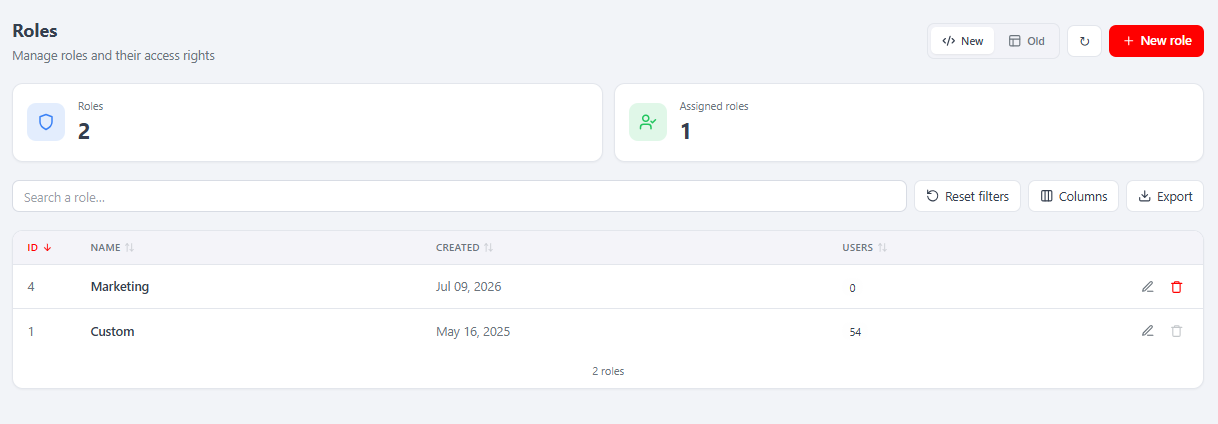
A role is a named rights profile stored once (melis_core_user_role) and assigned to many users. The list shows every role with KPI cards (Roles / Assigned), search, a Columns manager, Export and a New / Old toggle (Old = the classic tool in an iframe). Each row (ID, Name, Created, Users count) has edit/delete actions; a role assigned to users cannot be deleted.
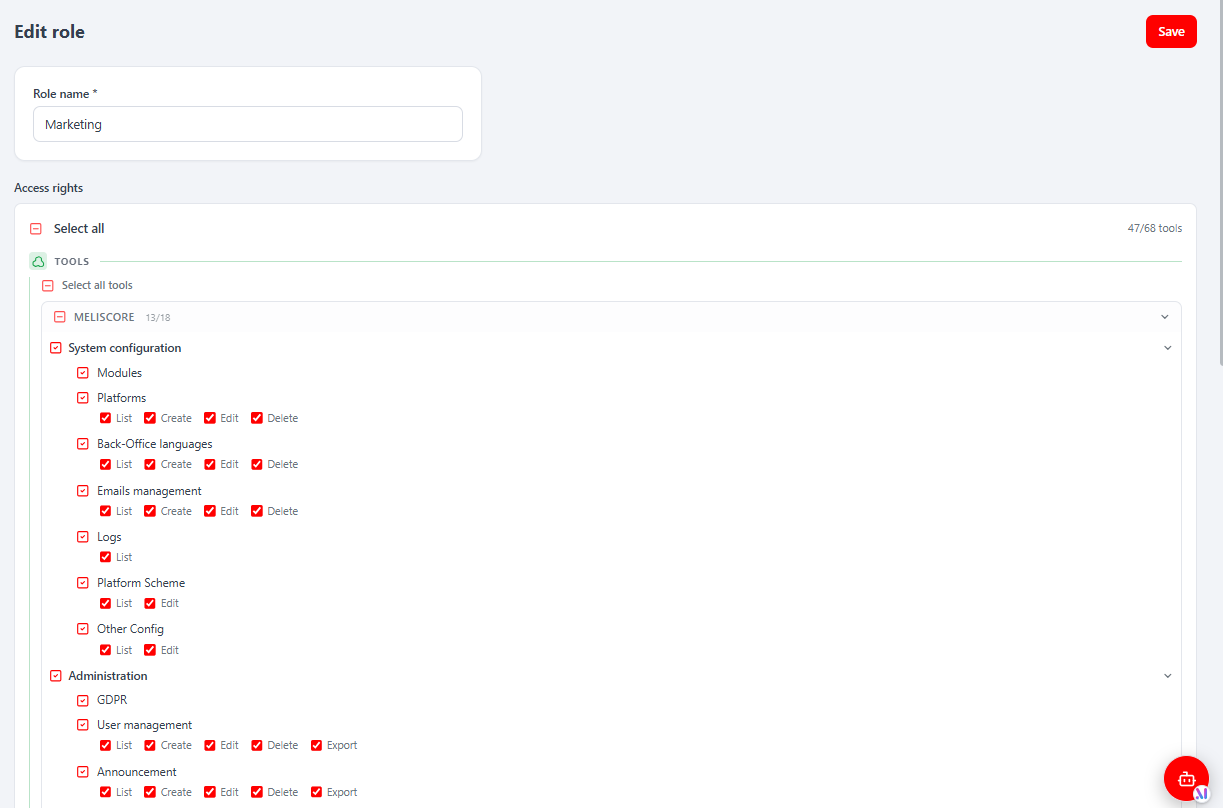
Editing a role opens a sub-tab with a Role name field and an Access rights tree that mirrors the Users rights tree (TOOLS grouped by section, per-tool List/Create/Edit/Delete/Export, plus the Pages and Dashboard-plugins sections). Save persists the name and the urole_rights XML.
WARNING
Writing a role's rights XML requires a platform administrator (usr_admin); a non-admin editing a role gets a 403 on the rights write. This blocks a privilege-escalation path (forging an all-rights role, then self-assigning it). The role name can be changed by anyone with the tool's edit right.
Role in the Users tool
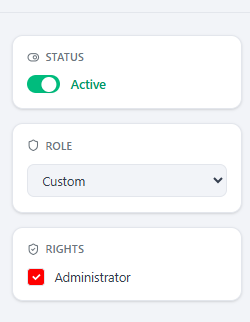
When the module is active, the MelisCore Users tool gains a Role column + filter in the list and a Role selector in the user form (alongside Status and Rights). The dropdown is fed by GET /melis/react-api/roles (the MelisCore selector list); on save, a listener re-injects the role's capabilities so they are not lost.
Media library
Where: sidebar → MelisCms → Media library (/melis-cms/media-library).
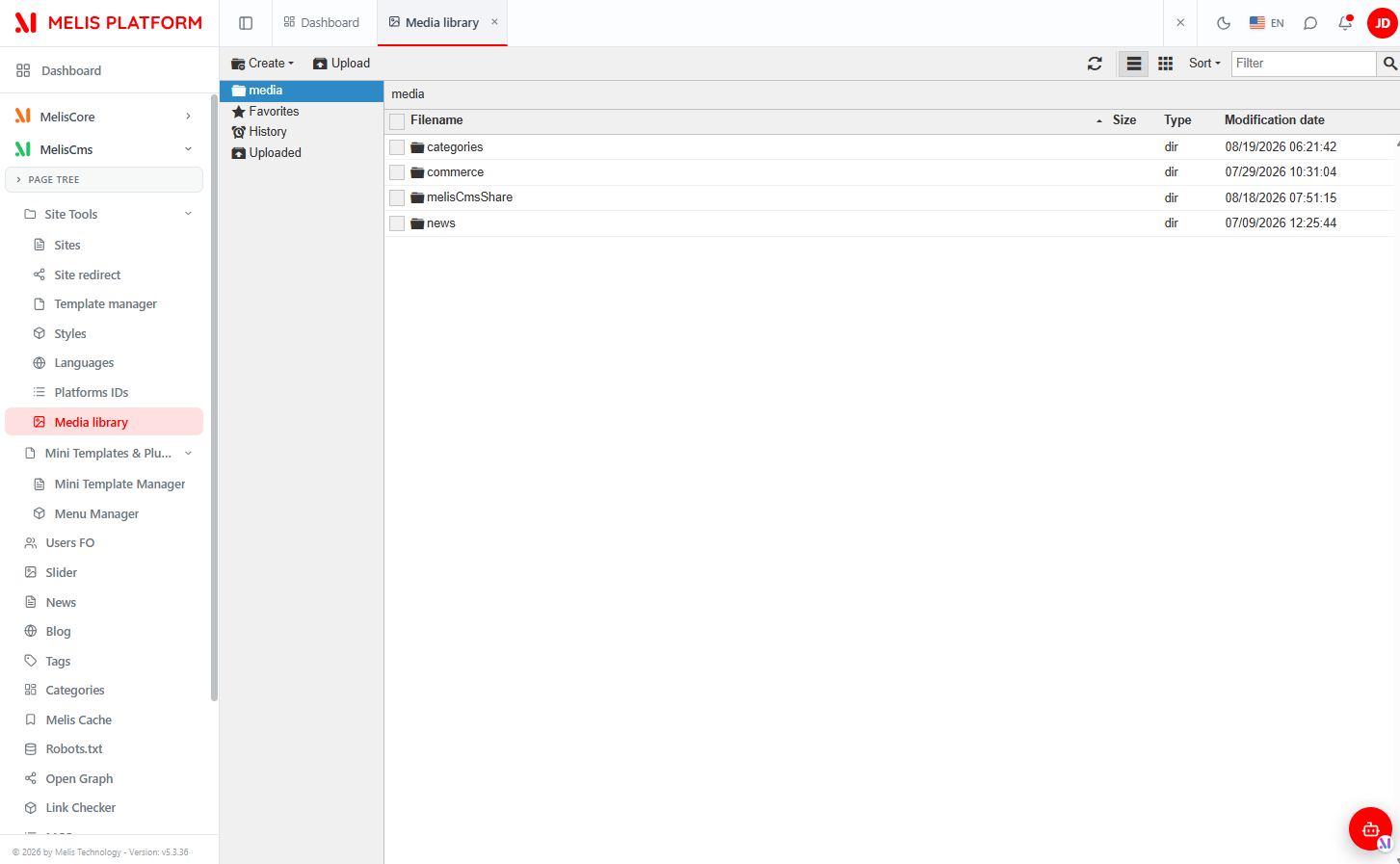
The advanced TinyMCE / MoxieManager file browser: folders on the left, files on the right (name, size, type, date), with Create, Upload, list/grid view, Sort, Filter and Favorites/History/ Uploaded shortcuts. The React page is a thin wrapper rendering a full-tab iframe to the legacy moxiemanager (/melis/MelisSmallBusiness/js/tinyMCE/moxiemanager/index.php?lang=xx), so behaviour is identical to the classic tool — no react-api of its own.
Workflow (page validation)
The Workflow lets an editor ask for validation and a validator answer. The same modal opens from the CMS page editor (Workflow button), the News and Blog editors, and the Dashboard widget. It is generic over the item type — PAGE, NEWS, BLOG.
Under Ask for validation, pick a Role to notify everyone with that role, or "1 person only" to reveal a User dropdown and target a single person, then Send request.
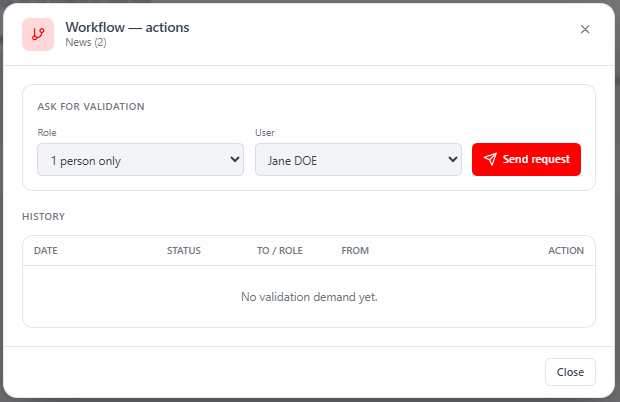
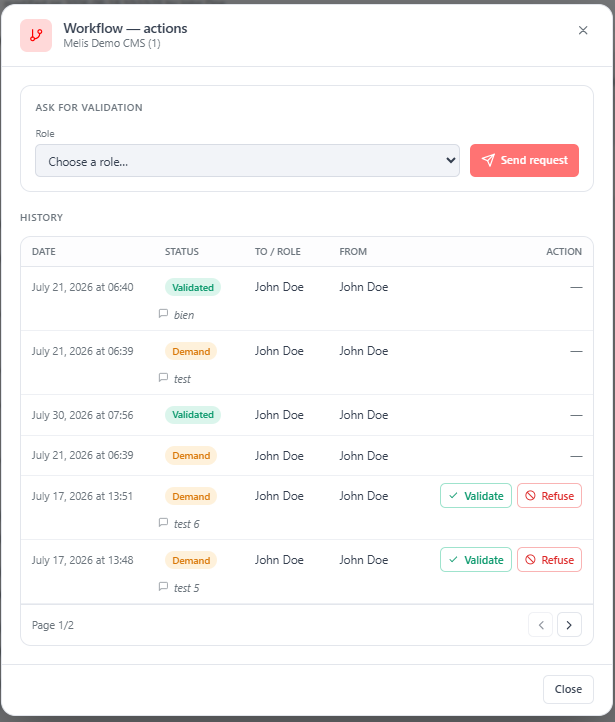
The modal's History lists every demand and answer (Date, Status, To/Role, From, Action). A recipient of an open demand gets Validate / Refuse buttons and may attach a note.
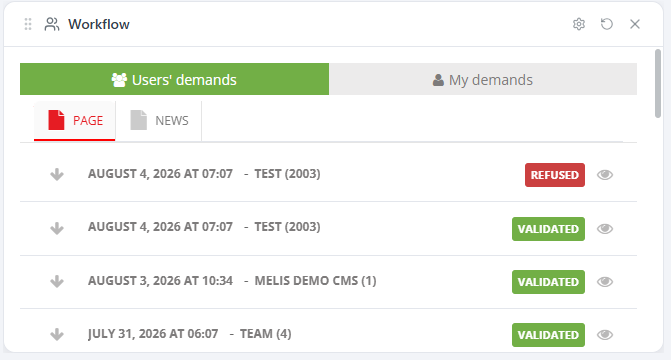
The back-office Dashboard shows a Workflow widget listing demands, split into Users' demands / My demands with PAGE / NEWS sub-tabs; each row shows a status pill (VALIDATED / REFUSED / Demand) and offers inline validate (✓) / refuse (✗) and preview actions on demands addressed to you.
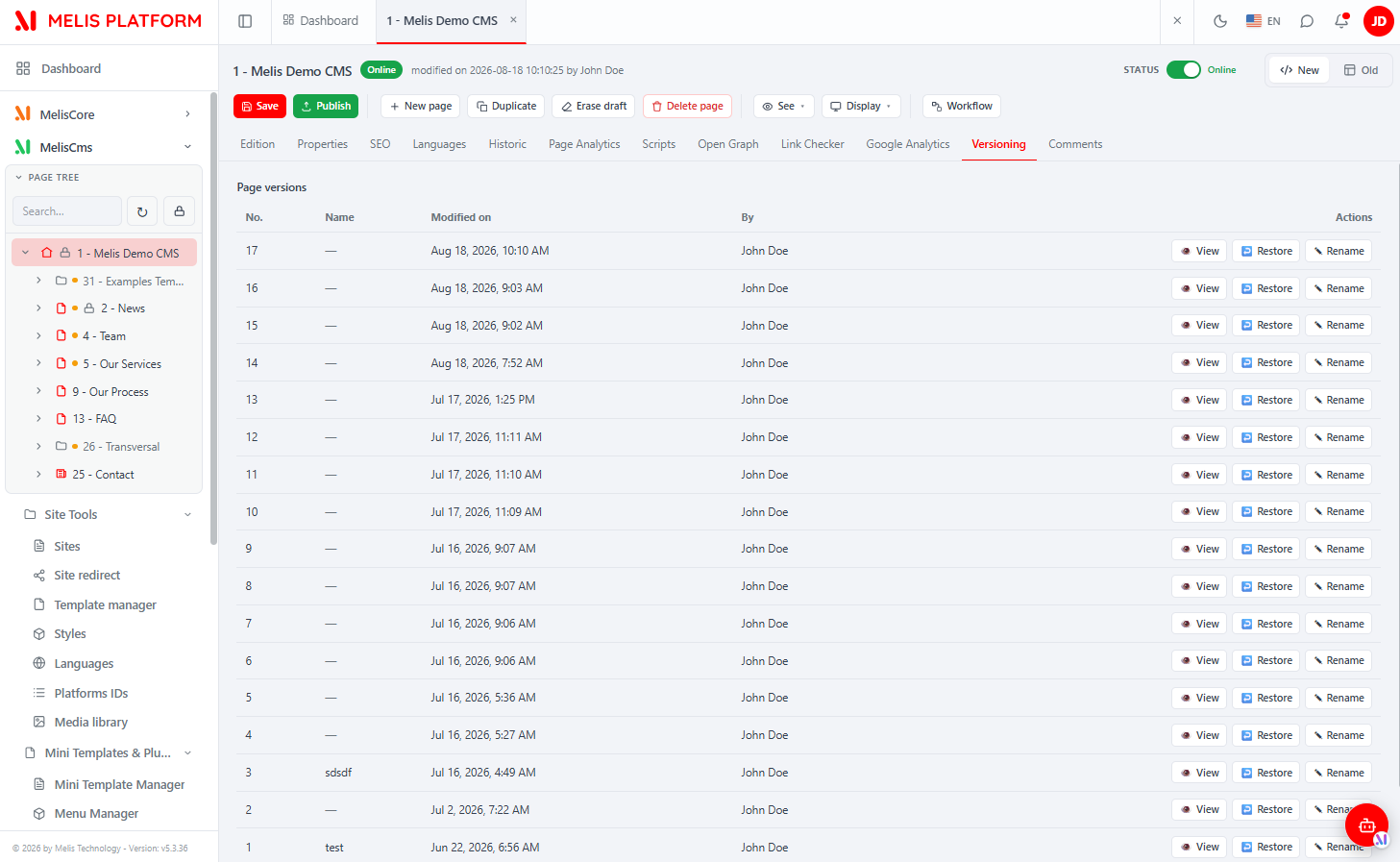
Versioning & Comments (CMS page editor)
Opening a page in the CMS editor adds two SmallBusiness tabs after the native ones:
Versioning — a paged list of the page's snapshots (No., Name, Modified on, By) with per-row View / Restore / Rename. A snapshot is taken on each publish.
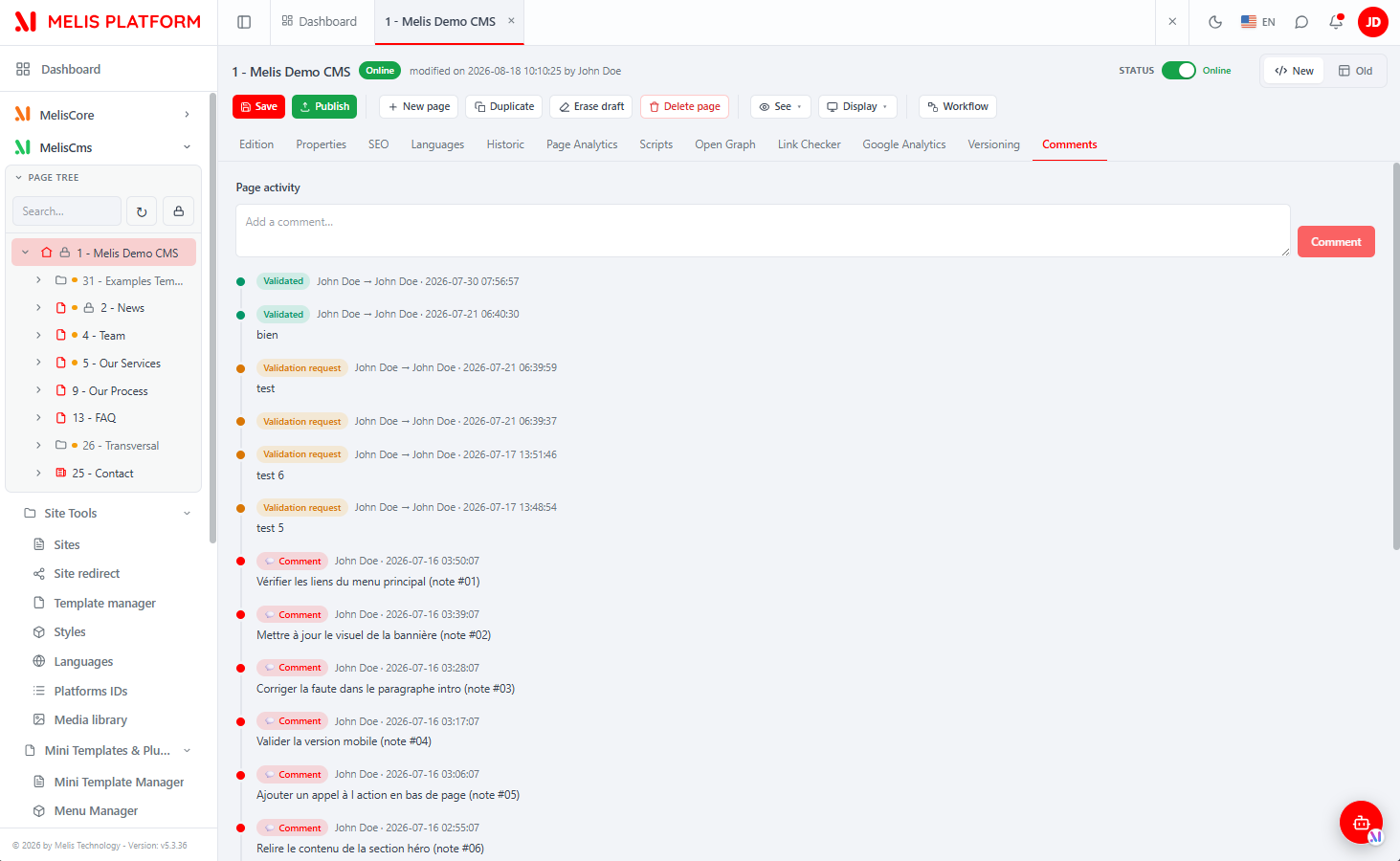
Comments — the page's activity timeline mixing user comments and workflow events (newest first), with an "Add a comment" box.
A page lock banner + Unlock button appear when another user holds the lock on the page.
react-api endpoints
All under /melis/react-api/…, contract { success, data, error }. The controllers live in this module (config/react-api.php + src/Controller/MelisReactApi*Controller.php).
| Controller | Base routes | Guard |
|---|---|---|
MelisReactApiRoleController | GET /user-roles, /user-roles/stats, /user-roles/:id; POST /user-roles/save; DELETE /user-roles/delete/:id | melissb_tool_userrole access + capability (rights XML write = admin-only) |
MelisReactApiWorkflowController | GET /workflow/roles, /workflow/users, /workflow/history; POST /workflow/ask | auth-only |
MelisReactApiPageVersioningController | GET /cms-page/versioning | auth-only |
MelisReactApiPageCommentsController | GET /cms-page/comments, /cms-page/timeline; POST /cms-page/comments/save | auth-only |
MelisReactApiPageLockController | GET /cms-page/lock; POST /cms-page/unlock | auth-only |
Workflow mutations reuse the proven legacy endpoints rather than react-api: GET /melis/MelisSmallBusiness/MelisWorkflow/saveWorkflowActions (validate / refuse) and POST /melis/MelisSmallBusiness/MelisWorkflow/addWorkflowComments (add a note). Comment text is HTMLPurifier-sanitised on save.
Capabilities
config/react.capabilities.php contributes the page-editor button + tabs under the shared meliscms_page key owned by MelisCms (merged, so MelisCms need not know about SB):
| Kind | Key | Label |
|---|---|---|
| action | workflow | Workflow button |
| action | unlock | Unlock button |
| tab | melissb_page_versioning | Versioning tab |
| tab | melissb_page_comments | Comments tab |
CmsPage.tsx filters those tabs / hides those buttons via useCaps('meliscms_page').can(cap). The Roles tool itself is keyed under melissb_tool_userrole and the Media library under melissb_medialib.
Database tables
Created by install/dbdeploy/126618_melis_sb_install.sql.
| Table | Role |
|---|---|
melis_sb_page_versioning | Archived copies of published pages (backs the Versioning tab). |
melis_sb_workflow | Workflow records per item. |
melis_sb_workflow_events | Workflow events (ask / validate / refuse). |
melis_sb_page_comment | Comments attached to a page (comment type 1 = PAGE, 2 = WORKFLOW). |
melis_sb_page_comment_type | Comment types. |
melis_sb_page_locked | Active page locks (which user is editing which page). |
melis_core_user_role | Named roles (urole_id, urole_name, urole_creation_date, urole_rights XML). |
Key services
| Service alias | Role |
|---|---|
MelisEnginePage | The module overrides the engine's page service with MelisSBPageService; on the version-preview route it returns the versioned tree from melis_sb_page_versioning, otherwise it behaves like the parent. |
MelisSBPageCommentService | Page comments: getPageComments() / setPageComments(). |
WARNING
By aliasing MelisEnginePage to its own class, this module replaces the core page service for the whole application while it is enabled. Keep that in mind when ordering modules.
The workflow sends three back-office emails (app.emails.php): WF_DEMAND, WF_VALIDATED, WF_REFUSED (tags USER_TO, USER_FROM, TYPE, DETAILS).
Key files
| Concern | Path |
|---|---|
| Module bootstrap & listeners | src/Module.php, src/Listener/ |
| react-api routes + invokables | config/react-api.php |
| react-api controllers | src/Controller/MelisReactApi{Role,Workflow,PageVersioning,PageComments,PageLock}Controller.php |
| Capabilities contribution | config/react.capabilities.php |
| Page service (engine override) | src/Service/MelisSBPageService.php |
| Comment service | src/Service/MelisSBPageCommentService.php |
| React bricks (source) | ui-react/src/ (brick.tsx, UserRolePage.tsx, MediaLibraryPage.tsx, WorkflowModal.tsx, RolesRightsTree.tsx) |
| Built bundle | public/ui-react/brick.js + brick.manifest.json |
| Install SQL | install/dbdeploy/126618_melis_sb_install.sql |