

MelisCmsTags
Shared tag/taxonomy system for the CMS — the "labels" that content modules (e.g. News) hang their items off of, now with a native React back-office. Package
melisplatform/melis-cms-tags.
Purpose
MelisCmsTags provides the platform's tag (taxonomy) system: multilingual tags (a title per language) that other modules associate their content with. Editors create and translate tags, see how many items use each tag, and delete unused ones. Other modules (e.g. MelisCmsNews) plug into the association layer via a config declaration and a single service call, making their items taggable without any schema change to the tag module. A front List Tags templating plugin displays a site's tags on the front office.
In Melis v6 the back-office is a native full-React brick rendered inside /melis-react, calling a module-owned react-api JSON layer. The server-side data model, service, tables, associations config and front plugin are unchanged from v5 — only the presentation and navigation layer moved to React.
Enable it
Add to config/melis.module.load.php:
return [
    'MelisCmsTags',
];
Requires melis-core and melis-cms. The module ships with dbdeploy: true — its three tables are created automatically on first deploy. The React brick appears in the back-office only if the module is activated (modular brick discovery).
Where it lives in the React back-office
Left sidebar → Site Tools group → Tags (fa-tag). It opens as a top tab named Tags. The menu forwardKey MelisCmsTags/TagsList maps to the tree route /melis-cms/tags (/melis-cms/tags/:id for the editor), where the TagsPage component renders.
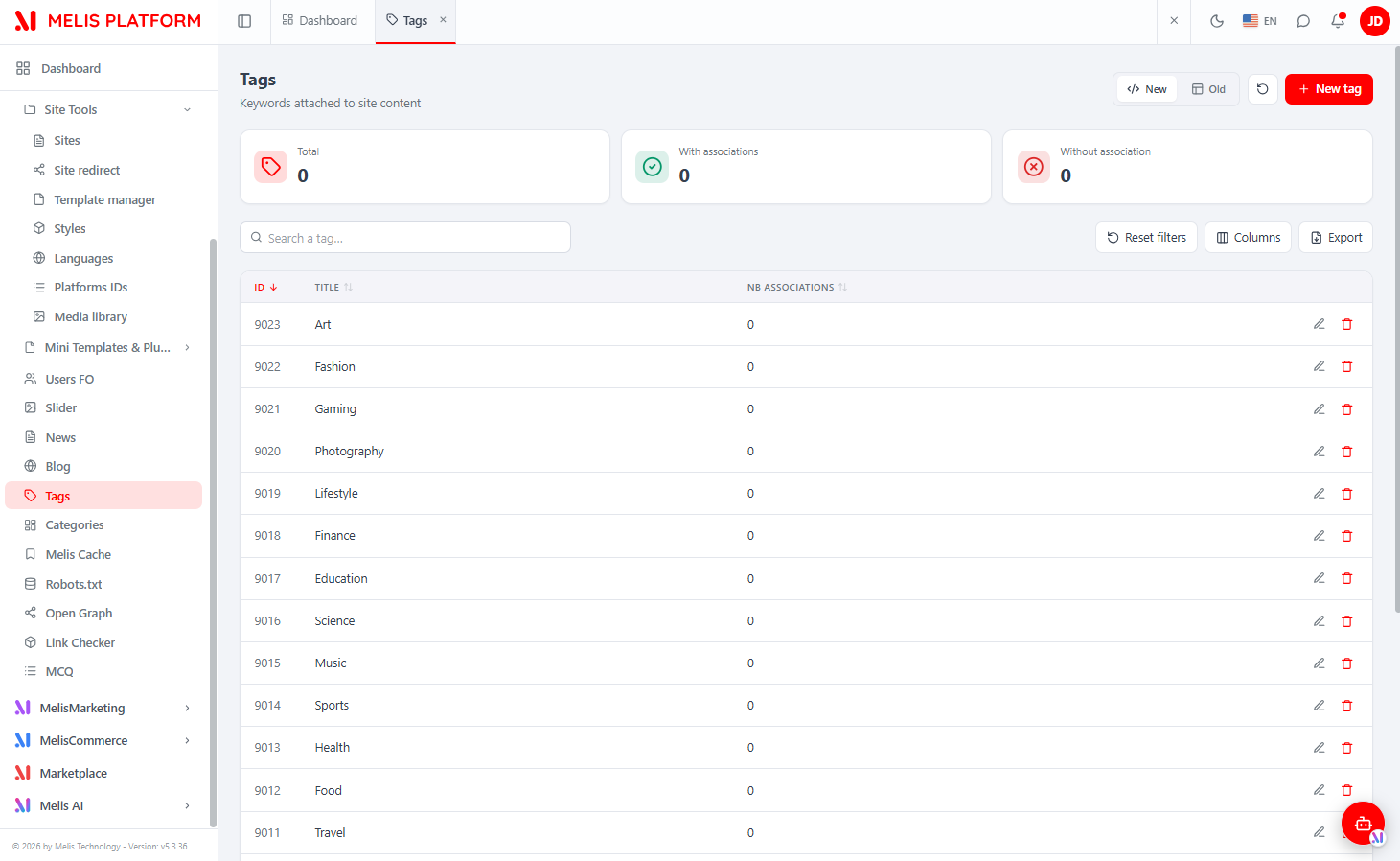
The brick is a native full-React UI with a New / Old toggle (top-right): New is the React UI (default), Old renders the legacy tool in an iframe (/melis/react-tool-page?key=tags_left_menu).
Back-office — list and editor
One shell tab (Tags) with in-tool sub-tabs. The list is the main view; opening or creating a tag adds an edit sub-tab (subTabs: true), so switching between open tags is instant.
The list shows every tag on the platform, with:
- KPI cards — Total · With associations · Without association (from the
statsendpoint). - Search ("Search a tag…", matches id or a title in any language), Reset filters, a Columns manager (hide/reorder), and an Export button (
.xlsxvia the hostwindow.MelisXLSX, CSV fallback). - Sortable columns ID / Title / Nb associations, with per-row edit and delete actions.
- A + New tag button that opens a blank editor.
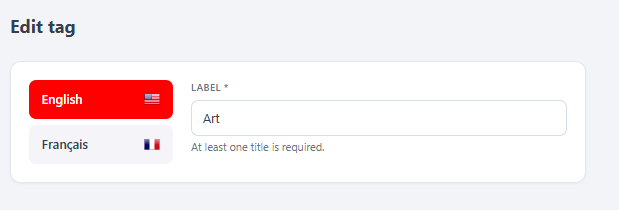
The editor is a compact form (a tag is just a title per language): a language switch (English / Français…) fed by the languages endpoint, and a Label field for the selected language. All translations are held at once and saved together — at least one non-empty title is required. Deleting a tag is refused while it still has associations, protecting tagged content.
Tagging content — the Tags picker
Tags are meant to be used by other modules. In the React News editor (Site Tools → News → open an article), the settings sidebar shows a TAGS panel: a checklist of the available tags. Ticking tags and saving the article stores the associations, which then count toward each tag's Nb associations.
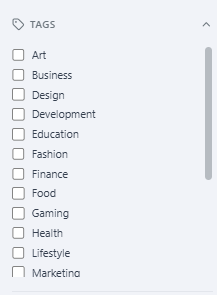
That picker and its saving are owned by the News brick (it reads GET /melis/react-api/news/tags and writes the shared link table with entity_type = 'NEWS'); MelisCmsTags only owns the tag data and the shared melis_cms_tag_entity table. The panel appears only when MelisCmsTags is active.
React API — endpoints
There is no config/react-api.php: the routes are declared inline in config/module.config.php as the child node react-api-cms-tags under melis-backoffice, so the URLs live under /melis/react-api-cms-tags (module-owned, not the shared /melis/react-api/… namespace). Controller: MelisCmsTags\Controller\MelisCmsTagsReactApiController. All responses use the { success, data, error } contract; requests send X-Requested-With: XMLHttpRequest and credentials: 'include'.
| Method & URL | Action | Purpose |
|---|---|---|
GET /melis/react-api-cms-tags | list | List tags (keyset: search, limit, sort, dir, after, optional lang) → {items,total,nextCursor}; each item has id, title, associationsCount |
GET /melis/react-api-cms-tags/stats | stats | KPI {total, withAssociations, orphan} |
GET /melis/react-api-cms-tags/languages | languages | CMS languages {languages:[{id,locale,name}]} (drives the editor language switch) |
GET /melis/react-api-cms-tags/:id | get | One tag {id, creationDate, titles:{langId:title}, associationsCount} |
POST /melis/react-api-cms-tags/save | save | Create / update ({id?, titles:{langId:title}}) → {id} |
DELETE /melis/react-api-cms-tags/delete/:id | delete | Delete a tag (refused if it still has associations) |
Route order matters:
stats/languages/saveare declared before the:idcatch-all so they resolve to their own actions rather thanget.
The controller mixes direct parameterised keyset SQL (list, stats) with the module's tables and service (TagTable, TagTextsTable, TagEntityTable for get/save; MelisCmsTagsService for delete — getAssociationsByTagId() blocks the delete, then deleteTagById() + TagTextsTable::deleteByField() clean up). save reproduces the legacy rules (≥1 non-empty title, ≤255 chars, per-language uniqueness) and fires the same events (meliscmstags_save_tag_end, meliscmstags_delete_tag_end).
Example (tags-api.ts):
const BASE = '/melis/react-api-cms-tags'
await apiFetch<TagListResult>(`${BASE}?search=art&limit=25&sort=id&dir=desc`) // list
await apiFetch<TagDetail>(`${BASE}/42`)                                       // one tag
await apiFetch<{ id: number }>(`${BASE}/save`, {                              // save all translations
  method: 'POST', headers: { 'Content-Type': 'application/json' },
  body: JSON.stringify({ id: null, titles: { 1: 'Art', 2: 'Art' } }),        // langId → title
})
await apiFetch<null>(`${BASE}/delete/42`, { method: 'DELETE' })              // delete
Capabilities
Declared in config/react.capabilities.php under the menu node tags_left_menu (the renderable tool node; MelisCmsTags\Module::getConfig() merges the file). Actions: list · create · edit · delete · export. In React, TagsPage's can(cap) reads window.MelisCan('tags_left_menu', cap) to gate the + New tag button, row edit/delete and Export. Server-side, every action calls denyUnlessAccess() (auth + MelisCoreRights::canAccess('tags_left_menu') → 401/403); here the capabilities key and the access-guard MELIS_KEY coincide (tags_left_menu).
Key services
| Service alias | Role |
|---|---|
MelisCmsTagsService | Full tag CRUD plus the association API. Every method fires *_start / *_end events via MelisGeneralService. |
Table gateway aliases: TagTable, TagTextsTable, TagEntityTable (registered in module.config.php).
Front office
ListTagsPlugin (Controller\Plugin\ListPublicationsPlugin.php) extends MelisTemplatingPlugin.
| Setting | Detail |
|---|---|
| Config plugin key | tags · XML DB key TagsList |
| Config file | config/plugins/ListPublicationsPlugin.config.php |
| Front view | MelisCmsTags/listtags |
| Settings tabs | Template (template + site select) · Filters (column / order / date-min / date-max / search) |
Naming drift. The plugin class lives in
ListPublicationsPlugin.phpand the shipped Phtml views arelistpublications.phtml/showpublication.phtml— a historical artefact; the live feature is the List Tags plugin above.
Database tables
Base structure in install/sql/setup_structure.sql; migrations in install/dbdeploy/.
| Table | Holds |
|---|---|
melis_cms_tag | Core tag row: tag_id, tag_creation_date, tag_site_id, tag_type |
melis_cms_tag_texts | Per-language texts: tag_text_id, tag_id, tag_title, tag_lang_id |
melis_cms_tag_entity | Tag ↔ content item link: id, tag_id, entity_id, entity_type (e.g. NEWS) |
Service example
$tags = $this->getServiceManager()->get('MelisCmsTagsService');

// Tag CRUD
$list = $tags->getTagsList($status, $langId, $start, $limit, $orderCol, $order, $siteId, $search);
$tag  = $tags->getTagById($tagId, $langId);
$id   = $tags->saveTag(['tag_site_id' => $siteId, ...], $tagId); // $tagId null → create
$tags->deleteTagById($tagId);

// Associations — the integration surface for other modules
$tags->saveTagEntity([$tagId1, $tagId2], $entityId, 'NEWS'); // (re)attach a tag set to an item
$set   = $tags->loadTagByEntityIdType($entityId, 'NEWS');    // tags of one item
$items = $tags->loadEntityByTagsId($tagIds, 'NEWS');         // items carrying given tags
$tags->deleteEntities($entityId, 'NEWS');                    // clear an item's tags
$assoc = $tags->getAssociationsByTagId($tagId, $langId);     // items associated to a tag
saveTagEntity() deletes the entity's existing links then re-saves the supplied set — call it from a content module's save flow to keep its tags in sync.
Making a module taggable (config-driven associations)
Declare the mapping under plugins.melis_cms_tag.datas.associations in config/associations.config.php. The shipped MelisCmsNews example:
'associations' => [
    'meliscmsnews' => [
        'module'           => 'MelisCmsNews',       // skipped if module not loaded
        'entity_type'      => 'NEWS',               // stored in melis_cms_tag_entity.entity_type
        'entity_table'     => 'melis_cms_news',
        'entity_primary_id'=> 'cnews_id',
        'trans' => [
            'trans_table'      => 'melis_cms_news_texts',
            'trans_foreign_id' => 'cnews_id',
            'trans_lang_key'   => 'cnews_lang_id',
        ],
        'association_title_key' => 'cnews_title',   // shown in the Associations grid "Title" column
    ],
],
Then call saveTagEntity() in the content module's save action. In the React News brick this is wired via its own /melis/react-api/news/tags surface; MelisCmsTags just owns the tag data and the shared link table.
Key files
| Concern | Path |
|---|---|
| Module config (routes, react-api routes inline, services, form elements) | vendor/melisplatform/melis-cms-tags/config/module.config.php |
| React capabilities | vendor/melisplatform/melis-cms-tags/config/react.capabilities.php |
| Association mapping | vendor/melisplatform/melis-cms-tags/config/associations.config.php |
| List Tags plugin config | vendor/melisplatform/melis-cms-tags/config/plugins/ListPublicationsPlugin.config.php |
| React API controller | vendor/melisplatform/melis-cms-tags/src/Controller/MelisCmsTagsReactApiController.php |
| Main service | vendor/melisplatform/melis-cms-tags/src/Service/MelisCmsTagsService.php |
| Front plugin | vendor/melisplatform/melis-cms-tags/src/Controller/Plugin/ListPublicationsPlugin.php |
| Table gateways | vendor/melisplatform/melis-cms-tags/src/Model/Tables/ |
| React brick source | vendor/melisplatform/melis-cms-tags/ui-react/src/ (TagsPage, tags-api.ts, ViewToggle, ExportModal) |
| React brick build + manifest | vendor/melisplatform/melis-cms-tags/public/ui-react/brick.js · brick.manifest.json |
| Install SQL | vendor/melisplatform/melis-cms-tags/install/sql/setup_structure.sql |
| DB migrations | vendor/melisplatform/melis-cms-tags/install/dbdeploy/ |
See also: melis-cms, melis-cms-news, melis-front, melis-engine, melis-core