

MelisCmsSlider
Backoffice slider / carousel manager — now a native React back-office brick — with a front-office templating plugin to display sliders on pages. Package
melisplatform/melis-cms-slider.
Purpose
MelisCmsSlider provides a back-office tool to build sliders (named carousels of ordered slides — image, title, subtitles, link) and a MelisCmsSliderShowSliderPlugin content block that renders a chosen slider on any front-office page. It also ships a reusable slider picker form element that other modules (News, Blog) embed to attach a slider to a content item.
In Melis v6 the tool ships a native full-React brick for the /melis-react back-office, with a New / Old toggle that falls back to the classic tool in an iframe. The framework, services, DB tables and front-office plugin are unchanged from v5.
Enable it
Add to config/melis.module.load.php:
return [
    // …
    'MelisCmsSlider',
];
Requires: melis-core, melis-engine, melis-front, melis-cms. The module ships dbdeploy: true so its tables are created/updated by melis-dbdeploy. The React brick is activation-gated: it appears in the back-office only while the module is in melis.module.load.php (modular brick discovery, see below).
React back-office
Where: left sidebar → MelisCms group → Slider (tree route /melis-cms/slider). It opens as a top tab named Slider. A New / Old toggle (top-right) switches between the React UI (New, default) and the legacy tool in an iframe (Old).
The tool is a three-level drill-down, surfaced as native host sub-tabs: list of sliders → a slider's slides → a slide form.
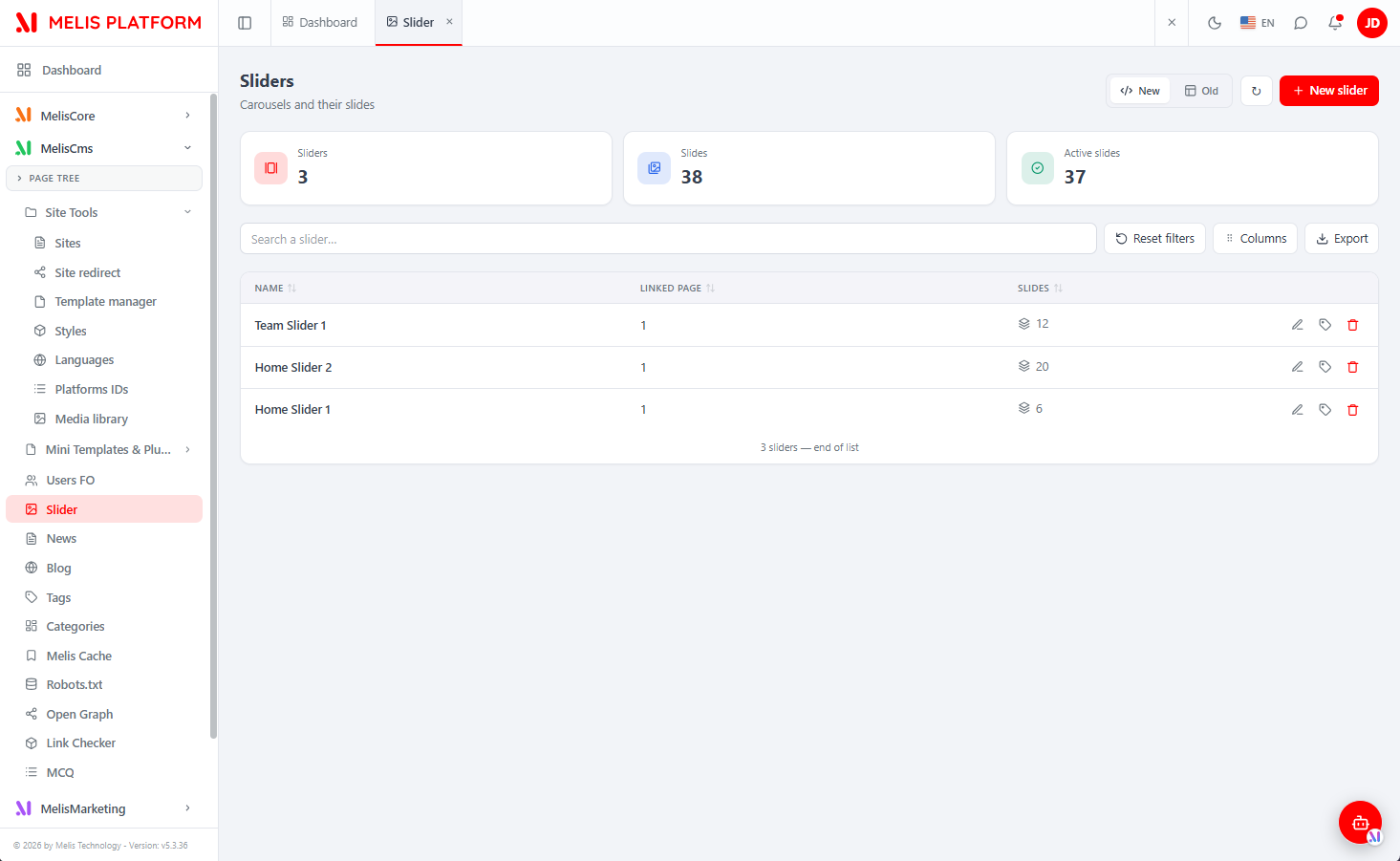
Level 1 — the list of sliders
Lists every slider on the platform (sliders are global; a slider can optionally be linked to a page). The list has KPI cards (total sliders, total slides, active slides), a search box, a Columns manager, an Export button and Reset filters; click a header to sort. Each row offers open (its slides), rename and delete.
+ New slider opens a modal for the name and an optional linked page chosen from the site's page tree; the same modal renames an existing slider.
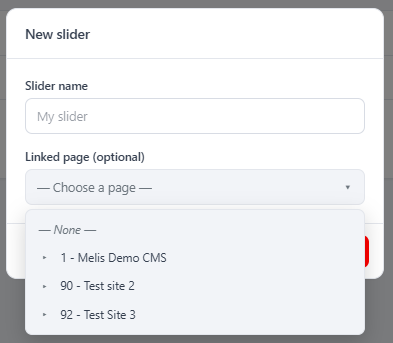
Level 2 — a slider's slides
Opening a slider adds a sub-tab (with ← Back) showing that slider's slides: order, status (green = active), image thumbnail, title, subtitle and link. Drag a row to reorder; + Add a slide creates one; edit/delete per row.

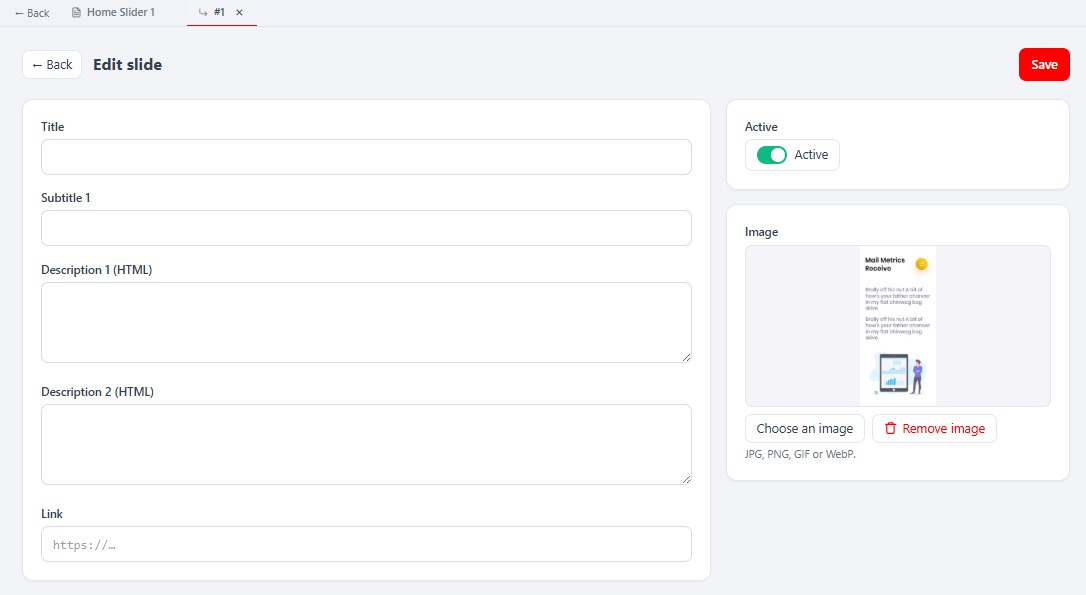
Level 3 — editing a slide
Editing (or adding) a slide opens a nested sub-tab with a React form: Title, Subtitle 1, two Description (HTML) fields, Link, an Active toggle and an Image panel (preview, Choose an image / Remove image; JPG, PNG, GIF or WebP). Save persists the slide. Title and Subtitle 1 are plain text; the two Description fields are raw HTML and map to sub2/sub3.
React API
The brick reads/writes through a JSON layer under /melis/react-api/sliders (routes in config/react-api.php, controller MelisReactApiCmsSliderController). All responses follow the { success, data, error } contract; every fetch sends X-Requested-With: XMLHttpRequest with credentials: 'include'.
| Method & URL | Purpose |
|---|---|
GET /sliders | List sliders (keyset: limit, search, sort, dir, after) with slideCount. |
GET /sliders/stats | KPI counts {sliders, slides, active}. |
GET /sliders/:id | One slider {id, name, pageId, slideCount}. |
POST /sliders/save | Create / rename a slider ({id?, name, pageId?}). |
DELETE /sliders/delete/:id | Delete a slider, its slides and image files. |
GET /sliders/:id/slides | The ordered slides of a slider. |
POST /sliders/slides/reorder | Reorder ({sliderId, ids:[…]}). |
POST /sliders/slide/upload | Multipart image upload (field image, ?sliderId=) → {path}. |
GET /sliders/slide/:id | One slide. |
POST /sliders/slide/save | Create / update a slide. |
DELETE /sliders/slide/delete/:id | Delete a slide, re-sequence order, remove its image. |
The controller talks to the tables directly via parameterised SQL, reproducing the legacy business rules (name required ≤255, slide order auto = max+1, images under /media/sliders/<sliderId>/… with extensions jpg/jpeg/gif/png/webp, safe-URL check on the link, cascade delete of files). The higher-level MelisCmsSliderService still backs the legacy tool and front-office plugin.
Capabilities
Advanced rights are declared in config/react.capabilities.php under the rights-bearing node meliscms_slider_tools_section, mirroring the three levels. Flattened capability strings (e.g. list, create, rename, export, slides, slides.create, slides.image.create) are checked in React via MelisCan(melisKey, cap) and server-side via denyUnlessCan(cap). Every controller action is guarded twice — an access guard (denyUnlessAccess() → 401/403) then a capability check; the capability resolver is default-allow for undeclared caps.
Host integration
| Concern | How |
|---|---|
| Discovery / gating | GET /melis/react-api/react-modules lists active modules shipping a brick.manifest.json; the host loads brick.js and mounts the brick. Removing the module hides the tool. |
| Menu → route | useNavMenu maps forwardKey MelisCmsSlider/MelisCmsSliderList to /melis-cms/slider. |
| Sub-tabs | subTabs: true — the brick drives the host's native sub-tab bar via window.__melisOpenSubTab / __melisCloseSubTab / __melisUpdateSubTabLabel; each screen stays mounted (hidden) so state survives. |
| New / Old toggle | window.__melisSetToolView(MELIS_KEY, mode); Old renders /melis/react-tool-page?key=MelisCmsSlider_left_menu in an iframe. |
| i18n | The brick reads document.documentElement.lang and ships an in-file {fr, en} dictionary. |
Brick id slider (matches brick.tsx ⇄ brick.manifest.json); the bundle is a Vite IIFE with React externalised to the host globals, so the UI uses inline styles and in-file i18n instead of importing host modules.
Key services
These still power the legacy tool, micro-services and the front-office plugin.
| Alias | Role |
|---|---|
MelisCmsSliderService | Business logic for sliders and slides; fires meliscmsslider_* events. |
MelisCmsSliderTable | Table gateway for melis_cms_slider. |
MelisCmsSliderDetailTable | Table gateway for melis_cms_slider_details. |
MelisCmsSliderService extends MelisGeneralService and exposes:
| Method | Role |
|---|---|
getSlider($sliderId, $status) | One slider with its slides; pass 1 for active slides only. |
getSliderByPageId($pageId, $status) | Slider linked to a page id, with its slides. |
getSliderList($start, $limit, $order, $search) | Paginated/searchable list of sliders. |
getSliderDetails($sliderDetailId) | A single slide row. |
saveSlider($data, $sliderId) | Create or update a slider; returns the slider id. |
saveSliderDetails($slideData, $detailId) | Create or update a slide. |
updateSliderDetailsOrdering($detailId, $newOrder) | Reorder a slide. |
deleteSlider($sliderId) | Delete a slider and all its slides. |
deleteSliderDetails($sliderDetailId) | Delete a single slide. |
getSlider() / getSliderByPageId() return a MelisCmsSlider\Entity\MelisCmsSlider entity whose getSlider() gives the container row and getSliderDetails() gives the slides.
Event naming note: each method fires meliscmsslider_service_*_start / _end events, but several write methods reuse another method's event names in the current source. saveSlider fires the get_slider_details events, and deleteSliderDetails / updateSliderDetailsOrdering reuse deleteSlider's delete_details events — so a listener on meliscmsslider_service_delete_details_end also fires on reorders.
Micro-services (config/app.microservice.php) expose getSliderList, getSlider, getSliderDetails, getSliderByPageId.
Front office
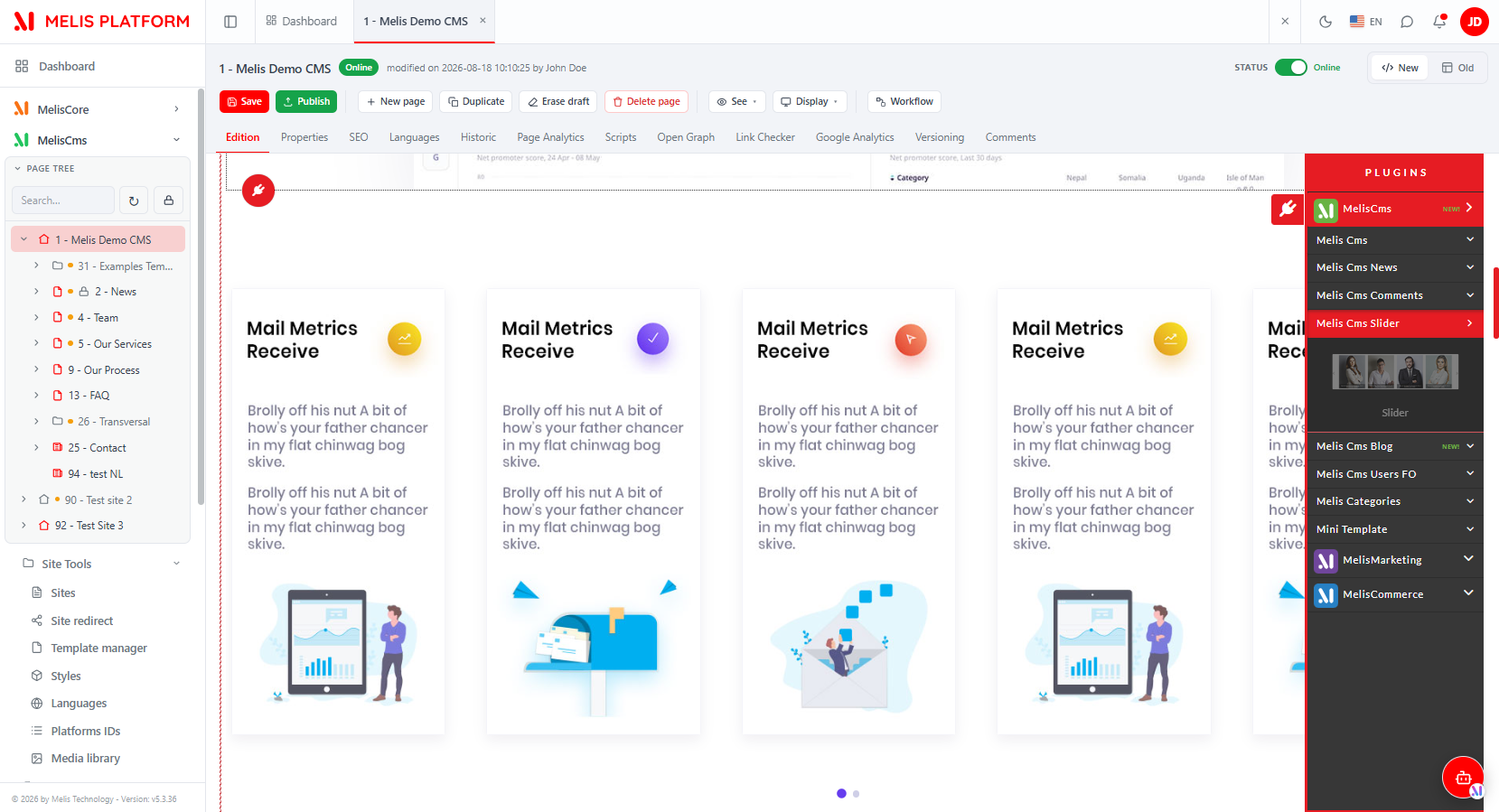
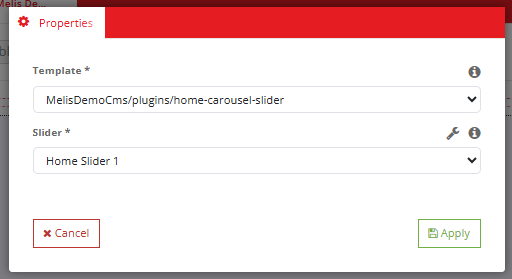
From the React page editor (MelisCms → open a page → Edition), open the plugins panel and drop the Show Slider block onto the page; its Properties let you pick the rendering template and the slider to display.
| Item | Role |
|---|---|
MelisCmsSliderShowSliderPlugin (controller plugin) | Fetches the configured slider via MelisCmsSliderService and renders it through the chosen template. Config: config/plugins/MelisCmsSliderShowSliderPlugin.config.php — one Properties tab with template_path and sliderId. Default template: view/melis-cms-slider/plugins/showslider.phtml. |
MelisCmsSliderPlugin (view helper) | MelisCmsSliderHelper — renders the plugin from a phtml template. |
CmsSliderSelect (form element) | Select populated with available sliders; factory src/Form/Factory/CmsSliderSelectFactory.php. Used in the plugin option form and embedded by News / Blog. |
Reusable picker interfaces: meliscmsslider_select_slider (renderSelectSliderAction) for News, meliscmsslider_select_slider_blog for Blog.
Consumers: MelisCmsNews persists the chosen slider in cnews_slider_id and ships a listener that detaches a deleted slider from any news using it; Blog uses cblog_slider_id.
Database tables
| Table | Holds |
|---|---|
melis_cms_slider | A slider: mcslide_id, mcslide_name, mcslide_page_id, mcslide_date. |
melis_cms_slider_details | A slide: mcsdetail_id, FK mcsdetail_mcslider_id, mcsdetail_status, mcsdetail_title, mcsdetail_sub1–sub3, mcsdetail_link, mcsdetail_img, mcsdetail_order. |
Example
$slider = $this->getServiceManager()->get('MelisCmsSliderService');

// Fetch one slider with active slides only
$one    = $slider->getSlider($sliderId, 1);

// Fetch the slider tied to a page
$byPage = $slider->getSliderByPageId($pageId, 1);

// Paginated list
$list   = $slider->getSliderList(0, 10, 'mcslide_id', null);

// Create / update
$id     = $slider->saveSlider($data, $sliderId);
$did    = $slider->saveSliderDetails($slideData, $detailId);

// Reorder
$slider->updateSliderDetailsOrdering($detailId, $newOrder);

// Delete slider + all its slides
$slider->deleteSlider($sliderId);
Listening to a service event:
$sharedEvents->attach(
    'MelisCmsSlider',
    'meliscmsslider_service_delete_details_end',
    $fn,
    50
);
Key files
| Concern | Path |
|---|---|
| Module wiring | vendor/melisplatform/melis-cms-slider/config/module.config.php |
| React API routes | vendor/melisplatform/melis-cms-slider/config/react-api.php |
| React capabilities | vendor/melisplatform/melis-cms-slider/config/react.capabilities.php |
| React API controller | vendor/melisplatform/melis-cms-slider/src/Controller/MelisReactApiCmsSliderController.php |
| React brick | vendor/melisplatform/melis-cms-slider/ui-react/src/ · public/ui-react/brick.manifest.json |
| Backoffice interface / tools | vendor/melisplatform/melis-cms-slider/config/app.interface.php · app.tools.php |
| Slide form | vendor/melisplatform/melis-cms-slider/config/app.forms.php |
| Micro-service config | vendor/melisplatform/melis-cms-slider/config/app.microservice.php |
| Templating plugin config | vendor/melisplatform/melis-cms-slider/config/plugins/MelisCmsSliderShowSliderPlugin.config.php |
| Service | vendor/melisplatform/melis-cms-slider/src/Service/MelisCmsSliderService.php |
| Entity | vendor/melisplatform/melis-cms-slider/src/Entity/MelisCmsSlider.php |
| Table gateways | vendor/melisplatform/melis-cms-slider/src/Model/Tables/ |
| Slider picker factory | vendor/melisplatform/melis-cms-slider/src/Form/Factory/CmsSliderSelectFactory.php |
| View helper | vendor/melisplatform/melis-cms-slider/src/View/Helper/MelisCmsSliderHelper.php |
| Default front template | vendor/melisplatform/melis-cms-slider/view/melis-cms-slider/plugins/showslider.phtml |
See also: Module reference · Legacy v5 page