

MelisMessenger
Internal, user-to-user messaging inside the Melis back-office, surfaced in the React back-office as a topbar notification icon and a "Melis Messenger" tab in My Account. Package
melisplatform/melis-messenger.
Purpose
MelisMessenger adds a lightweight private-messaging system so back-office collaborators can talk to each other. A user starts a conversation with one or more other users, messages are exchanged and refreshed on a polling interval, and an unread badge surfaces new messages from any screen. It is a back-office-only tool — there is no front-office component.
In the React back-office (/melis-react) it is a special native-React brick, not a left-menu tool. It has no sidebar entry and no route (route, forwardKey, melisKey are all null) and instead plugs two widgets into host extension points:
- a topbar messenger icon with an unread-count badge (
MessengerHeader.tsx), and - a "Melis Messenger" tab inside My Account (
MessengerTab.tsx), a native React chat panel.
The React components ship no react-api and no capabilities — they reuse the module's existing legacy JSON endpoints. Business logic stays server-side in MelisMessengerService.
Enable it
Add to config/melis.module.load.php:
return [
    'MelisMessenger',
];
Requires melisplatform/melis-core. The module category is core with dbdeploy enabled, so its tables install through the dbdeploy mechanism. Both React surfaces appear only when the module is active — the account tab is guarded by window.__melisIsModuleActive('MelisMessenger'), and the header widget is registered through the brick, which the host loads only for active modules.
In the React back-office
There is no sidebar entry for Messenger. You reach it two ways:
- The topbar icon — a chat bubble in the back-office header, next to the language switcher. A red badge shows your unread count (
99+above 99). Clicking it opens My Account with the Melis Messenger tab pre-selected.

- The Melis Messenger tab — inside My Account (chat-bubble icon, next to Profile). A native React panel showing your Contacts (conversations, most-recent first) beside the selected conversation thread (your bubbles on the right). A + button opens a user search to start a new conversation, and a composer at the bottom lets you write and Send. Opening a conversation marks it read, so the header badge drops immediately.
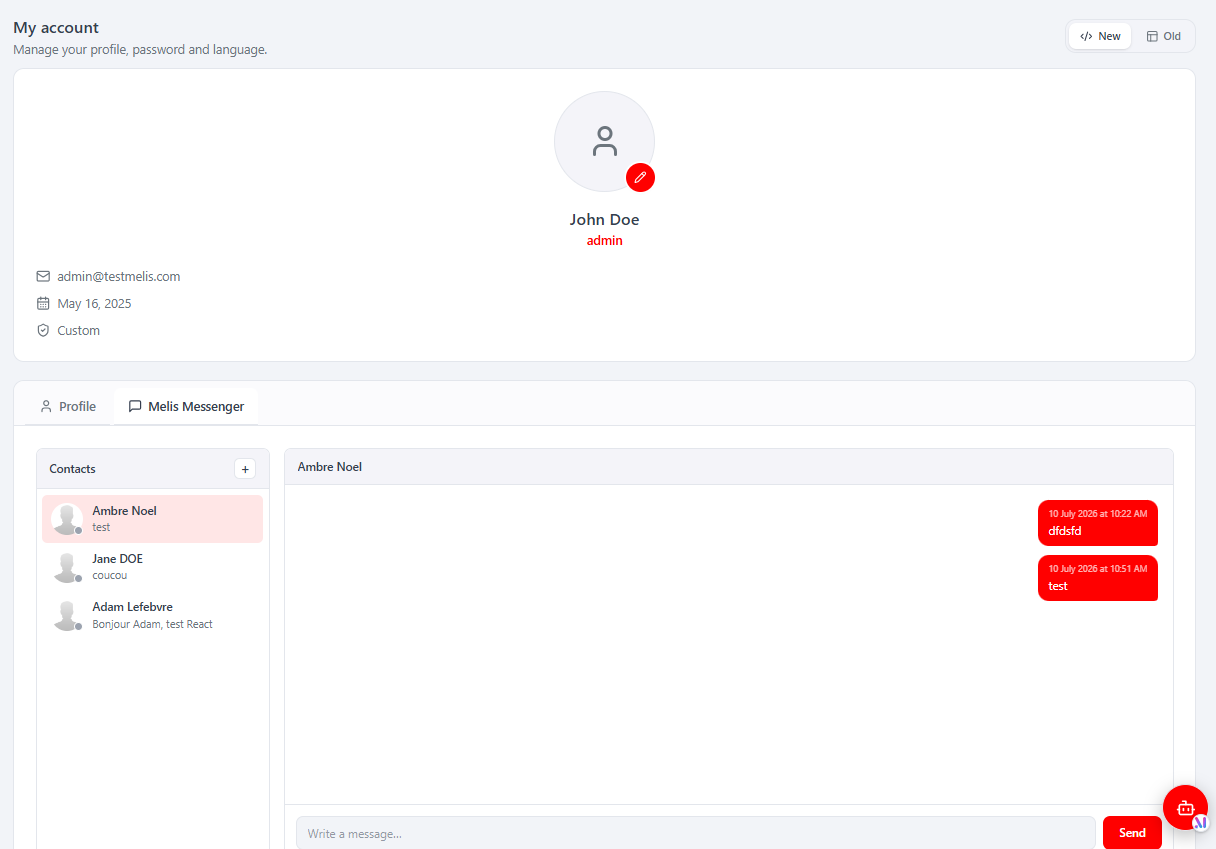
The badge and the open thread refresh on a timer, when the browser tab regains focus, and as soon as you open a conversation. On a narrow screen (~under 560px) the tab collapses to one column at a time (Contacts or conversation) with a back button, like a mobile chat app. A New / Old toggle on the account page falls back to the legacy profile in an iframe; in that case the header icon drives the iframe DOM to open the legacy Messenger tab instead.
The brick
The React UI lives in ui-react/ and builds (Vite IIFE, React/ReactRouter externalised to the host globals) to public/ui-react/brick.js alongside brick.manifest.json. The manifest declares this is not a tool — note the nulls:
{ "id": "messenger", "route": null, "label": "Messenger",
  "forwardKey": null, "melisKey": null, "entry": "brick.js" }
ui-react/src/brick.tsx registers two host surfaces for the id messenger, both gated on module activation:
// 1) My-Account tab — modular extension point
window.__melisAccountTabs.push({
  id: 'messenger', label: 'Melis Messenger', icon: <ChatIcon />, order: 10,
  render: () => <MessengerTab />,
})
window.dispatchEvent(new CustomEvent('melis-account-tabs-changed'))

// 2) Topbar icon — the brick's Header widget
window.__melisRegisterBrick?.({ id: 'messenger', Header: MessengerHeader })| Component | Role |
|---|---|
brick.tsx | Entry point. Registers the Header widget and pushes the My-Account tab. |
MessengerHeader.tsx | Topbar icon + unread badge. Polls getNewMessage for the count, caches the last count in sessionStorage for instant paint, recounts on focus/visibility and on the melis-messenger-unread-changed event. Click opens My Account and pre-selects the Messenger tab. |
MessengerTab.tsx | The native React chat panel: Contacts list, conversation thread, composer, "new conversation" user search. Reads/writes the legacy JSON endpoints; responsive; dispatches melis-messenger-unread-changed when it marks a conversation read. |
Because the bundle externalises only react / react-dom / react-router-dom to the host globals (it cannot import Tailwind/shadcn/lucide/i18n), the components use inline styles with host CSS vars and an in-file {fr,en} dictionary keyed on document.documentElement.lang.
Endpoints reused
The module ships no config/react-api.php. Both React components call the existing legacy JSON endpoints of MelisMessenger\Controller\MelisMessengerController under /melis/MelisMessenger/MelisMessenger/…, sending X-Requested-With: XMLHttpRequest and credentials: 'include'.
Header (MessengerHeader.tsx) — the badge poller:
| Method & URL | Purpose |
|---|---|
GET …/getNewMessage | Unread messages → { messages: [...] }; badge count = messages.length. |
GET …/getMsgTimeInterval | Platform polling interval { interval } (default 60 000 ms). |
The header caps polling to min(interval, 10 000 ms) so the always-visible badge stays responsive.
My-Account tab (MessengerTab.tsx) — the chat panel:
| Method & URL | Purpose |
|---|---|
GET …/getContactListByDate | Conversations sorted by last-message date → { data: ContactRow[] }. |
GET …/getConversation/:id?limit=&offset= | A conversation's messages → { data: Message[], user_id }. |
GET …/getUserListForConversation?search= | User search for "new conversation" → { data: UserRow[] }. |
POST …/createConversation | Start a conversation (mbrids=<userId>) → { conversationId }. |
POST …/saveMessage | Send a message (msgr_msg_id, msgr_msg_cont_message) → { success }. |
POST …/updateMessageStatus | Mark the open conversation read (id=<convoId>) — fired on open/reply. |
GET …/getMsgTimeInterval | Polling interval for the thread refresh. |
getContactListByDate and getUserListForConversation are used specifically by the React tab (date-sorted list + server-side user search); the older getContactList / renderMessenger* actions still drive the legacy tool and are left unchanged.
Key services
| Alias | Role |
|---|---|
MelisMessengerService | Public service for messaging: send and read messages/conversations. |
MelisMessengerMsgTable | Table gateway for melis_messenger_msg. |
MelisMessengerMsgContentTable | Table gateway for melis_messenger_msg_content. |
MelisMessengerMsgMembersTable | Table gateway for melis_messenger_msg_members. |
MelisMessengerService methods fire melismessenger_*_start / *_end events for each read/list call (e.g. melismessenger_get_conversation_start / _end):
| Method | Role |
|---|---|
saveMsg($data) | Create/update a conversation; returns the conversation id. |
saveMsgMembers($data) | Attach a user to a conversation. |
saveMsgContent($data) | Save a message inside a conversation. |
getConversation($id) | Fetch a full conversation by id. |
getConversationWithLimit($id, $limit, $offset) | Paginated conversation fetch. |
getNewMessage($id) | Fetch new/unread messages since the last poll. |
updateMessageStatus($data, $msg_id, $user_id) | Mark messages read for a user. |
getContactList($convo_id, $user_id) | Resolve the contacts of a conversation. |
prepareConversationId($userId) | List conversation ids a user belongs to. |
getUserRightsForMessenger() | Check the current user's access rights to the module. |
Database tables
| Table | Holds |
|---|---|
melis_messenger_msg | One row per conversation (msgr_msg_id, msgr_msg_creator_id, msgr_msg_date_created). |
melis_messenger_msg_members | Users participating in a conversation (msgr_msg_mbr_id, msgr_msg_id, msgr_msg_mbr_usr_id). |
melis_messenger_msg_content | Individual messages (msgr_msg_cont_id, sender, message text, date, status). |
Capabilities
None. The module has no config/react.capabilities.php and no rights-bearing menu node — it is not a menu tool. Access is guarded by the legacy endpoints requiring an authenticated back-office session, and the surfaces are gated on module activation. There are no MelisCan(...) capability strings to declare or check for Messenger.
Example
$messenger = $this->getServiceManager()->get('MelisMessengerService');

// Create a conversation, add a member, then post a message
$convoId = $messenger->saveMsg($data);
$messenger->saveMsgMembers(['msgr_msg_id' => $convoId, 'msgr_msg_mbr_usr_id' => $userId]);
$messenger->saveMsgContent(['msgr_msg_id' => $convoId, 'msgr_msg_cont_message' => 'Hi']);

// Read messages
$thread = $messenger->getConversation($convoId);
$page   = $messenger->getConversationWithLimit($convoId, 10, 0);
$new    = $messenger->getNewMessage($convoId);

// Mark read
$messenger->updateMessageStatus($data, $msgId, $userId);
Key files
| Concern | Path |
|---|---|
| Module config (routes, services, controllers) | vendor/melisplatform/melis-messenger/config/module.config.php |
| Interface declaration (legacy Profile tab + header icon) | vendor/melisplatform/melis-messenger/config/app.interface.php |
| Forms config | vendor/melisplatform/melis-messenger/config/app.forms.php |
| Tools config | vendor/melisplatform/melis-messenger/config/app.tools.php |
| Public service | vendor/melisplatform/melis-messenger/src/Service/MelisMessengerService.php |
| Main controller (JSON endpoints reused by React) | vendor/melisplatform/melis-messenger/src/Controller/MelisMessengerController.php |
| Table gateways | vendor/melisplatform/melis-messenger/src/Model/Tables/ |
| React brick (Header widget + My-Account tab) | vendor/melisplatform/melis-messenger/ui-react/src/ |
| Built brick + manifest | vendor/melisplatform/melis-messenger/public/ui-react/brick.js, brick.manifest.json |
| DB install delta | vendor/melisplatform/melis-messenger/install/ |
See also: melis-core