

MelisCmsMcq
Back-office MCQ (multiple-choice questionnaire / quiz) builder for the Melis CMS, now a native full-React tool in the v6 back-office. Package
melisplatform/melis-cms-mcq.
Purpose
MelisCmsMcq is the UI half of the MCQ system. It provides the workbench where you author questions (with answers, type, difficulty, category and tags), organise them into question categories and MCQ groups, and assemble MCQs (tests) either by hand via a per-user basket or automatically via a random model. It has no data layer of its own: all persistence (tables, services, scoring, XML snapshots and front-office rendering) is delegated to the companion module MelisCmsMcqEngine.
In v6 the tool is a native full-React brick: real React pages calling the module's own /melis/react-api/mcq* JSON endpoints, with no iframe in the default view. The legacy PHP tool is untouched and reachable only through a per-tool New / Old toggle.
Enable it
Add to config/melis.module.load.php:
return [
    'MelisCmsMcq',
];
Requires melisplatform/melis-cms-mcq-engine (^5.3) and laminas/laminas-paginator. Also requires MelisCms, MelisCore (backoffice) and MelisCmsTags (question tagging) to be loaded. Install chain: MelisCmsMcq → melis-cms-mcq-engine → melis-cms + melis-cms-tags.
The React brick is discovered via GET /melis/react-api/react-modules and only appears when the module is active. src/Module.php merges config/react-api.php (the JSON endpoints) and config/react.capabilities.php (the advanced-rights map) into the application config.
Where it lives in the React back-office
Sidebar → MelisCms → MCQ, route /melis-cms/mcq (derived from the menu forward MelisCmsMcq/MelisCmsMcq). The brick is registered under id cms-mcq and draws the whole tool in React — no Sidebar/Header of its own.
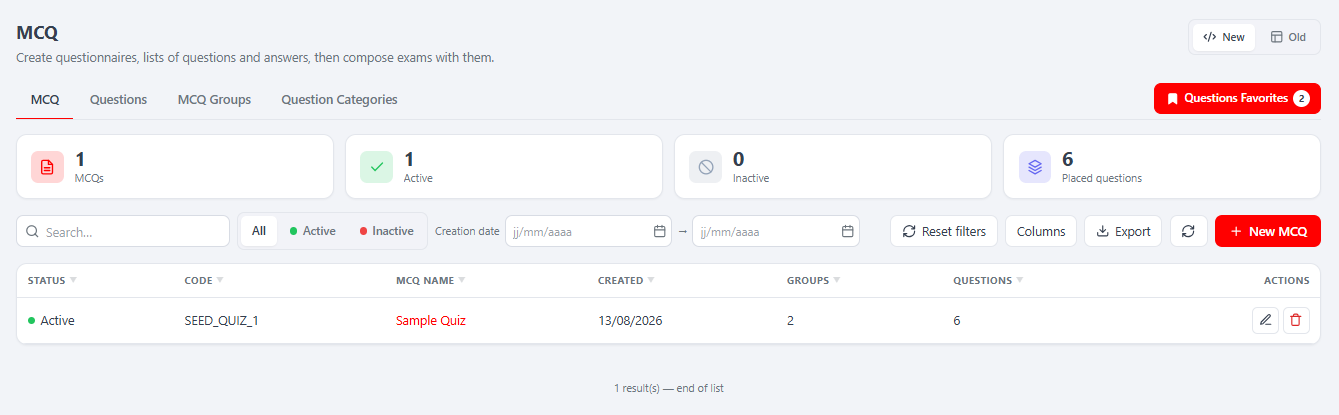
The manifest (public/ui-react/brick.manifest.json) sets persistent: true and subTabs: true, so the brick owns its own in-tool sub-tab bar and stays mounted across host navigation: opening an MCQ or a question adds a sub-tab, and filters, sort and half-typed forms survive when you jump back to a list. The URL is only a cosmetic reflection (history.replaceState) of the active record.
| Property | Value |
|---|---|
| Brick id | cms-mcq |
| Route | /melis-cms/mcq |
| Label | MCQ |
| forwardKey | MelisCmsMcq/MelisCmsMcq |
| melisKey | meliscmsmcq_tool (access-guard and rights-bearing key) |
New / Old toggle. On the list view an unrestricted user gets a New (React) / Old (legacy iframe) switch; the "Old" view is the classic tool served at
/melis/react-tool-page?key=meliscmsmcq_tool. Restricted users only ever see the React view.
Back-office workbench
A four-tab React workbench, plus a Questions Favorites basket (a per-user bookmarked shortlist) in the tool header. Rule of thumb: author questions → group them (MCQ groups / categories) → assemble a MCQ → Preview to take it and read the correction.
| Tab | What it manages |
|---|---|
| MCQ | List of assembled tests (Id, Status, Code, name, creation date, groups, questions) with KPI cards, search, status/date filters, column manager and export. Add opens the MCQ builder as a sub-tab. |
| Questions | Question list with filters for category / type / status / difficulty / tags and search; a bookmark action toggles the question into Questions Favorites. |
| MCQ groups | Reusable question bundles (Id, Status, Code, Name). KPI cards, export, add/edit modal. |
| Question categories | Named question groupings (Id, Status, Code, Name). KPI cards, export, add/edit modal. |
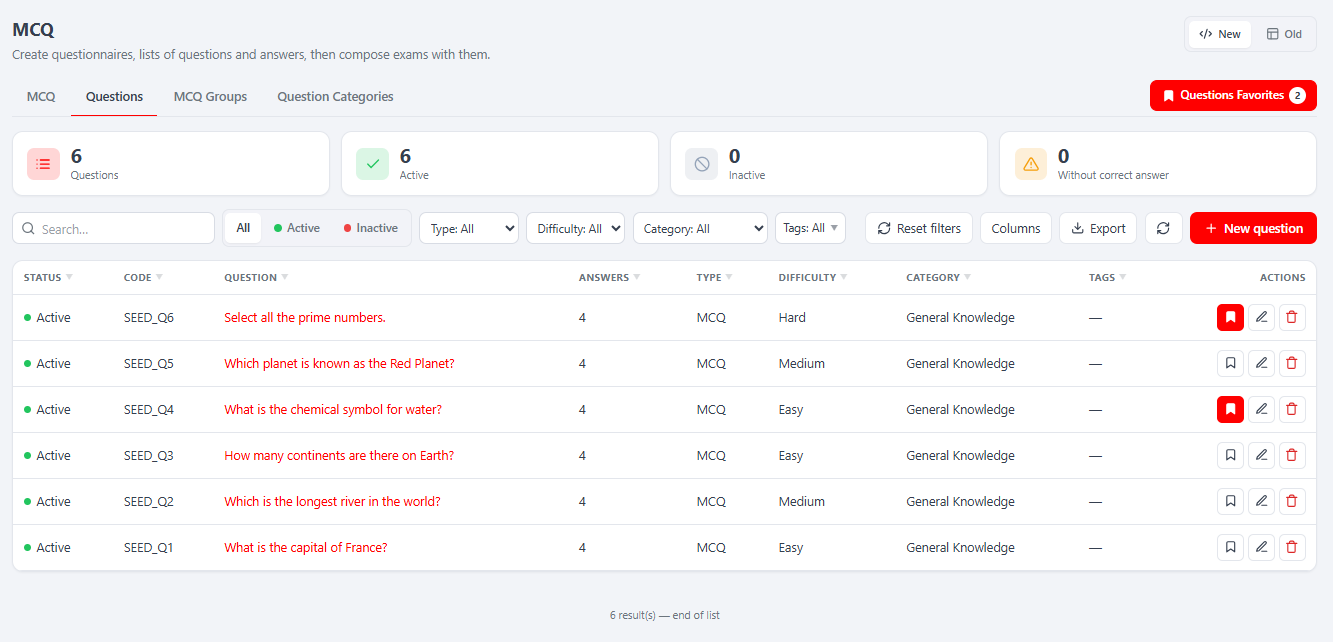
Question editor
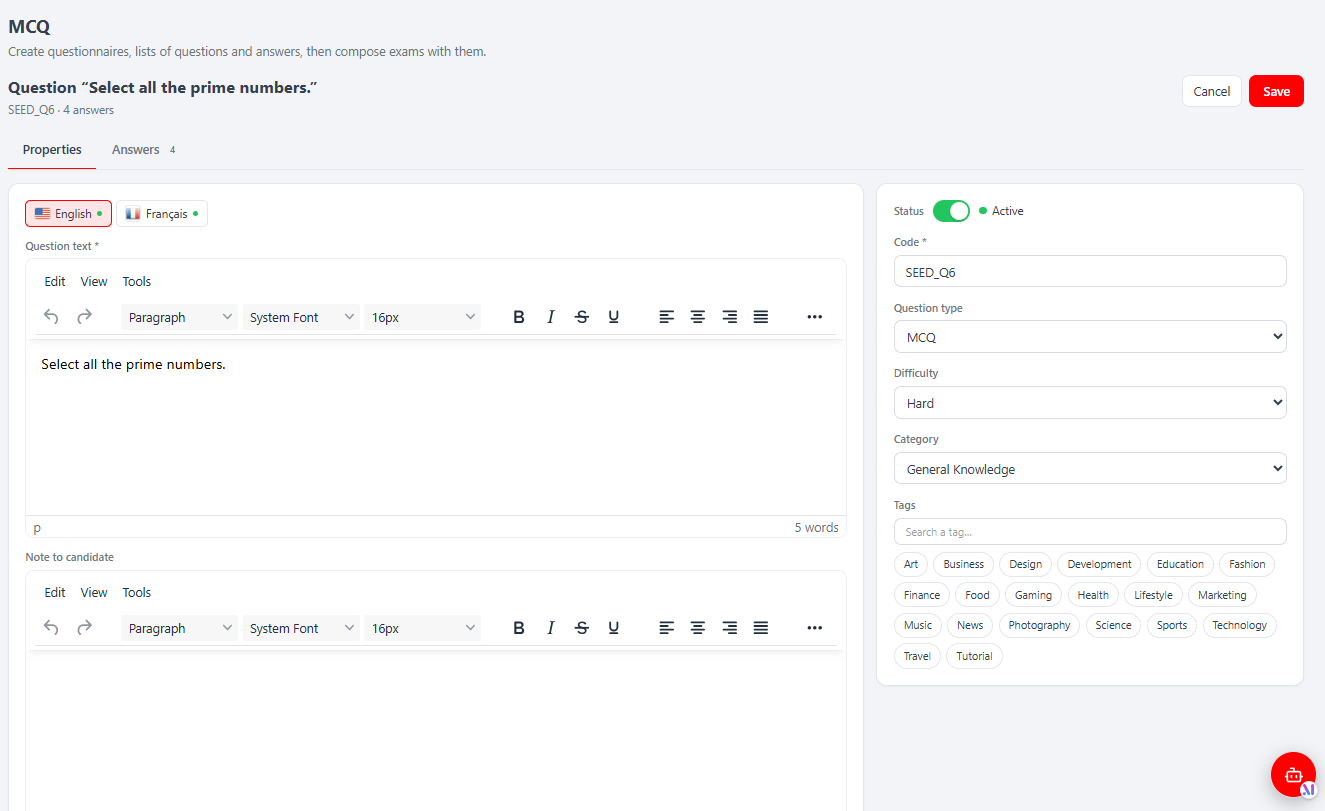
Add / edit on the Questions tab opens the editor as a sub-tab, in two tabs:
| Editor tab | Content |
|---|---|
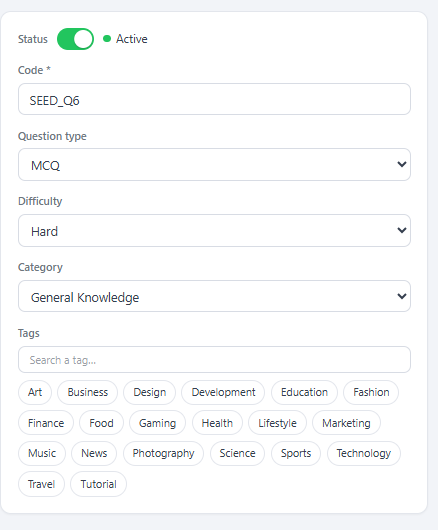
| Properties | Code, Type (MCQ / Open Ended), Category, Tags, Difficulty, Status |
| Texts / Answers | Per-language question text plus each answer with its Correct answer (Yes/No) flag, a code and a status; drag the grip handle to reorder answers |
MCQ builder
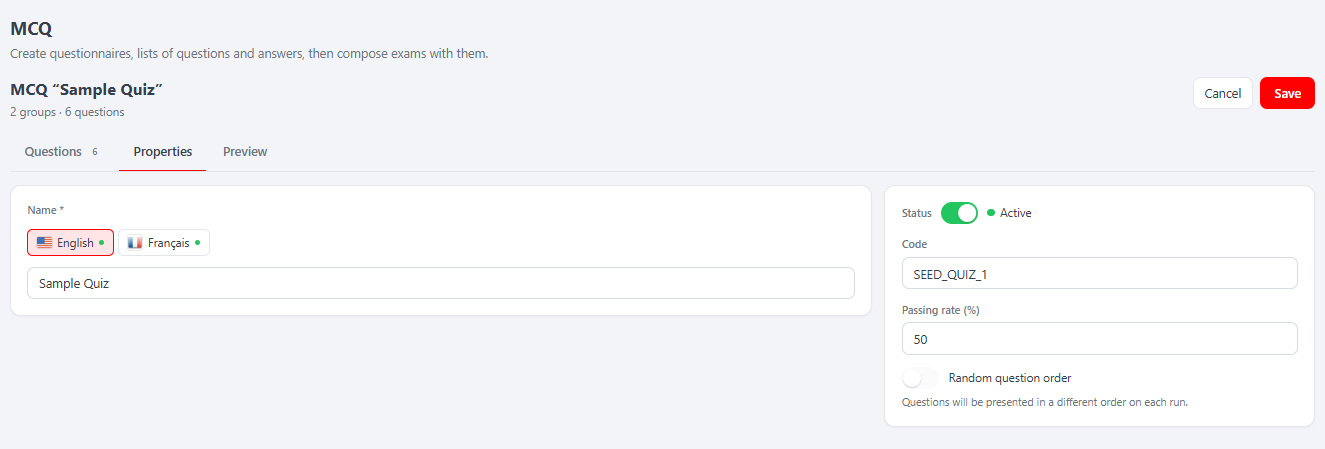
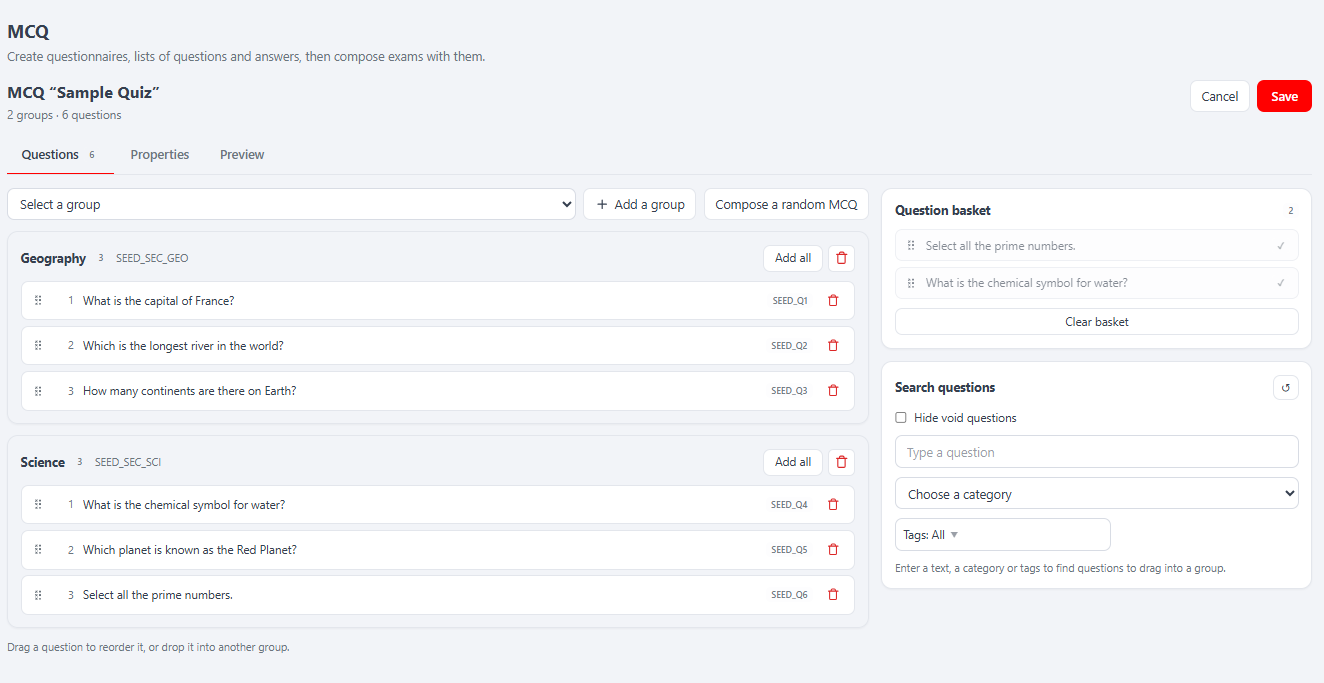
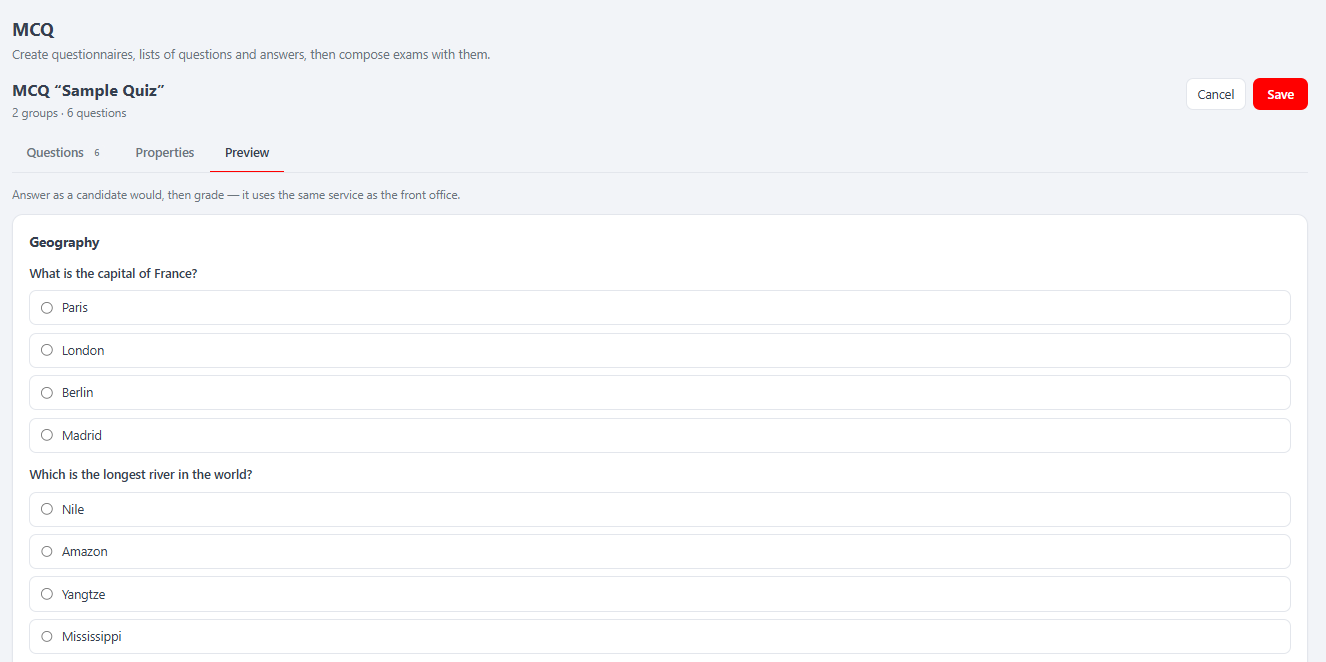
MCQ tab → Add (or edit a row) opens the builder as a sub-tab, in three tabs:
| Builder tab | Content |
|---|---|
| Properties | Name, code, status, Minimum score required (%) (passing rate) and a "change questions order at every MCQ creation" random-shuffle toggle |
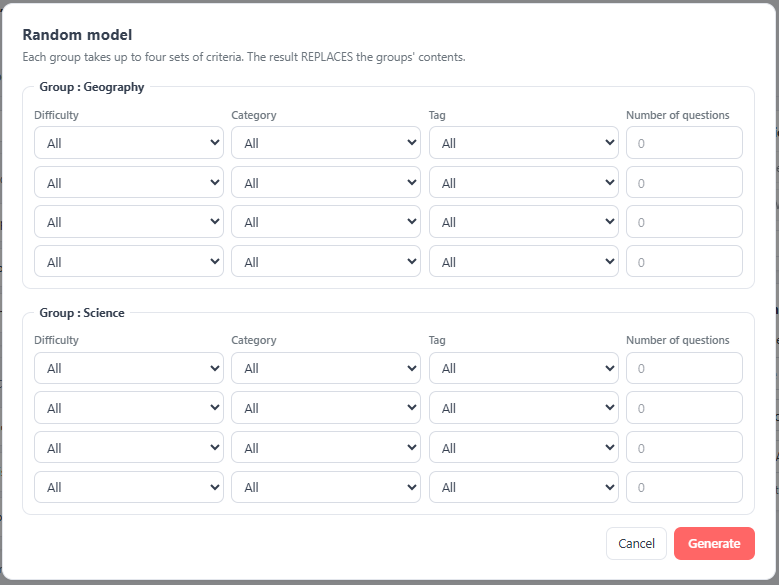
| Composition (Questions) | Add groups, then fill each group by dragging questions from the Questions Favorites / Search Questions side panels, or click Configure a random MCQ to auto-pick per group |
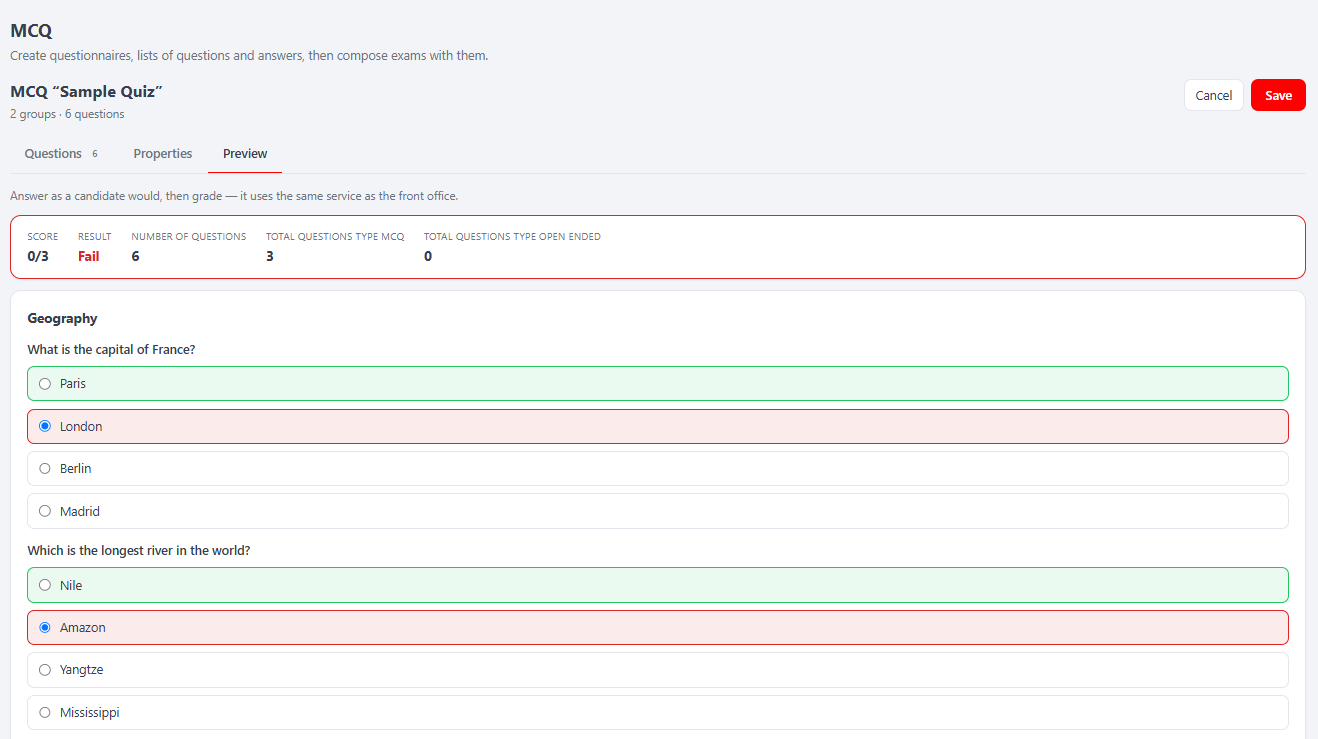
| Preview | Take the assembled quiz, then submit to see the engine-computed Correction (score, pass/fail, per-question user vs. correct answers). The React UI only displays it |
The Random Model modal defines per-group criteria rows (Difficulty / Category / Tag / Number); saving resolves the matching question IDs server-side via the engine's getRandomQuestionIds.
A save fails if there is no name, no group, or any empty group — same rules as the legacy tool. The MCQ's XML snapshot (
mcq_xml) is regenerated by the engine on every save, never written by hand. Creating or deleting a category refreshes shared reference data so it appears immediately in the Question editor's category selector.
React API — endpoints
All routes are child routes of melis-react-api (merged from config/react-api.php), served by four invokable controllers. Response contract everywhere: { success: bool, data: T, error?: string, fields?: string[] }. Every action calls denyUnlessAccess() (auth + MelisCoreRights::canAccess('meliscmsmcq_tool')) then a capability guard denyUnlessCan(<cap>).
MCQ — MelisReactApiMcqController:
| Method · URL | Action · cap | Purpose |
|---|---|---|
GET /melis/react-api/mcq | list · mcq | keyset list |
GET /melis/react-api/mcq/stats | stats · mcq | KPI cards |
GET /melis/react-api/mcq/groups | groups · mcq | groups selectable in the builder |
GET /melis/react-api/mcq/:id | get · mcq | full detail (props, names, ordered groups + questions) |
POST /melis/react-api/mcq/save | save · mcq.create | mcq.edit | create/update (regenerates mcq_xml) |
POST /melis/react-api/mcq/evaluate | evaluate · mcq.preview.test | score a set of answers |
GET /melis/react-api/mcq/:id/preview | preview · mcq.preview | the MCQ as played (from XML) |
DELETE /melis/react-api/mcq/delete/:id | delete · mcq.delete | delete (cascade) |
Questions (+ answers, basket, random draw) — MelisReactApiMcqQuestionController, at /melis/react-api/mcq-questions[…]: list/stats/refs/get/save (cap questions), delete (questions.delete), and the composition endpoints basket, basket/toggle, basket/clear, search, random, random-model (all cap mcq.composition). refs returns the shared reference data — types, difficulties, categories, tags, langs, nextCode.
MCQ groups — MelisReactApiMcqGroupController: list/stats/save/delete/related/get at /melis/react-api/mcq-groups[…] (caps groups, groups.delete).
Question categories — MelisReactApiMcqCategoryController: list/stats/save/delete/related/get at /melis/react-api/mcq-categories[…] (caps categories, categories.delete).
⚠ Route order matters: literal segments (
/stats,/save,/groups,/basket,/random,/evaluate,/refs) are declared before the catch-all/:id, and all names are prefixedmcq-*to avoid colliding with the genericmelis-react-apiroutes.
Business logic stays server-side. These controllers only validate input, run a transaction and shape JSON; the real work is in the engine services they resolve.
Capabilities (advanced rights)
config/react.capabilities.php is keyed under the rights-bearing menu node meliscmsmcq_tool — the same melisKey the controllers guard. Access to the tool itself stays MelisCoreRights::canAccess('meliscmsmcq_tool'); these capabilities gate components inside an already-authorised tool. Default-allow: a user/role without the capabilities section keeps everything.
Flattened capability strings:
mcq,mcq.create,mcq.edit,mcq.delete,mcq.export;mcq.composition(compose page — also gates the basket + search/random endpoints),mcq.properties,mcq.preview,mcq.preview.testquestions,questions.create,questions.edit,questions.delete,questions.export;questions.properties,questions.answersgroups,groups.create,groups.edit,groups.delete,groups.exportcategories,categories.create,categories.edit,categories.delete,categories.export
The four top-level keys (mcq, questions, groups, categories) are the four list tabs. React reads them via useCaps(MELIS_KEY) and hides tabs/buttons accordingly; the server-side denyUnlessCan() is the real enforcement.
Engine services used
MelisCmsMcq registers no services of its own — its React controllers resolve aliases from MelisCmsMcqEngine at runtime:
| Engine service alias | Used by this module for |
|---|---|
MelisCmsMcqQuestionsService | Questions CRUD, basket list, random selection (getRandomQuestionIds) |
MelisCmsMcqAnswersService | Answers CRUD (question editor) |
MelisCmsMcqQuestionCategoryService | Question categories CRUD |
MelisCmsMcqGroupsService | MCQ groups CRUD |
MelisCmsMcqService | MCQ CRUD, XML generation (generateMcqXml), fetch (getMcq), scoring (evaluateAnswers), delete (deleteMcqById) |
Database tables
All tables are owned by MelisCmsMcqEngine. The BO surfaces in this module map to them as follows:
| Engine table | BO surface that writes to it |
|---|---|
melis_cms_mcq_questions + _trans | Questions tab + question editor |
melis_cms_mcq_answers + _trans | Answers editor (inside question editor) |
melis_cms_mcq_question_groups + _trans | Question categories tab |
melis_cms_mcq_groups + _trans | MCQ groups tab (tied to an MCQ via mcqg_mcq_id) |
melis_cms_mcq + _trans | MCQ tab; assembled test stored as XML in mcq_xml |
melis_cms_mcq_questions_list | Question-to-MCQ-group membership |
melis_cms_mcq_baskets | Questions Favorites per user |
Naming caution. The UI's "Question categories" map to
melis_cms_mcq_question_groups; the UI's "MCQ groups" map tomelis_cms_mcq_groups. Two separate "group" tables with different purposes — see the MelisCmsMcqEngine doc.
Tags integration
config/app.interface.php registers a MelisCmsTags association so questions are taggable (association type MCQ_QUESTION, entity table melis_cms_mcq_questions, primary mcqq_id). The Questions list surfaces a tags column and a tags filter driven by this registration; in the React tool tags are also part of the question refs payload.
Front office
MelisCmsMcq has no front-office output of its own. The quiz renderer is a view helper (renderMcqQuestions) registered in MelisCmsMcqEngine; the Preview tab uses it via the engine. See the MelisCmsMcqEngine reference for front-office rendering details.
Key files
| Concern | Path |
|---|---|
| React API routes + 4 invokable controllers | config/react-api.php |
| Advanced-rights capability map | config/react.capabilities.php |
| Module bootstrap (merges the two configs above) | src/Module.php |
| Shared controller trait (MELIS_KEY, denyUnlessAccess, json/error/tr) | src/Controller/McqReactApiTrait.php |
| MCQ list/get/save/preview/evaluate/delete | src/Controller/MelisReactApiMcqController.php |
| Questions + answers + basket + random draw | src/Controller/MelisReactApiMcqQuestionController.php |
| MCQ groups | src/Controller/MelisReactApiMcqGroupController.php |
| Question categories | src/Controller/MelisReactApiMcqCategoryController.php |
| React brick source (Vite IIFE) | ui-react/src/ (brick.tsx, McqPage.tsx, McqBuilder.tsx, QuestionEditor.tsx, mcq-api.ts, …) |
| Built brick bundle + manifest | public/ui-react/{brick.js, brick.manifest.json} |
| Legacy tool (tree, tabs, DataTables, views, JS) | config/app.interface.php, config/app.tools.php, src/Controller/, view/, public/js/ |
See also: melis-cms-mcq-engine, melis-cms-tags, melis-cms, melis-core