

MelisCalendar
Back-office scheduling tool with a native React month calendar, drag-and-drop events and a dashboard widget. Package
melisplatform/melis-calendar.
Purpose
MelisCalendar is the calendar / event-scheduling tool of the platform: dated events on an interactive month grid, drag-to-schedule and drag-to-reschedule. In the v6 React back-office (/melis-react) it ships as a native full-React brick — a custom monthly grid with native (and touch) drag-and-drop — that reads and writes through a react-api JSON layer. A New / Old toggle lets users fall back to the legacy FullCalendar tool in an iframe. Events are platform-global (a shared team agenda, not tied to a site).
Enable it
Add to config/melis.module.load.php:
return [
    'MelisCalendar',
];
The only required dependency is melisplatform/melis-core. The tool appears in the React back-office only while the module is active (modular brick discovery via GET /melis/react-api/react-modules).
Back-office (React)
Left sidebar → MelisMarketing → Calendar (calendar icon). It opens as a persistent top tab named Calendar. It is a single-level tool (no sub-tabs) with a create/edit modal.
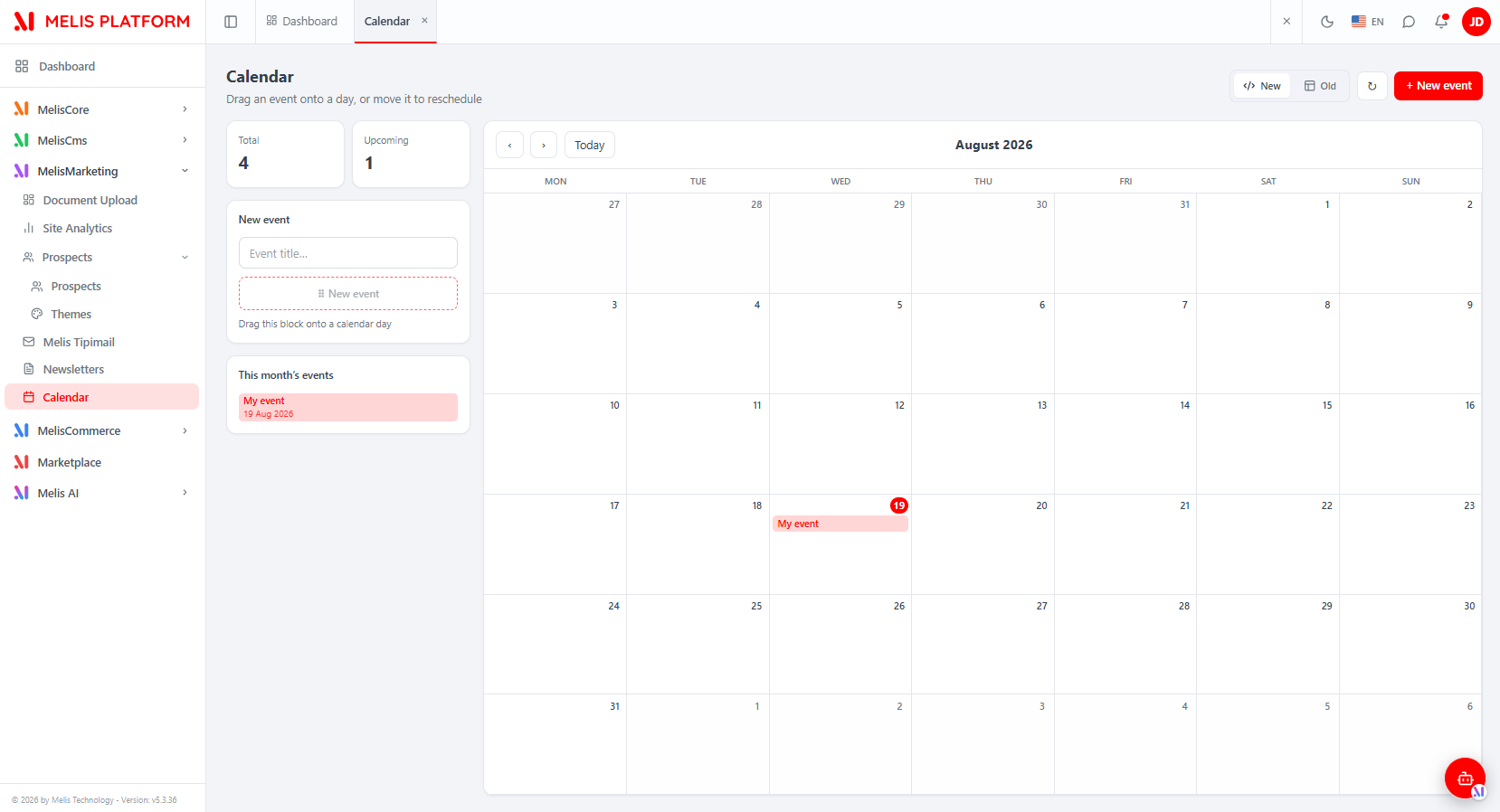
| Area | Description |
|---|---|
| Custom month grid | 6-week grid (Monday→Sunday), ‹ / › to change month, Today to jump back, current day highlighted. Events render as chips on their day(s); multi-day events span cells. |
| "New event" drag block | Left-panel dashed block: type a title, then drag it onto a day to create the event there (tap-to-arm on touch devices). |
| "+ New event" | Top-right button opening the modal with explicit Title / Start / End date pickers. |
| KPI cards | Total and Upcoming counts (upcoming = start date today or later). |
| "This month's events" list | Left-panel list of the current month's events; click one to edit. |
| Reschedule | Drag an event chip to another day; its duration is preserved. |
| New / Old toggle | Top-right toggle switching the whole tool between the React UI (New, default) and the legacy FullCalendar tool in an iframe (Old). |
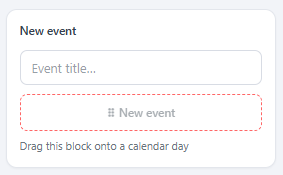
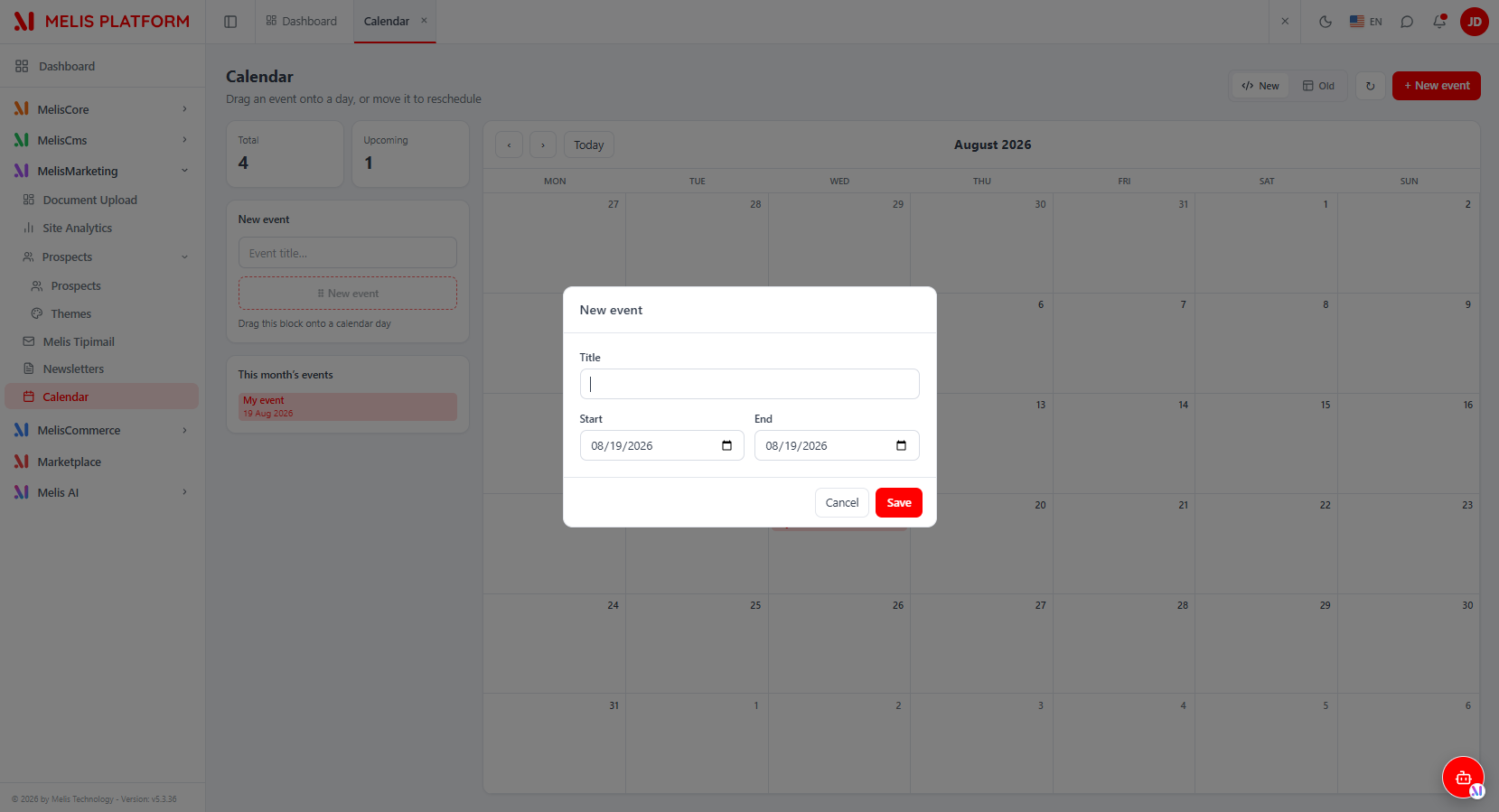
Rules enforced on save: the title is required (≤ 255 chars); if End is before Start it is clamped to Start, so an event's end is always ≥ its start.
React API
Routes live in config/react-api.php (merged via MelisCalendar\Module::getConfig()), served by MelisCalendar\Controller\MelisReactApiCalendarController. All under /melis/react-api/calendar-events, response contract { success, data, error }, dates as YYYY-MM-DD (no time). Every request sends X-Requested-With: XMLHttpRequest with credentials: 'include'.
| Method & URL | Action | Purpose |
|---|---|---|
GET /calendar-events[?from=&to=] | list | Events overlapping the window → { items: [{id,title,start,end}] } |
GET /calendar-events/stats | stats | KPI { total, ongoing, upcoming } |
GET /calendar-events/:id | get | One event {id,title,start,end} |
POST /calendar-events/save | save | Create (no id) / update (with id); also used for reschedule |
DELETE /calendar-events/delete/:id | delete | Delete an event |
Route order matters: /stats, /save and /delete/:id are declared before the catch-all /:id.
// create OR reschedule/edit (omit id = create, include id = update)
await fetch('/melis/react-api/calendar-events/save', {
  method: 'POST', credentials: 'include',
  headers: { 'X-Requested-With': 'XMLHttpRequest', 'Content-Type': 'application/json' },
  body: JSON.stringify({ id: null, title: 'Kickoff', start: '2026-08-19', end: '2026-08-19' }),
})
The controller talks to
melis_calendardirectly via parameterised SQL (Laminas\Db\Adapter\AdapterInterface), reproducing the legacy rules and audit fields (cal_created_by/cal_last_update_byfromMelisCoreAuth). It does not callMelisCalendarService.
Capabilities (advanced rights)
Declared in config/react.capabilities.php under the leaf tool node meliscalendar_tool (the same key is the controller access-guard melisKey and the front can() key):
return [
    'melisReactToolCapabilities' => [
        'meliscalendar_tool' => ['create', 'edit'],
    ],
];
Only two capabilities exist:
create— create an event (drag a new title onto a day / "+ New event").edit— move / reschedule (drag), edit or delete an existing event.
Viewing the calendar requires create OR edit (either is enough): list / stats are guarded server-side by denyUnlessCanAny(['create','edit']), and in the UI by can('create') || can('edit'). save requires create when there is no id and edit when an id is present; delete requires edit. Guards are default-allow (undeclared cap allowed) and admin-bypass.
Services & events (legacy backbone)
The module still exposes MelisCalendarService for programmatic access — used by the legacy tool and by other modules, but not by the React controller:
| Method | Role |
|---|---|
addCalendarEvent() | Creates a new event. |
reschedCalendarEvent() | Updates the dates of an existing event. |
deleteCalendarEvent() | Removes an event. |
A meliscalendar_save_event_end event fires after each save. Other modules can attach to it for notifications or external calendar synchronization:
$sharedEvents->attach('MelisCalendar', 'meliscalendar_save_event_end', function ($e) {
    $params = $e->getParams();
    // custom notification or sync logic
}, 10);
Dashboard widget
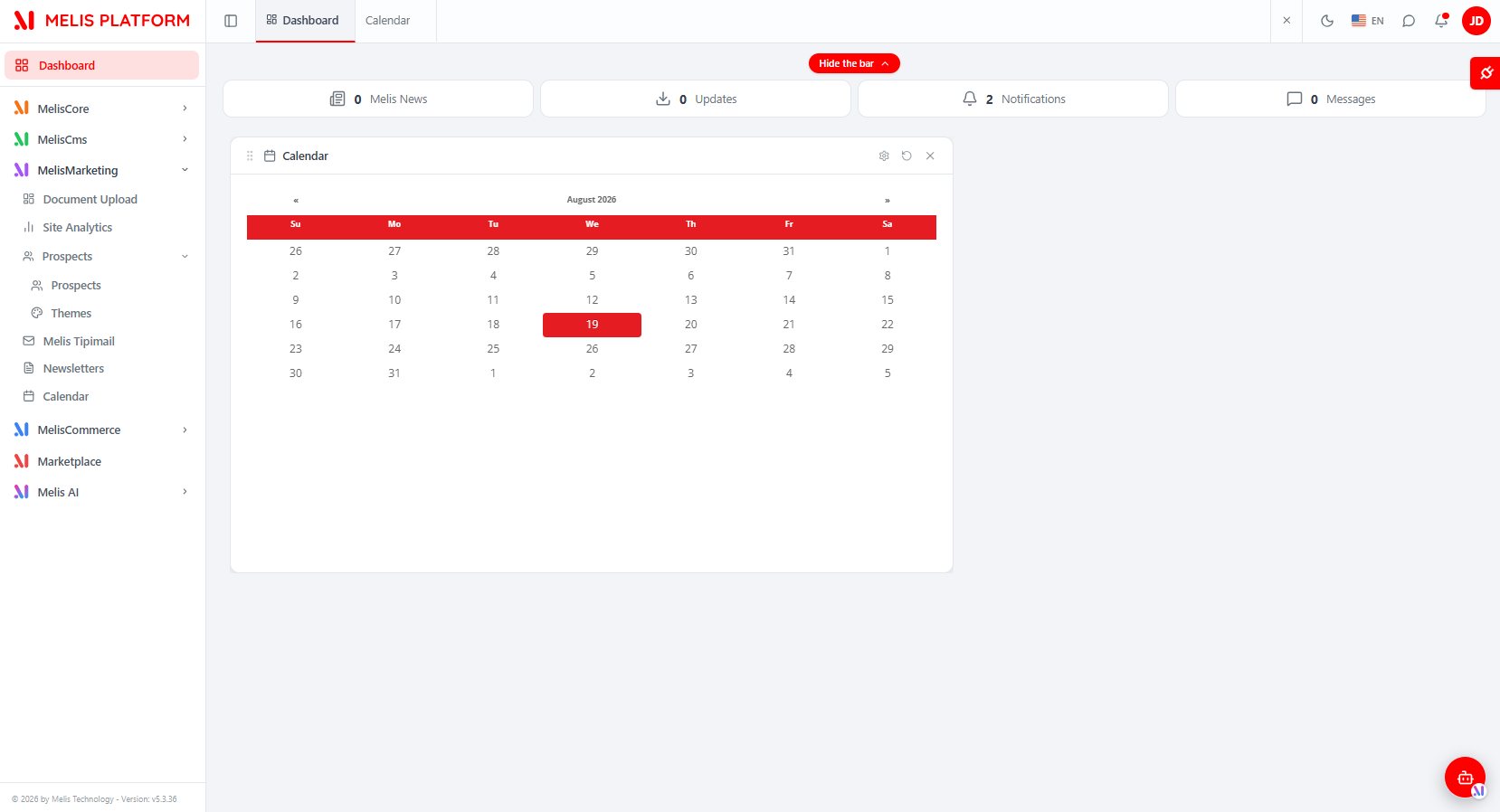
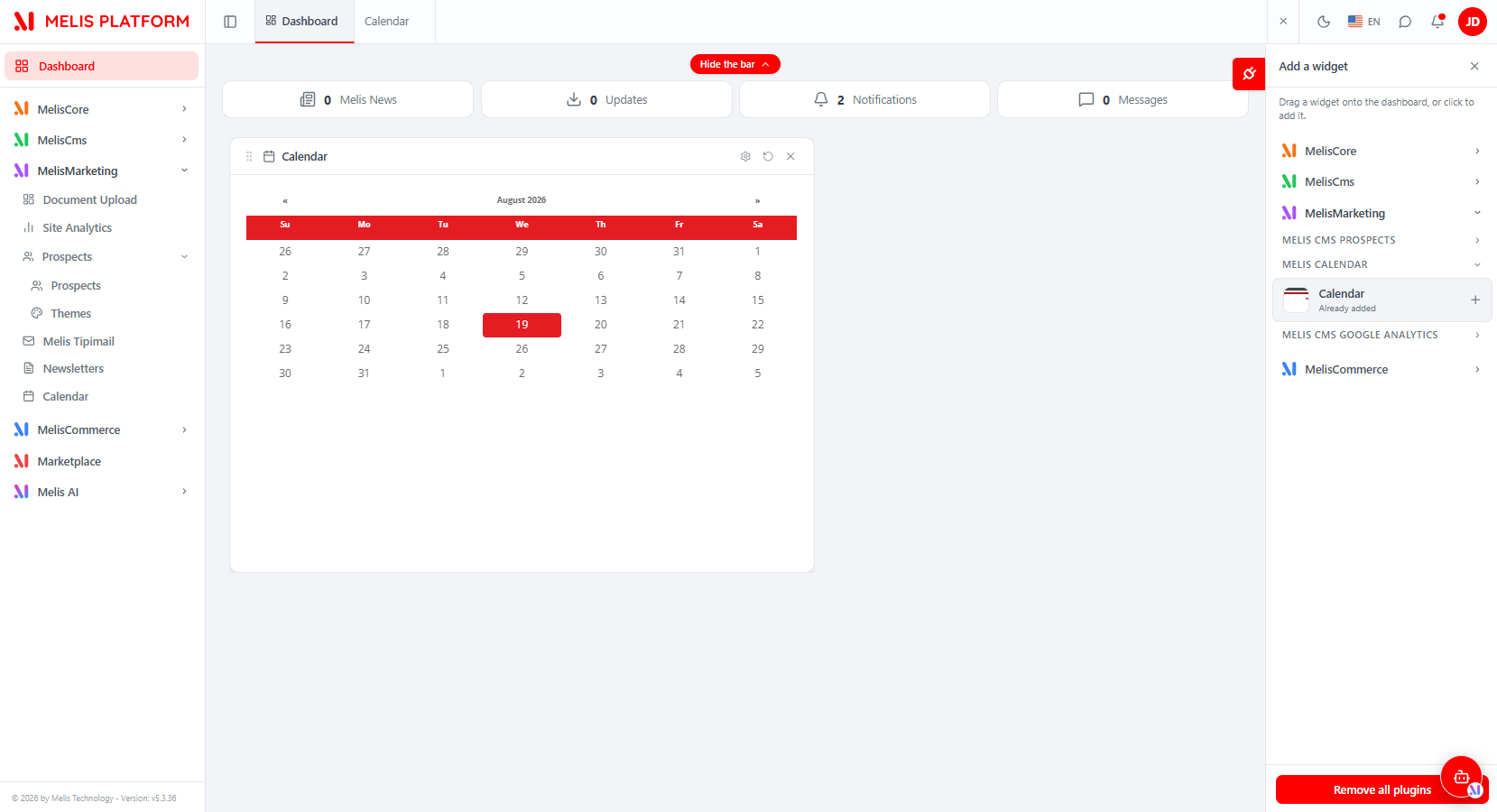
A Calendar dashboard widget shows the same events on the back-office Dashboard without opening the tool. It is added from the dashboard's plugin selector (MELIS CALENDAR section) and is served by the legacy MelisCalendarEventsPlugin.
Database tables
| Table | Holds |
|---|---|
melis_calendar | One row per event; includes audit fields tracking creation and last modification. |
See also: melis-core