

MelisCmsGoogleAnalytics
Google Analytics 4 (GA4) provider that turns a site's configured GA4 property into sessions curves, KPI totals and demographics inside the Melis React back-office. Package
melisplatform/melis-cms-google-analytics.
Purpose
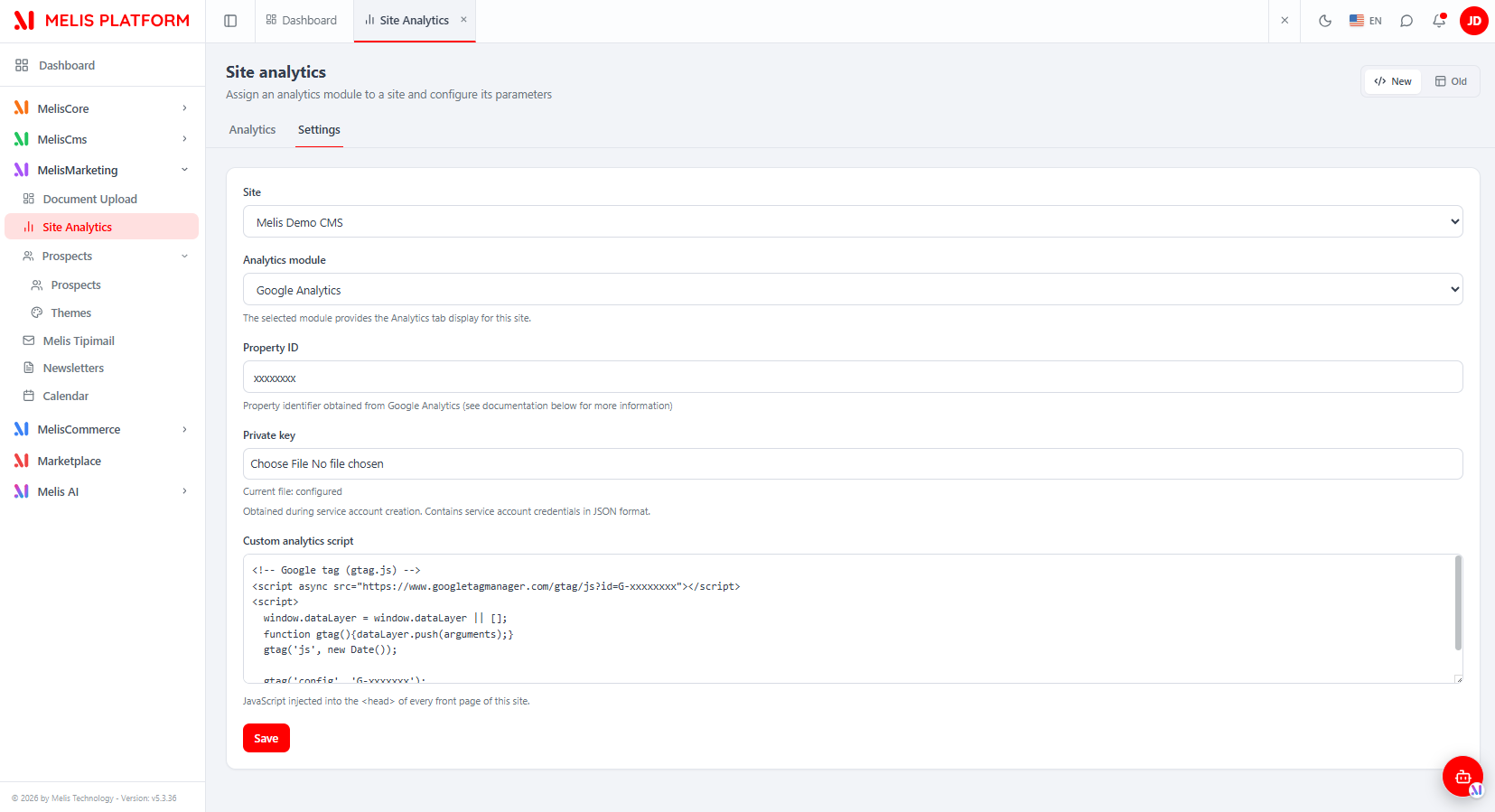
MelisCmsGoogleAnalytics reads a site's GA4 property server-side (via google/apiclient + google/analytics-data) and renders it as charts in the React back-office. It is a display-only provider: turning GA on for a site — choosing the provider, entering the Property ID and uploading the service-account private key JSON — is done in the Site analytics tool owned by melis-cms-page-analytics, not by this module.
The module ships two surfaces backed by one dashboard component:
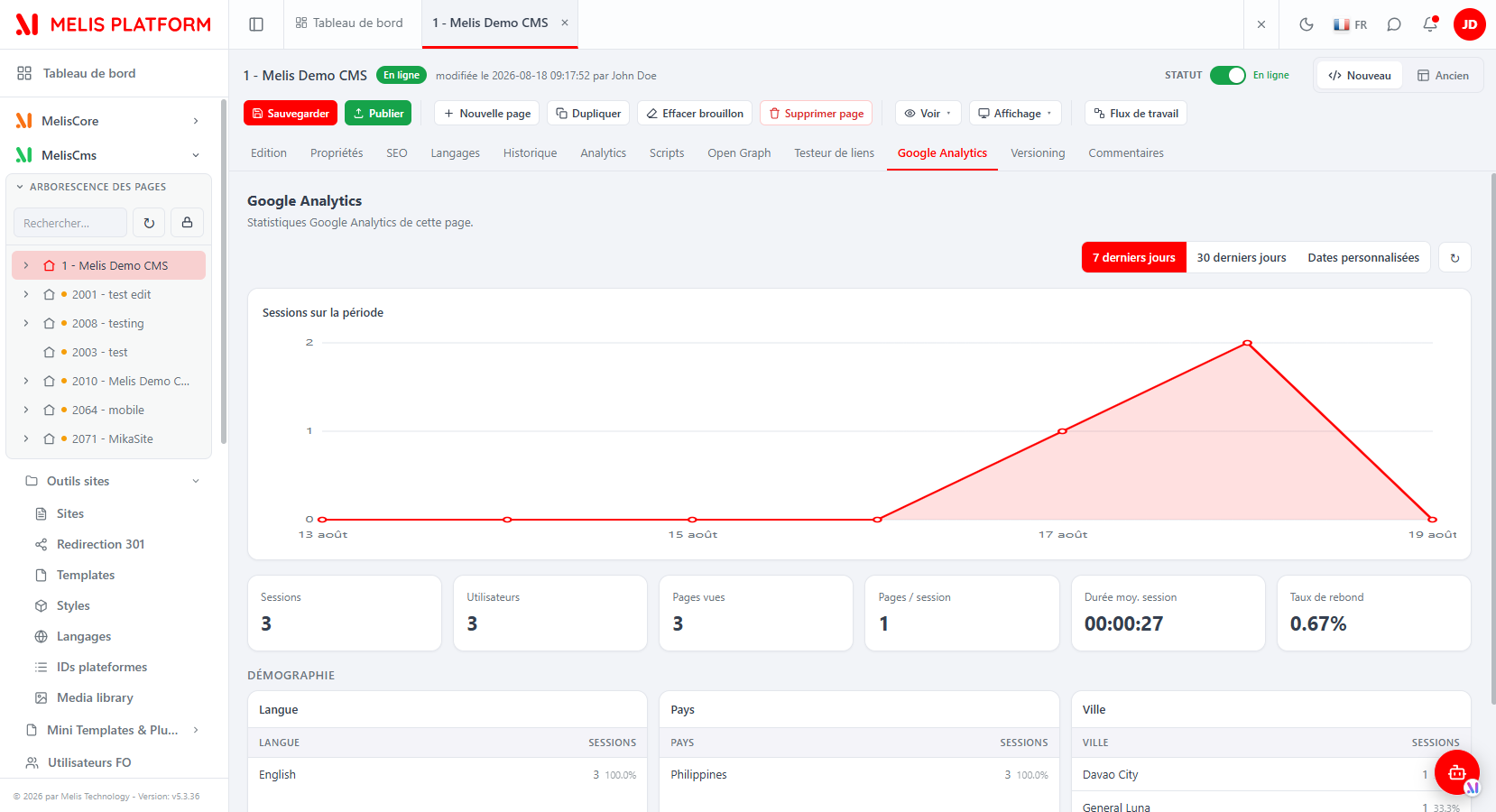
- A Google Analytics tab in the React CMS page editor, showing GA stats for the open page (filtered by page path).
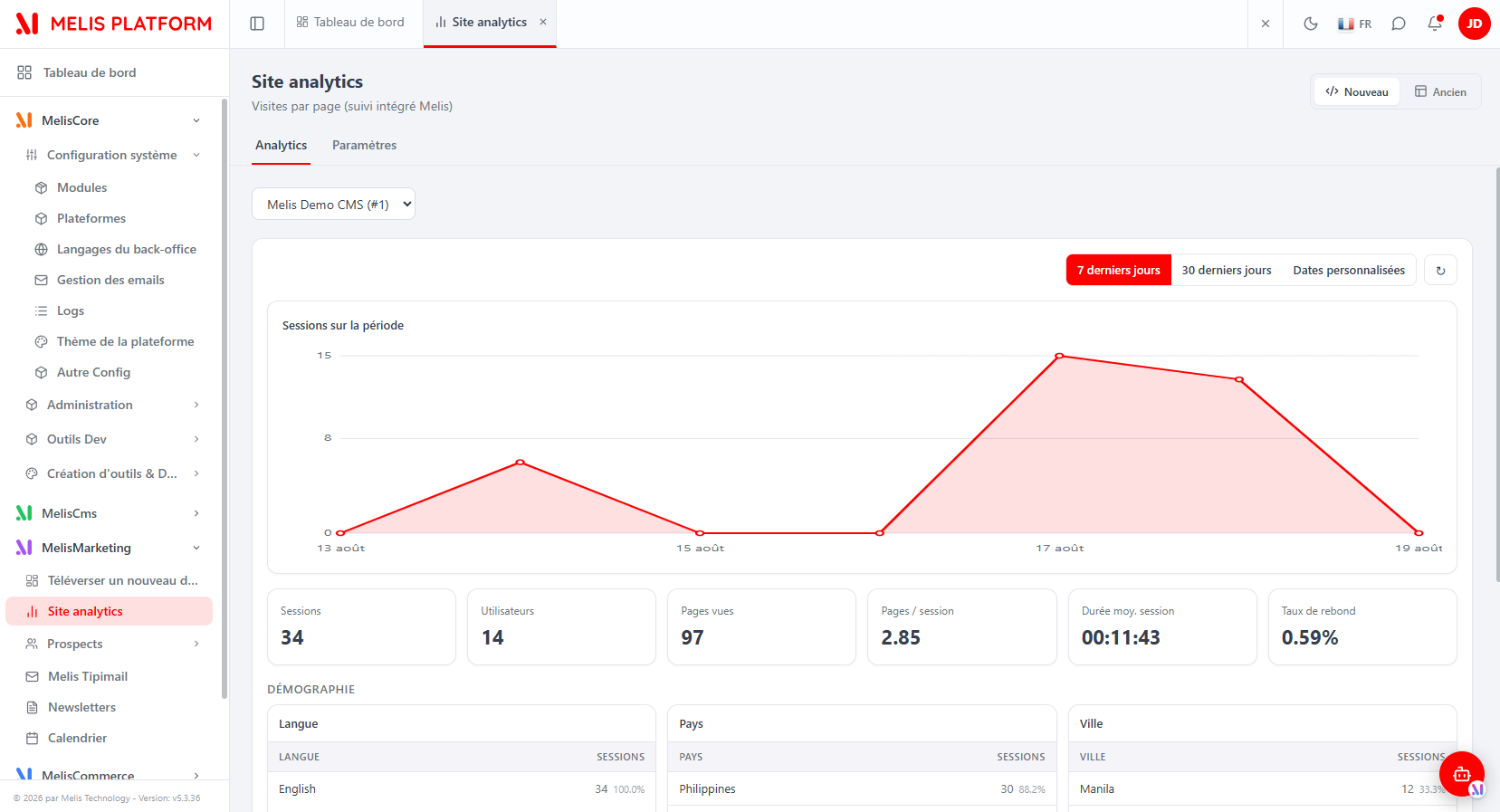
- A native React site-level display injected into the Site analytics tool, showing GA stats for the whole site when that site's Analytics module is set to Google Analytics.
Enable it
The module is discovered by the React host at boot via GET /melis/react-api/react-modules, which lists active modules shipping a brick.manifest.json. Deactivating the module removes both surfaces.
Composer dependencies: google/apiclient ^2.15, google/analytics-data ^0.16.0, melis-core, melis-cms, melis-cms-page-analytics.
The React brick
This is a page-editor TAB brick (widget-only): it has no left-menu tool, no route and no react-api.php. The manifest is the multi-brick shape with a single id-only entry, so the host loads the bundle at boot and the brick self-registers early.
{ "entry": "brick.js", "bricks": [ { "id": "cms-google-analytics" } ] }brick.tsx does not call __melisRegisterBrick; instead it performs two registrations at module-eval time:
// 1) Contribute a tab to the CMS page editor (owned by the CmsPage brick).
registerPageTab('melis_cms_google_analytics_page_tab', GoogleAnalyticsPageTab)

// 2) Register the native site-level display for the PageAnalytics host to mount by key.
;(window.__melisAnalyticsSiteDisplays ||= {})['melis_cms_google_analytics'] = GoogleAnalyticsSiteDisplay
window.dispatchEvent(new CustomEvent('melis:analytics-site-display-registered'))| Component | Role |
|---|---|
brick.tsx | Registration only — adds the page tab and the site display; no routed brick. |
GoogleAnalyticsPage.tsx (GoogleAnalyticsPageTab) | Page-editor tab. Receives { idPage }, resolves the page's site + path via getPageContext, then mounts the dashboard with siteId + pagePath. |
GoogleAnalyticsSiteDisplay.tsx | The dashboard: date-range switch, inline SVG sessions chart, KPI cards, three demographics tables. Reused by both surfaces (pagePath present ⇒ page-scoped, absent ⇒ whole site). |
Because React is externalised to host globals, the bundle cannot import host modules, hence the inline styles, in-file {fr,en} i18n (from document.documentElement.lang) and a hand-drawn SVG chart (no chart library). The Google SDK is never used client-side.
The dashboard
Both surfaces render the same dashboard:
- Date-range control — 7 days / 30 days / Custom (start & end date pickers + Apply) and a refresh button. End date defaults to today (GA4 intraday included).
- Sessions over the period — a line/area chart of sessions per day.
- KPI cards — Sessions, Users, Page views, Pages/Session, Avg. Session Duration, Bounce Rate.
- Demographics — three tables (Language, Country, City), each sorted by sessions with a share %.
If GA is not configured for the site or the API fails, a red error box shows the backend message (e.g. "GA settings incomplete") instead of charts.
Finding it: per page → MelisCms → open a page → Google Analytics tab. Per site → MelisMarketing → Site analytics → pick the site → Analytics sub-tab. GA is turned on for a site in Site analytics → Settings (Analytics module = Google Analytics, Property ID, private key JSON upload, optional custom analytics script).
Data endpoints
The module has no config/react-api.php. The React UI calls the already-existing GoogleAnalyticsController (route application-MelisCmsGoogleAnalytics/default, ViewJsonStrategy).
| Method & URL | Action | Purpose |
|---|---|---|
GET /melis/MelisCmsGoogleAnalytics/GoogleAnalytics/getPageContext?idPage=<id> | getPageContextAction | Resolve a page's owning site + path → { success, siteId, pagePath, pageURL }. |
POST /melis/MelisCmsGoogleAnalytics/GoogleAnalytics/getChartData | getChartDataAction | Fetch GA4 data for a site (optionally a page path) → { success, chartData, errors }. |
The getChartData body is form-encoded:
const body = new URLSearchParams()
body.set('siteId', String(siteId))
body.set('dateRange[option]', option)          // '7days' | '30days' | 'custom'
body.set('dateRange[startDate]', startDate)    // '7daysAgo' | '30daysAgo' | 'YYYY-MM-DD'
body.set('dateRange[endDate]', endDate)        // 'today' | 'YYYY-MM-DD'
body.set('dateRange[clientTimestamp]', String(Date.now()))
if (pagePath) body.set('pagePath', pagePath)   // page tab only → GA4 dimensionFilter on pagePath
chartData shape consumed by the UI:
chartData.date.totals{}→ KPI values (sessions,activeUsers,screenPageViews,screenPageViewsPerSession,averageSessionDuration,bounceRate).chartData.date.plot{ <tsSeconds>: { sessions } }→ the sessions curve (keys are seconds).chartData.language / .country / .city→ the demographics tables ({ value: { sessions } }).
Server-side, getChartDataAction calls the GA4 services (GoogleAnalytics4APIService / MelisCmsGoogleAnalyticsService, aliased in module.config.php), which use the site's Property ID and private-key JSON and normalise GA4 rows into chartData. On an API failure the action returns a clean { success:false, errors } rather than a 500.
Capabilities
Declared in config/react.capabilities.php and merged by Module::getConfig(). Because the module contributes a tab to the CMS page tool, it declares its capability under the shared rights-bearing node meliscms_page (an ArrayUtils::merge folds the tabs[] into the CMS page tool's caps):
return [
  'melisReactToolCapabilities' => [
    'meliscms_page' => [
      'tabs' => [
        ['key' => 'melis_cms_google_analytics_page_tab', 'label' => 'tr_melis_cms_google_analytics'],
      ],
    ],
  ],
];- The
keymust equal the key passed towindow.__melisRegisterPageTabinbrick.tsx— it is the tab's capability. Without it, the CMS-page caps whitelist hides the tab button even for an admin. - There is no backend capability to declare: the module exposes no
react-apiaction. Access is gated by access to the CMS page editor (page tab) and to the Site analytics tool (site display).
Host integration
- Page-tab bridge (
__melisRegisterPageTab) — provided by the CmsPage brick. Both bricks share an idempotent guard: whoever loads first createswindow.__melisPageTabRegistryand defines the registrar. CmsPage readstabs['melis_cms_google_analytics_page_tab']and renders the component with{ idPage }; the button appears only if the capability is granted. - Site-display bridge (
__melisAnalyticsSiteDisplays) — provided/consumed by themelis-cms-page-analyticsSite analytics tool. The brick registers its component under the keymelis_cms_google_analytics(matching the site's storedpad_analytics_key) and firesmelis:analytics-site-display-registered. The host mounts it (with{ siteId }) in the Analytics sub-tab when the site's Analytics module = Google Analytics — replacing the old iframe with native React. - Generic bits stay in the host. The page-editor tab shell, the Site analytics tool, the site selector and the Settings form belong to MelisCms / MelisCmsPageAnalytics; this module only fills the Google Analytics display.
Key files
| Concern | Path |
|---|---|
| Routes / GA services aliases | config/module.config.php |
React capabilities (meliscms_page.tabs[]) | config/react.capabilities.php |
Controller (getPageContextAction, getChartDataAction) | src/Controller/GoogleAnalyticsController.php |
| React brick source (Vite IIFE) | ui-react/src/brick.tsx, GoogleAnalyticsPage.tsx, GoogleAnalyticsSiteDisplay.tsx |
| Built brick + manifest | public/ui-react/brick.js, public/ui-react/brick.manifest.json |
See also: melis-cms-page-analytics · melis-cms · melis-core