

MelisDocumentUpload
Backoffice document-upload management as a native React tool: define document types, collect, store and serve uploaded files, and attach them to MelisFormCreator answers. Package
melisplatform/melis-document-upload.
Purpose
MelisDocumentUpload is a reusable document-collection tool. You define the document types you want to collect (a passport, a proof of address…), then browse the actual uploaded files — stored on the filesystem (under data/) or in the database as a BLOB, and served back through a stable token URL that needs no backoffice login. Its headline consumer is MelisFormCreator, which can require a document and bind an upload to a specific form answer.
In v6 the tool ships as a native full-React brick in the /melis-react back-office. The React layer owns the whole UI and its JSON API; all business logic (validation, storage, token, relations) stays in the module's Laminas services, unchanged from v5.
Enable it
Standard Laminas module, already listed in config/melis.module.load.php as 'MelisDocumentUpload'. If you add it manually:
// config/melis.module.load.php
return [
    // …
    'MelisDocumentUpload',
];
Then composer require melisplatform/melis-document-upload. It depends on melisplatform/melis-core; the MelisFormCreator integration (Form Type / Status columns, the "document" form requirement) only appears when MelisFormCreator is active. The brick is discovered via GET /melis/react-api/react-modules and only shows when the module is active.
The React back-office
The brick registers a single routed page (DocumentUploadPage) under brick id melis-document-upload. It appears in the sidebar under MelisMarketing → Document Upload and opens on the Uploaded documents tab. A two-tab workbench:
- Uploaded documents — browse the actual uploaded files (ID, Document name, Owner, Size, Type, File/Form name, Form Answer ID, Upload date). Upload a new one, reassign its owner, view it via its token URL, or delete it.
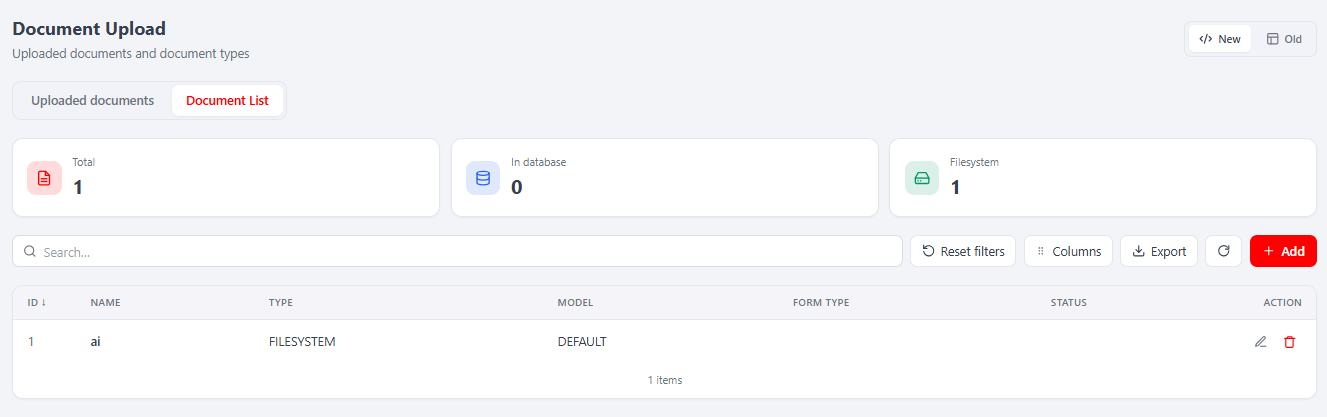
- Document List (types) — manage the document definitions (ID, Name, Model DEFAULT/CUSTOM, storage Type FILESYSTEM/DB, Max size, Path; plus Form Type / Status when MelisFormCreator is active). Add / edit / delete.
Both tabs carry KPI cards (Total / In database / Filesystem), live search, a persisted column manager (drag to reorder / hide) and export (xlsx/CSV). Opening a row or Add opens its form as a native sub-tab in the host's SubTabBar (URL /melis-document-upload/:sub, e.g. type-new, type-5, uploaded-new, uploaded-12).
A top-right New / Old toggle (ViewToggle.tsx) shows the classic legacy tool in an iframe at /melis/react-tool-page?key=melis_document_upload_tool for comparison.
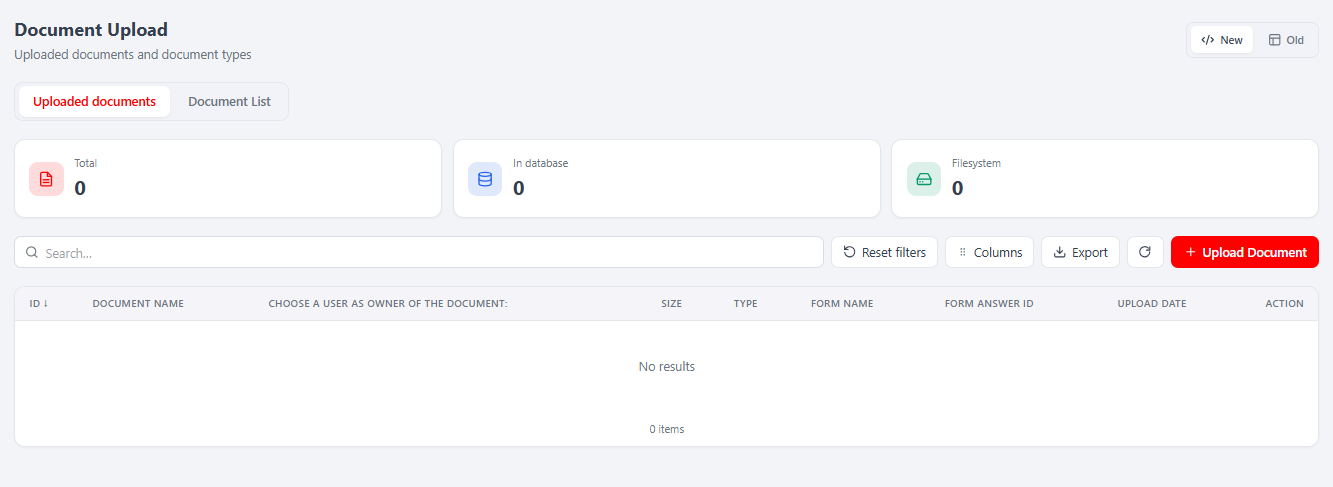
Uploaded documents tab
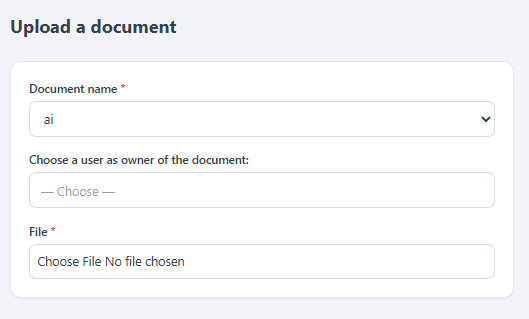
Row actions edit (reassign owner / view file) and delete (confirm modal). Upload Document opens the upload form as a sub-tab: the Owner is a server-backed typeahead, Document name is a dropdown of your definitions. Saving with a file runs the same server processUpload (validation, filesystem move or DB blob, token). Editing without a new file only reassigns the owner. View file resolves the file's public token URL.
Document List (types) tab
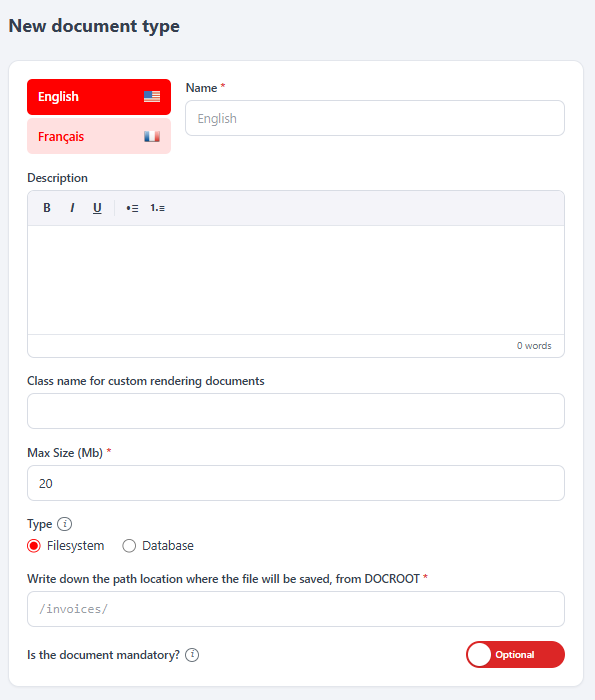
The type form carries the per-language Name, a rich-text Description, a Class name for custom rendering documents (fills it in to make the type CUSTOM), a Max Size (Mb), the storage Type (Filesystem + a path from DOCROOT, or Database), an Is the document mandatory? toggle, and — when MelisFormCreator is active — Display (ALL / MANUAL) and Form status. For a Filesystem type, the save path is validated server-side against path-traversal (.., backslashes and non-[A-Za-z0-9_-/] chars are rejected).
React JSON API
There is no config/react-api.php. The React endpoints are actions of MelisDocumentUpload\Controller\DocumentUploadReactApiController (which extends DocumentUploadListController and reuses the module's services), reached through the module's existing catch-all MVC route. Every URL is of the form /melis/MelisDocumentUpload/DocumentUploadReactApi/<action>. Because the catch-all rejects a third path segment, ids are passed as ?id= query params and deletes are POST …?id=.
Every action first calls denyUnlessAccess() (auth via MelisCoreAuth->hasIdentity() + MelisCoreRights->canAccess('melis_document_upload_tool'), returns 401 / 403). Response contract everywhere: { success: bool, data: T, error?: string, errors?: {...} } (17 endpoints total).
Method · URL (…/DocumentUploadReactApi/…) | Purpose · service |
|---|---|
GET /meta | which optional modules are active (formCreator, formEngine) |
GET /languages | ordered platform languages |
GET /typesList?search= | list definitions (MelisDocumentService::getList) |
GET /typesStats | KPI cards (total / db / filesystem) |
GET /formOptions | FormCreator statuses + show modes (when active) |
GET /typesGet?id= | full record + per-language names |
POST /typesSave | create/update (saveDocumentItem; validates FS path) |
POST /typesDelete?id= | soft delete (deleteDocumentItem) |
GET /uploadedList?search= | list uploaded files (MelisDocumentUploadService::getList) |
GET /uploadedStats | KPI cards |
GET /uploadedGet?id= | single uploaded doc |
POST /uploadedSave (multipart) | upload a file (processUpload) |
POST /uploadedUserSave | reassign only the owner of an existing row |
POST /uploadedDelete?id= | delete (deleteDocumentUpload) |
GET /uploadedFileUrl?id= | public token URL (getDocumentUrl) |
GET /documentOptions | document-type options for the upload dropdown |
GET /boUsers?phrase= | BO-user typeahead for the owner field |
// document-upload-api.ts — BASE = '/melis/MelisDocumentUpload/DocumentUploadReactApi'
const res = await fetch(`${BASE}/uploadedList?search=`, {
  headers: { 'X-Requested-With': 'XMLHttpRequest' },
  credentials: 'include',
})
const { success, data } = await res.json()  // data: { items: UploadedItem[], total }
Capabilities
config/react.capabilities.php (merged into getConfig(), read by MelisReactApi\Service\Capabilities) is keyed under the rights-bearing menu node melis_document_upload_tool — the same melisKey the controller guards and DocumentUploadPage passes to useCaps(). It declares 2 tabs, each with the same five actions:
'melisReactToolCapabilities' => [
  'melis_document_upload_tool' => [
    'tabs' => [
      ['key' => 'uploaded', 'label' => 'tr_melisdocumentupload_content_tabs_uploaded',
        'actions' => ['list', 'create', 'edit', 'delete', 'export']],
      ['key' => 'types', 'label' => 'tr_melisdocumentupload_content_tabs_list',
        'actions' => ['list', 'create', 'edit', 'delete', 'export']],
    ],
  ],
],
The React can() checks (uploaded.create, types.export, …) mask buttons for comfort; the real server enforcement is the tool-level access guard (canAccess('melis_document_upload_tool')) run by every action.
Key services
Registered as service_manager aliases in config/module.config.php. All extend MelisCore\Service\MelisGeneralService (every method fires *_start / *_end events).
| Service alias | Role |
|---|---|
MelisDocumentService | Manages document definitions (table melis_docupl_documents): getList(), getItemById(), saveDocumentItem(), deleteDocumentItem() (soft-delete via isactive), getDocumentByDocumentId(), multilingual names via saveFormDocumentTranslation() / getDocumentTranslation(). |
MelisDocumentUploadService | Handles uploaded files. processUpload($docId, $file, $postValues) validates, stores (FILESYSTEM or DB), records the row and assigns a token; uploadFile(), saveDocumentUploaded(), deleteDocumentUpload(), getDocumentUploadByToken(), getDocumentUrl($docUploadId) (returns the ?token=… URL), getLatestDocumentUploadByDocId(). |
MelisDocumentUploadRelationsService | Reads upload→answer relations: getLatestDocumentUploadedDataByIdAndObjectId(), getDocUplRelationData(). |
MelisDocumentUploadListRelService | Manages definition→form-object relations (melis_docupl_documents_lists_rel): saveDocumentUploadForm(), saveFormDocument(), getDocumentsByFormAnswerId(), getDocumentsDoneByFormAnswerId(), deleteDocumentListFormDelete(). |
Table gateways are also aliased: MelisDocumentTable, MelisDocumentTransTable, MelisDocumentUploadTable, MelisDocumentUploadRelationsTable, MelisDocumentListRelTable, MelisDocumentUserTable.
Front office
The module is not a templating plugin. Uploaded files are exposed through a token URL and a view helper:
- Public view route —
melis-backoffice/melisdocument(/melis/melisdocument?token=<token>), handled byDocumentUploadController::viewAction. The token resolves to a row inmelis_docupl_documents_uploadedand the file is streamed with its stored MIME type. The route is declared inmeliscoreexcluded_routes(no backoffice auth). DocumentUploadHelperview helper (aliasDocumentUploadHelper) —$this->DocumentUploadHelper($documentTypeId, $template, $objectId, $docUplRelationId)renders the upload widget HTML for a document definition, picking the DEFAULT or CUSTOM template.
Controller plugins render and (de)serialise the upload form: MelisDocumentUploadTemplatePlugin (abstract base, methods render(), validateForm(), encodeCustomDatas()/decodeCustomDatas()), MelisDocumentUploadTemplateDefaultPlugin (DEFAULT type) and MelisDocumentUploadTemplateCustomPlugin (CUSTOM type, extra fields). A CUSTOM definition names its own plugin class in mdud_doc_class.
MelisFormCreator integration
Under the melisformcreator interface the module injects a Document tab into the form edition page (melisformcreator_form_edition_page_content_tabs_document), served by DocumentUploadedFormCreatorController, so a form can require a configured document. Three listeners registered in src/Module.php on the melis-backoffice route wire this together: DeleteListener, DocumentFormCreatorListener, DocumentFormCreatorInstructionListener. Once a form collects documents, the answers' files appear in the Uploaded documents tab.
Database tables
Created by install/dbdeploy/ (dbdeploy is enabled in composer.json).
| Table | Role |
|---|---|
melis_docupl_documents | Upload definitions: mdud_type (DEFAULT/CUSTOM), mdud_file_saving_type (DB/FILESYSTEM), mdud_file_saving_path_from_root, mdud_max_size_mb, mdud_doc_class, mdud_is_mandatory, isactive. |
melis_docupl_documents_trans | Per-language names for a definition (mdudtr_lang_id, mdudtr_name). |
melis_docupl_documents_uploaded | Uploaded files: name, size, MIME (mdud_file_mimetype), extension, mdudu_saving_type, mdudu_file_object (BLOB), mdudu_token, uploader, mdudu_upload_date, isactive. |
melis_docupl_docs_relations | Links an uploaded file to an object (mdudr_type, e.g. Form_answer, + mdudr_object_id). |
melis_docupl_documents_lists_rel | Links a definition to a form object (mdudlr_object_type = FORM). |
Example
Validate, store an uploaded file for a document definition, then build its public URL:
$uploadService = $this->getServiceManager()->get('MelisDocumentUploadService');

// $docId = a melis_docupl_documents.mdud_id ; $_FILES['my_field'] = the uploaded file
$res = $uploadService->processUpload($docId, $_FILES['my_field'], [
    'mdudr_type'      => 'Form_answer',
    'mdudr_object_id' => $formAnswerId,
]);

if ($res['success']) {
    $url = $res['fileUrl']; // e.g. https://mysite.local/melis/melisdocument?token=...
}
Key files
| Concern | Path |
|---|---|
| Module config / routes / services | config/module.config.php |
React capabilities (2 tabs, no react-api.php) | config/react.capabilities.php |
| React brick source | ui-react/src/ (brick.tsx, DocumentUploadPage.tsx, document-upload-api.ts) |
| Built brick | public/ui-react/brick.js, public/ui-react/brick.manifest.json |
| React API controller (17 actions) | src/Controller/DocumentUploadReactApiController.php |
| Upload service | src/Service/MelisDocumentUploadService.php |
| Definition service | src/Service/MelisDocumentService.php |
| Public view + tool controller | src/Controller/DocumentUploadController.php |
| FormCreator controller | src/Controller/DocumentUploadedFormCreatorController.php |
| View helper | src/View/Helper/DocumentUploadHelper.php |
| Render plugins | src/Controller/Plugin/ |
| Listeners | src/Listener/ |
| Schema | install/dbdeploy/ |