

MelisCmsPageHistoric
Audit log for CMS page editing — records who did what to a page and when, surfaced as a Historic tab in the React page editor and a dashboard widget. Package
melisplatform/melis-cms-page-historic.
Purpose
MelisCmsPageHistoric automatically captures every page action (save, publish, unpublish, delete) with the author identity and timestamp. History is written via event listeners hooked onto the CMS page lifecycle — nothing needs to be wired up per page. The log is exposed read-only: in a Historic tab inside the page editor and in a Recent page activity dashboard widget. It is for accountability, not for restoring pages.
Enable it
Add to config/melis.module.load.php:
return [
    'MelisCmsPageHistoric',
];
Run the bundled install/dbdeploy/ deltas to create the history table (extra.dbdeploy: true). Requires melis-core, melis-engine, melis-front and melis-cms.
A module without a brick
This is an unusual React module: it ships no brick of its own (no ui-react/, no public/ui-react/brick.manifest.json, no Vite bundle). Its React footprint is three PHP config files merged by Module::getConfig(), plus a controller and a legacy dashboard plugin. Both React surfaces appear only while the module is active.
| Config file | Contribution |
|---|---|
config/react-api.php | The GET /melis/react-api/cms-page/historic endpoint + invokable controller |
config/react.capabilities.php | The Historic tab capability under the shared meliscms_page node |
config/app.interface.php | The Historic tab button in the CMS page editor (icon history) |
The React component that renders inside the Historic tab is not shipped by this module — it is supplied host-side by the melis-core shell and wired through the page-tab registry (window.__melisRegisterPageTab('melispagehistoric_historic', Component)). This module contributes only the data endpoint, the capability and the tab-button declaration; the CMS page editor (MelisCms) hosts the tab.
Historic tab (React page editor)
Left sidebar → MelisCms → open a page → the Historic tab in the editor's tab row. It shows a read-only table of this page's actions, newest first, with columns Date, Action (coloured Publish / Save / Unpublish badges) and User. A Filter (All actions) dropdown narrows to a single action type. The list is paginated server-side — it never loads the whole history at once.
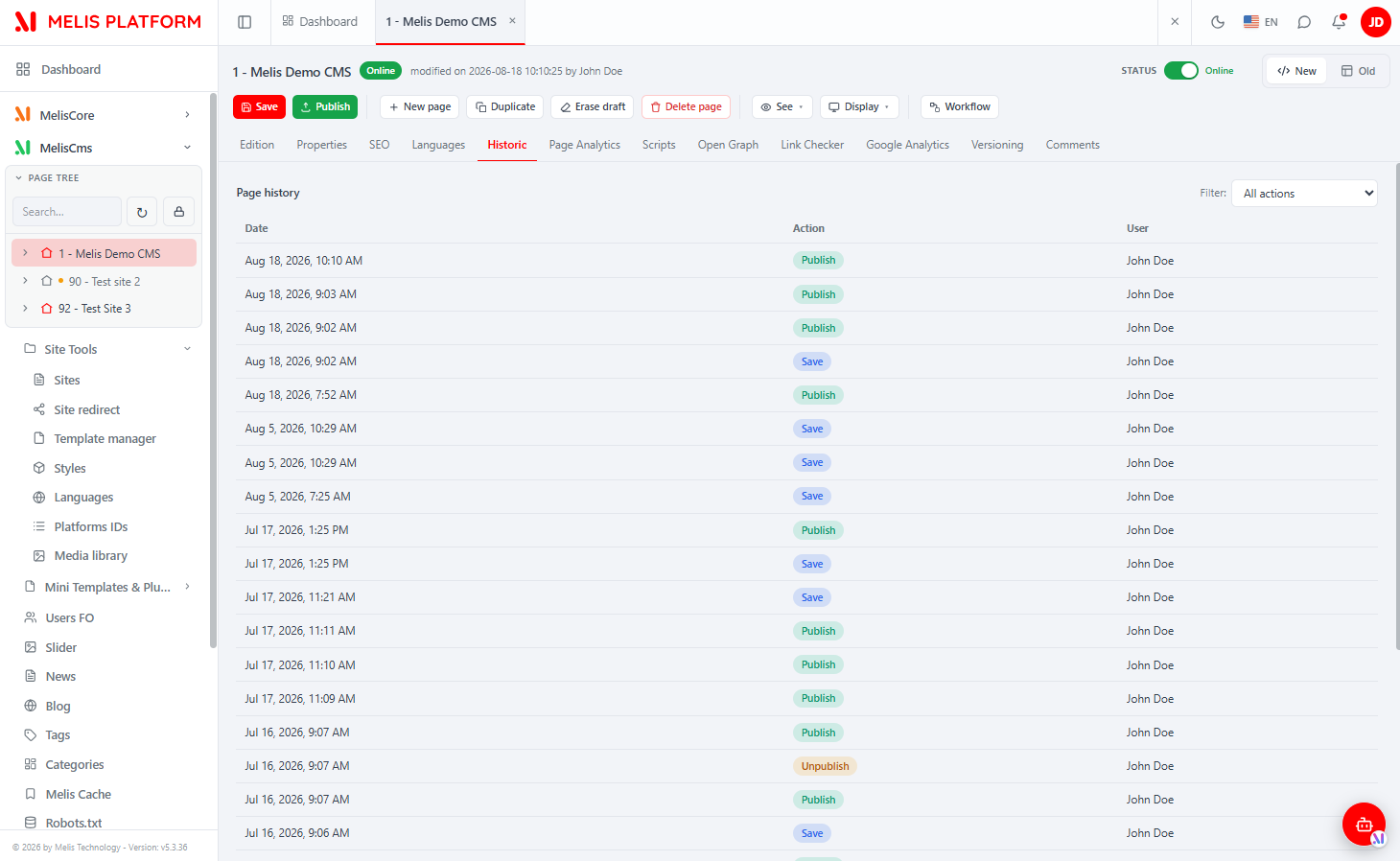
The tab shows only the current page's history. For activity across all pages, use the dashboard widget below.
Recent page activity dashboard widget
On the back-office Dashboard, the Recent page activity widget lists the most recent page actions across all users (timestamp · status dot · page name + id · action · user). It is added/removed from the "Add a widget" panel like any other dashboard widget, under the MELIS CMS PAGE HISTORIC group.
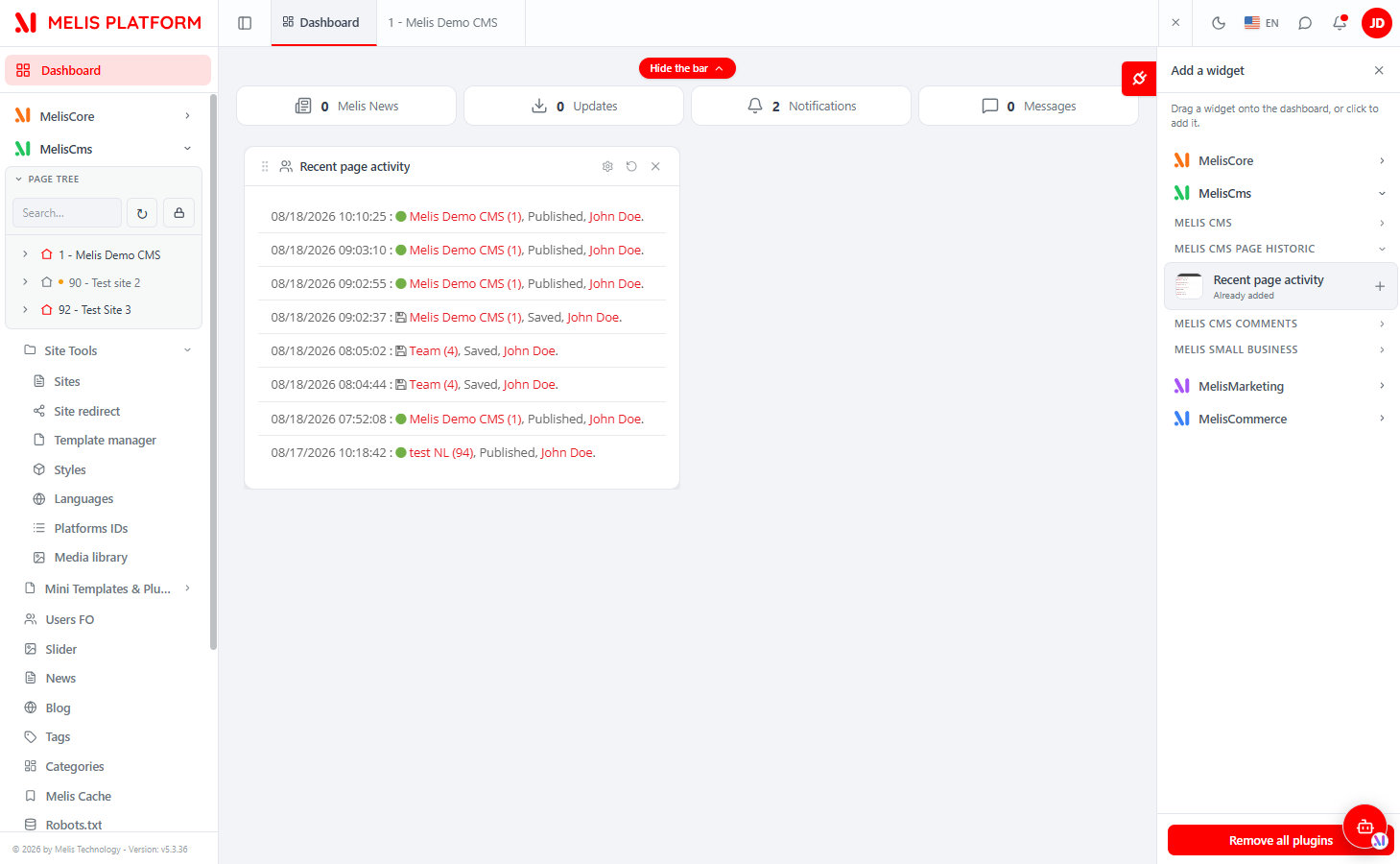
This widget is still a legacy PHP dashboard plugin (MelisCmsPageHistoricRecentUserActivityPlugin, action recentActivityPages) rendered inside the React dashboard's widget host — there is no React rewrite. It reads through MelisPageHistoricTable->getPagesHistoricForDashboard() and gates on MelisCms being active plus the dashboard-plugin access right.
React API — the Historic endpoint
Declared in config/react-api.php, controller MelisCmsPageHistoric\Controller\MelisReactApiPageHistoricController (invokable alias MelisReactApiPageHistoric). One action, contract { success, data, error }.
| Method & URL | Action | Purpose |
|---|---|---|
GET /melis/react-api/cms-page/historic?idPage=<id>&page=<n>&perPage=<25>&action=<type> | listAction | The current page's audit rows, paginated server-side, plus the distinct action types for the filter dropdown |
Response data shape:
{ "success": true, "data": {
  "idPage": 1,
  "items": [ { "id": 123, "date": "2026-08-18 10:10:25", "action": "Publish",
               "user": "John Doe", "userId": 1 } ],   // newest first (ORDER BY hist_id DESC)
  "page": 1, "perPage": 25, "total": 87,               // total = indexed COUNT → drives paging
  "action": "",                                        // active action filter ('' = all)
  "actionTypes": ["Publish", "Save", "Unpublish"]      // DISTINCT hist_action for the filter select
} }
Implementation notes:
- Guard: the action checks
MelisCoreAuth->hasIdentity()only (returns401if unauthenticated). It does not enforce a capability server-side — treat the capability below as a UI-gating signal, not a backend authorization check. - Data: direct parameterised SQL on
melis_hist_page_historic(LEFT JOINmelis_core_userfor the user name; a deleted user is labelled"Utilisateur supprimé (<id>)"). - Pagination:
perPageclamped to1..200(default 25);totalis a separate indexedCOUNT(*)honouring the sameWHERE. The optionalactionfilter applies to both the count and the page.
Capabilities
Because the module contributes a tab to the CMS page tool, its capability is declared under the shared meliscms_page rights node (an ArrayUtils::merge appends into that tool's tabs[]):
return [
  'melisReactToolCapabilities' => [
    'meliscms_page' => [
      'tabs' => [
        ['key' => 'melispagehistoric_historic', 'label' => 'tr_melispagehistoric_page_tab_historic_Historic'],
      ],
    ],
  ],
];- The
key(melispagehistoric_historic) is the tab's capability; it matches the key the host uses to register the tab component and the interfacemelisKeyinapp.interface.php. - It is keyed under
meliscms_page("Edition de page" in Users → Rights), not the wrappermeliscmsand not the tab-button node. - Without this declaration, the CMS-page caps whitelist hides the tab button — even for an admin.
How history is written (listener pattern)
Two listeners wired in src/Module.php (back-office bootstrap only) record the rows; React only reads them.
| Listener | Event(s) | What it records |
|---|---|---|
MelisPageHistoricPageEventListener | meliscms_page_save_end, meliscms_page_publish_end, meliscms_page_unpublish_end, … | Save / Publish / Unpublish |
MelisPageHistoricDeletePageListener | meliscms_page_delete_end | Delete (also cleans up) |
You do not write history rows yourself — saving, publishing or deleting a page through the CMS triggers the listeners automatically.
Database table
| Table | Holds |
|---|---|
melis_hist_page_historic | One row per recorded action: hist_id (PK), hist_page_id, hist_action, hist_date, hist_user_id, hist_description. |
Key files
| Concern | Path |
|---|---|
| React-api controller | vendor/melisplatform/melis-cms-page-historic/src/Controller/MelisReactApiPageHistoricController.php |
| React-api route | vendor/melisplatform/melis-cms-page-historic/config/react-api.php |
| Historic tab capability | vendor/melisplatform/melis-cms-page-historic/config/react.capabilities.php |
| Historic tab button / interface | vendor/melisplatform/melis-cms-page-historic/config/app.interface.php |
| Module bootstrap (listeners) | vendor/melisplatform/melis-cms-page-historic/src/Module.php |
| Table gateway | vendor/melisplatform/melis-cms-page-historic/src/Model/Tables/MelisPageHistoricTable.php |
| Dashboard plugin (legacy) | vendor/melisplatform/melis-cms-page-historic/src/Controller/DashboardPlugins/MelisCmsPageHistoricRecentUserActivityPlugin.php |
| Install SQL / dbdeploy | vendor/melisplatform/melis-cms-page-historic/install/ |
See also: MelisCms, Module reference