

MelisSql
Read-only SQL query runner in the React back-office Dev Tools, shipped as a native full-React brick. Package
melisplatform/melis-sql.
Purpose
MelisSql is a small developer tool: a read-only SQL query runner. You type one SELECT statement, press Run, and the matching rows come back in a dynamic table — without leaving the back-office or opening an external database client. It connects using the platform's configured config['db'] credentials, so no connection details are entered.
In Melis v6 the tool ships as a native full-React brick in /melis-react: a real React page that calls one react-api JSON endpoint, with a New / Old toggle that can fall back to the legacy tool in an iframe. It is an admin-only diagnostic and inspection tool, not an end-user feature.
Enable it
Add to config/melis.module.load.php:
return [
    'MelisSql',
];
The tool appears in the React back-office only if the module is activated (modular brick discovery). Requires melisplatform/melis-core and PHP ^8.1|^8.3|^8.4.
Where it lives in /melis-react
Left sidebar → Dev Tools group → SQL. It opens as a top tab named SQL. The brick manifest declares route /melis-core/sql and maps the menu forwardKey MelisSql/List to it.
It is a single-screen tool: one page with a query box, a Run button and a dynamic results table. No sub-tabs, no drill-down.
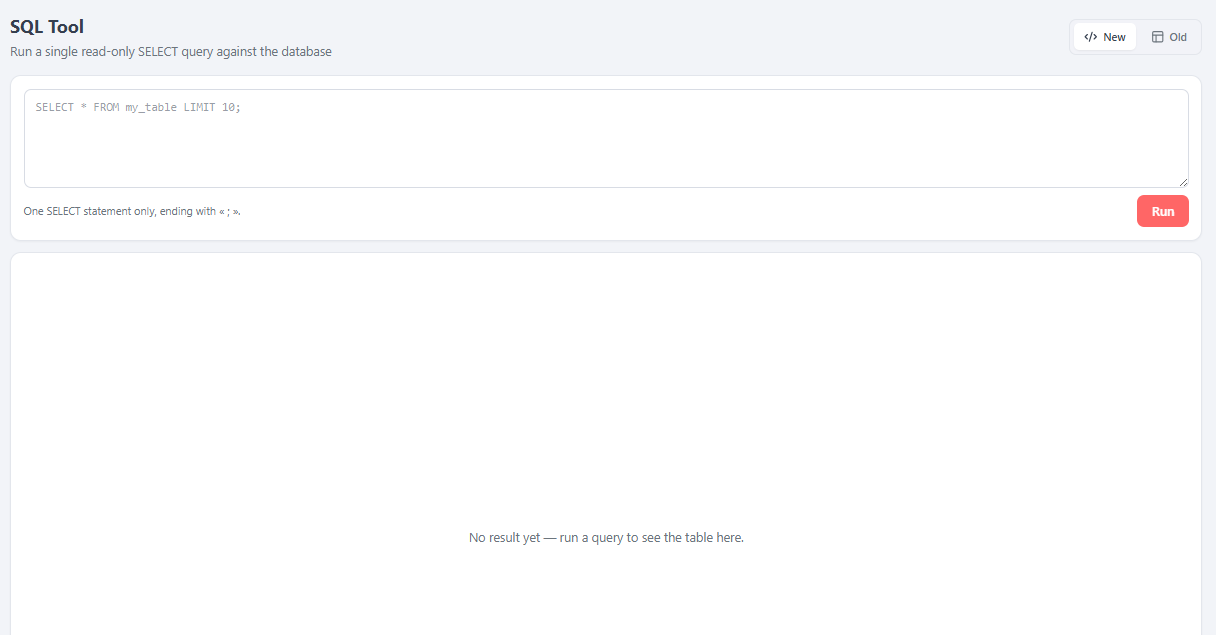
Using the React tool
- Type one
SELECTstatement in the query text area. - End it with a semicolon
;. - Click Run (or press Ctrl/Cmd + Enter).
Once a query returns, a results card appears with:
- A row count (e.g.
12 row(s); when searching,matches / total). - A search box that filters returned rows across all columns (even hidden ones).
- A Columns button opening a column manager: two lists (Visible / Hidden), drag to hide/reorder, Reset to show them all. The layout is remembered per browser (
localStorage, keymelis-sql-cols-v1). - The table itself: click a header to sort (ascending → descending); recognised image blobs (e.g. a user avatar) render inline as thumbnails.
New / Old toggle
A top-right New / Old toggle switches the whole tool between views. New (default) is the React UI; Old renders the legacy tool in a singleton iframe (/melis/react-tool-page?key=melissql_tool), positioned over an anchor via a ResizeObserver.
Query rules
The tool refuses anything that isn't a single read-only statement, showing the reason in a red banner:
| Situation | What happens |
|---|---|
Statement doesn't start with SELECT | Rejected — only SELECT queries are allowed. |
| No semicolon at the end | Rejected — a query should end with ';'. |
More than one statement (several ;) | Rejected — only one query is allowed. |
| You are not a platform admin | Rejected — 403 Forbidden (admin-only). |
| The query can't be prepared / fails | The database error is shown in the banner. |
React API endpoint
There is no config/react-api.php for this module. The single endpoint is reached through the module's catch-all back-office route (config/module.config.php, /melis/MelisSql[/:controller[/:action]]), which resolves the alias MelisSql\Controller\MelisSqlReactApi → MelisSqlReactApiController (declared under controllers.invokables). Contract: { success, data, error }.
| Method & URL | Controller action | Purpose |
|---|---|---|
POST /melis/MelisSql/MelisSqlReactApi/run | runAction | Validate + execute one read-only SELECT, return { columns, rows, rowCount } |
Request body: { "query": "SELECT … ;" }.
// runSqlQuery(query) — the only call the brick makes (ui-react/src/sql-api.ts)
const res = await fetch('/melis/MelisSql/MelisSqlReactApi/run', {
  method: 'POST',
  headers: { 'X-Requested-With': 'XMLHttpRequest', 'Content-Type': 'application/json' },
  body: JSON.stringify({ query: 'SELECT * FROM melis_cms_page_tree;' }),
})
// → { success: true, data: { columns: string[], rows: Record<string,unknown>[], rowCount: number } }
MelisSqlReactApiController extends the legacy ListController to reuse its runQuery() guard verbatim (same mysqli connection from config['db'], same single-statement / SELECT-only validation, same translated error messages). It adds only JSON reshaping plus the safeguards below. Validation/DB errors return HTTP 200 with { success:false, error }; auth failures return 401/403; non-POST returns 405.
Capabilities
Declared in config/react.capabilities.php (merged via MelisSql\Module::getConfig()), keyed under the tool's melissql_tool melisKey:
return ['melisReactToolCapabilities' => [
    'melissql_tool' => ['run'],   // one internal cap: the Run (execute-query) action
]];runis a custom capability (not one of the standardlist/create/edit/delete/exportcaps). It lets an admin see/consult the tool without necessarily being allowed to execute queries.- Front gating.
SqlPagecallsuseCaps('melissql_tool')→can('run')and only then renders the Run button and enables the Ctrl/Cmd + Enter shortcut. - This file is declarative only (drives the Users → Rights checkboxes); the real enforcement is the access guard +
usr_admingate in the controller.
Security notes
- Admin-only. The controller runs
denyUnlessAccess()(401 if unauthenticated, 403 ifMelisCoreRights::canAccess('melissql_tool')fails), then additionally requiresusr_admin. Themelissql_toolright is delegatable, so rights alone are not enough — a non-admin gets 403 Forbidden. - Read-only by construction.
runQuery()rejects anything that isn't exactly one statement ending in;and beginning withSELECT— no path toINSERT/UPDATE/DELETE/DDL. Treat any change torunAction/runQueryas security-sensitive. - Sensitive-column masking.
maskSensitiveColumns()masks the values of columns whose name matchespassword|passwd|pwd|mot_de_passe|secret|token|api_keywith••••••••, server-side, so a hash never reaches the browser on aSELECT *. It is a guardrail, not a boundary. - Binary-safe JSON.
sanitizeForJson()base64-encodes non-UTF-8 binary and emits recognised image blobs (e.g.melis_core_user.usr_image) asdata:<mime>;base64,…URIs for inline rendering. - Avoid unbounded
SELECT *on very large tables: there is no server-side pagination.
Key files
| Concern | Path |
|---|---|
| Catch-all route, controller invokable, Old-view toolpage extension | config/module.config.php |
Capabilities (melisReactToolCapabilities → melissql_tool → run) | config/react.capabilities.php |
Legacy tool + runQuery() guard (reused by the API controller) | src/Controller/ListController.php |
React API controller (admin gate + reuse runQuery + mask + JSON-safe) | src/Controller/MelisSqlReactApiController.php |
Old-view iframe toolPageAction() quirk | src/Controller/React/PluginViewToolPageExtension.php |
| React brick source (Vite IIFE) | ui-react/src/ — brick.tsx, SqlPage.tsx, ViewToggle.tsx, sql-api.ts |
| Built brick + manifest | public/ui-react/brick.js, public/ui-react/brick.manifest.json |
See also: MelisCore